Skip to content



With Polario 5.11, we are opening up new possibilities for interactive events and enabling more intensive use of the app. A customisable gamification system rewards selected activities with points, whilst survey results can be presented live directly from the CMS. The update is complemented by greater control over automatic translations, as well as numerous improvements to the CMS, iOS, Android and web app.
Gamification: Promoting engagement in a targeted way
Participants explore the content of an event or community app to varying degrees. Until now, however, CMS administrators have lacked a centralised way of specifically encouraging desired activities and visibly rewarding them.
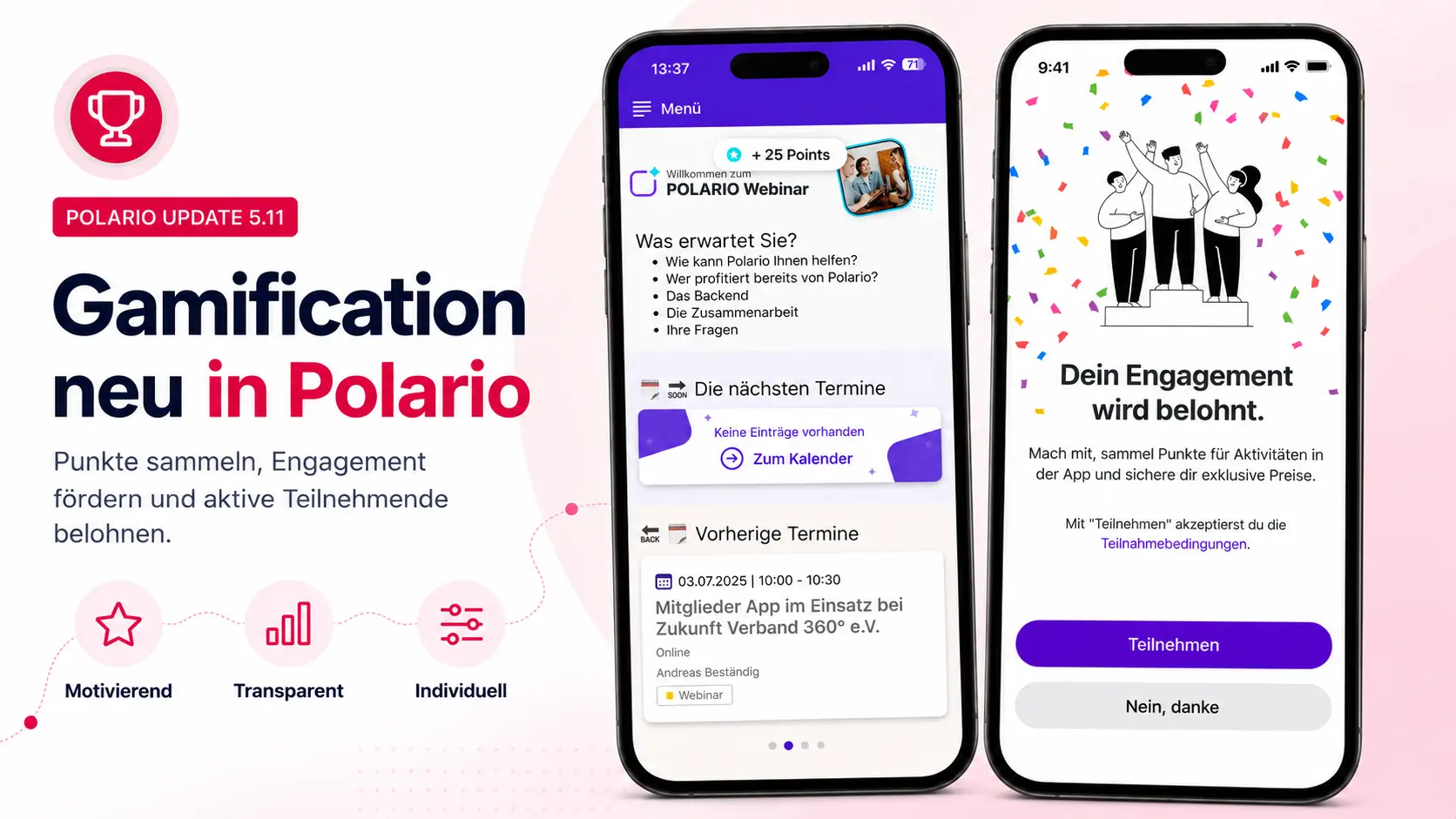
Polario 5.11 offers a points-based gamification system for this purpose. CMS administrators can configure the feature on a project-by-project basis and specify which actions earn participants points. In this way, it is possible, for example, to encourage engagement with content, the use of selected features or interactions within the app.
The first time a project with gamification enabled is opened, participants decide for themselves whether they wish to take part. Once they have agreed, points are automatically awarded for the configured actions. Points earned appear immediately in the app, whilst the current score and individual ranking can be accessed via the project menu.
Participation can be cancelled at any time via the account settings. CMS administrators are also provided with an overview of the leaderboard and can identify particularly active participants.
Gamification thus creates additional incentives to engage more deeply with the app and its content – accompanied by immediate feedback and a transparent ranking system.
Presenting survey results live
Live polls make events, meetings and internal town hall sessions more interactive. However, until now it has not been possible to display the results directly from the Polario CMS in a suitable presentation view.
With Polario 5.11, survey results can now be presented in a standalone full-screen view. CMS administrators can open the view directly from the relevant survey and then display it on a projector screen or an external monitor.
The results are updated continuously. At the same time, the presenters retain control over when the results of a question become visible to the audience. The update can be paused if necessary.
The presentation view automatically adopts the branding of the relevant project and takes into account both light and dark mode, as well as the language used in the CMS. This means that no further adjustments are required before the presentation.
This enables organisers to act on their audience’s feedback immediately and display the results without the need for additional presentation software.

Exclude certain menu labels from translations
Labels in the main menu are automatically translated into the active project languages. However, in the case of brand names, abbreviations and proper nouns, a translation may be undesirable or alter the original meaning.
With immediate effect, CMS administrators can specify for each main menu item whether its label should be translated automatically. If translation is disabled, the term stored in the default language will appear in all languages.
The setting is located directly within the edit screen for the menu item. By default, automatic translation remains enabled.
This enables brand names and other sensitive terms to be presented consistently across languages, without the need to maintain them manually in every project language.
Faster and more reliable machine translations
Until now, automatic translations were generated immediately whilst the data was being saved. For multilingual projects, this could significantly prolong the processing time and, in some cases, lead to the process being aborted.
With Polario 5.11, this process has been fundamentally overhauled. Content is first saved as normal; the corresponding translations are then generated in a separate background process. They are usually available within a few seconds of being saved.
Should an error occur during a translation, it will no longer affect further work in the CMS. The process of copying multilingual projects has also been optimised, so that content and translations can be processed more quickly.
CMS administrators therefore benefit from shorter waiting times and a more stable workflow – particularly when working on large-scale, multilingual projects.
Bug fixes improvements
- Technical revisions to the processing and provision of authorisations
- Information on the terms of use has been added to the access control section
- Button for automatic translations integrated into the editing screen for main menu items
- Survey translations adapted to the updated interface
- Gamification settings are hidden in the user account if the feature is disabled in the project
- Point entry for document lists added
- Improved display of headings and bulleted lists
- Fixed an issue with loading and filtering gallery content
- Order of keywords adjusted
- Display of linked directory entries corrected
- Standardisation of the design of bookmark buttons
- Filters for editable entries in dynamic directories are hidden
- Improved tracking of activities in the social feed for gamification
- Make the edit dialogues for directories clearer
- Remove empty sections and unsupported file types from the directory management
- Selections in single-select fields can be deselected
- Calendar entries with the same start time are sorted alphabetically
- File extensions hidden in the image preview
- Changes to project selection in the ‘Settings’ and ‘User Account’ sections have been implemented
- Logic and presentation of surveys revised
- Fixed persistent push notifications after logging out
- Fixed filtering of empty widget cards
- Colours of headings and poll elements have been adjusted
- Correction to the display of several surveys in the calendar
- Improvements to the translation and reloading of surveys
- Project start view corrected following a project change