Skip to content





Comparing event apps doesn’t start with the longest list of features. First, you need to identify your target audiences, usage scenarios and essential requirements. Only then can you fairly evaluate platforms, demos and quotes. If you reverse this process, you’ll easily end up making a decision based on an impressive presentation rather than on the actual event process.
In short: An event app should be selected in five steps: define objectives and usage scenarios; establish essential criteria; shortlist providers using the same set of questions; carry out comparable demos or a pilot; and finally, consolidate the weighted evaluation, risks and total cost of ownership. Essential criteria that are not met must not be compensated for by additional features.
This guide explains the evaluation method. It is deliberately not intended as a second market overview. If you would like to find out about specific platforms first, please refer to the separate 2026 comparison of event app providers.
Why a simple list of features is not enough to make a choice
Many event apps offer features such as an agenda, speaker profiles, push notifications, polls, Q&A, networking and analytics. However, simply ticking a box in a table tells you very little about whether a feature will be intuitive, reliable and manageable in your specific scenario.
Four examples illustrate the problem:
- ‘Multilingual capability available’ does not specify which content is translated, how corrections are handled, or which languages are supported.
- ‘API available’ says nothing about endpoints, authentication, data flow, limits, documentation or error handling.
- ‘Networking included’ does not clarify whether profiles, direct messages, appointments, matchmaking or consents fit the required process.
- ‘Analytics available’ does not indicate which data is visible, exportable and usable in compliance with data protection regulations.
You should therefore formulate requirements as verifiable usage scenarios. Instead of “push notifications”, the requirement could be:
An editor informs only the participants of a rescheduled session. The message links directly to the updated programme item and is displayed clearly within the app.
You can actually test out a scenario like this in the demo. Polario’s general overview of features can serve as a list of topics, but it does not replace the need to prioritise elements for your own event.
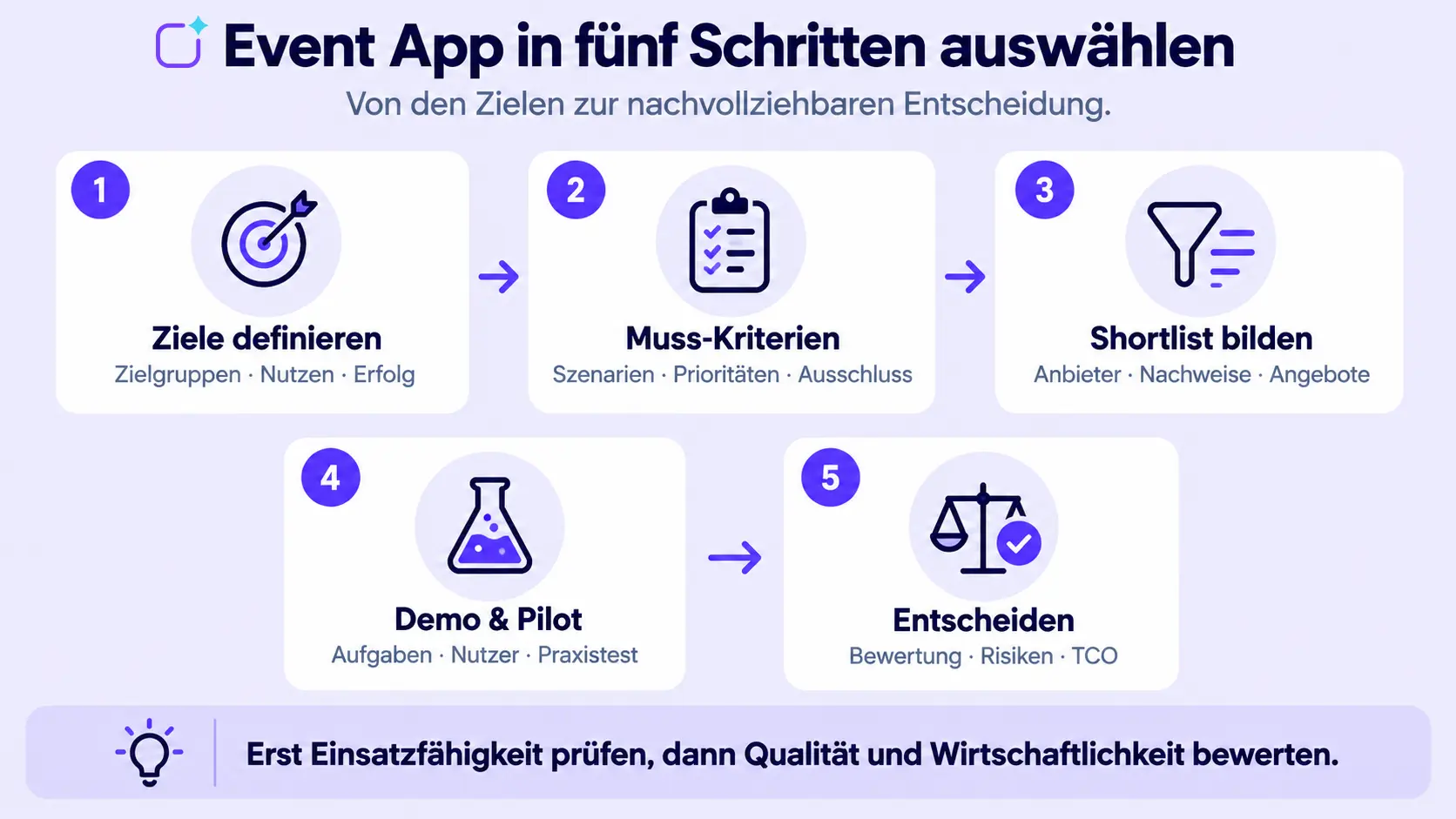
Selecting an event app: the process in five steps
1. Define objectives and target groups
Start with the desired outcome. Is the app primarily intended to centralise information, communicate last-minute changes, promote networking, raise the profile of sponsors, or streamline the entire participant experience?
Also, distinguish between the different target groups:
- Participants,
- Speakers and moderators,
- Exhibitors and sponsors,
- Event organisers and editorial team,
- Service and support teams,
- IT, data protection and procurement.
Not every target group requires the same content or access rights. An app may seem intuitive to participants whilst, at the same time, being unnecessarily complex to manage in the CMS. Both perspectives should be taken into account in the assessment.
2. Define usage scenarios and mandatory criteria
Describe five to ten critical processes from the perspective of the future users. Derive ‘must’, ‘should’ and ‘may’ criteria from these.
‘Must’ criteria determine operational capability. Examples might include German hosting, a specific deployment model, SSO, offline access or a required interface.
‘Should’ criteria are important and are assessed on a weighted basis. They may highlight advantages without diluting fundamental exclusion criteria.
‘Could’ criteria are supplementary features of lesser business value. They should not be overvalued simply because of an impressive demonstration.
3. Pre-qualify suppliers
Send the same concise information request to all candidates. This should include the event profile, user numbers, languages, app model, essential criteria, integrations, timetable and desired service.
The event app provider comparison tool can be used to draw up a longlist. The aim of the pre-qualification process is not to produce a definitive ranking, but rather to create a shortlist of ideally three to five solutions that can demonstrably meet the mandatory criteria.
4. Carry out a comparable demonstration and pilot project
A free product demonstration usually highlights the strengths of the provider in question. To ensure a fair comparison, all candidates must follow the same demo script. Set out real-world tasks and have them carried out live.
A pilot becomes necessary when usability, data import, complex roles or critical integrations cannot be reliably tested in a demo. It requires clear success criteria, real test subjects and a defined scope. An unstructured test approach without specific tasks, on the other hand, yields little insight.
5. Consolidating assessment, risks and TCO
Distinguish between three aspects:
- 1. Operational readiness: Are all mandatory criteria met?
- 2. Qualitative assessment:How well does the solution meet the weighted criteria?
- 3. Risk and cost-effectiveness: What contractual, operational, integration or cost risks remain?
Only when these aspects have been documented separately can a transparent decision be reached.
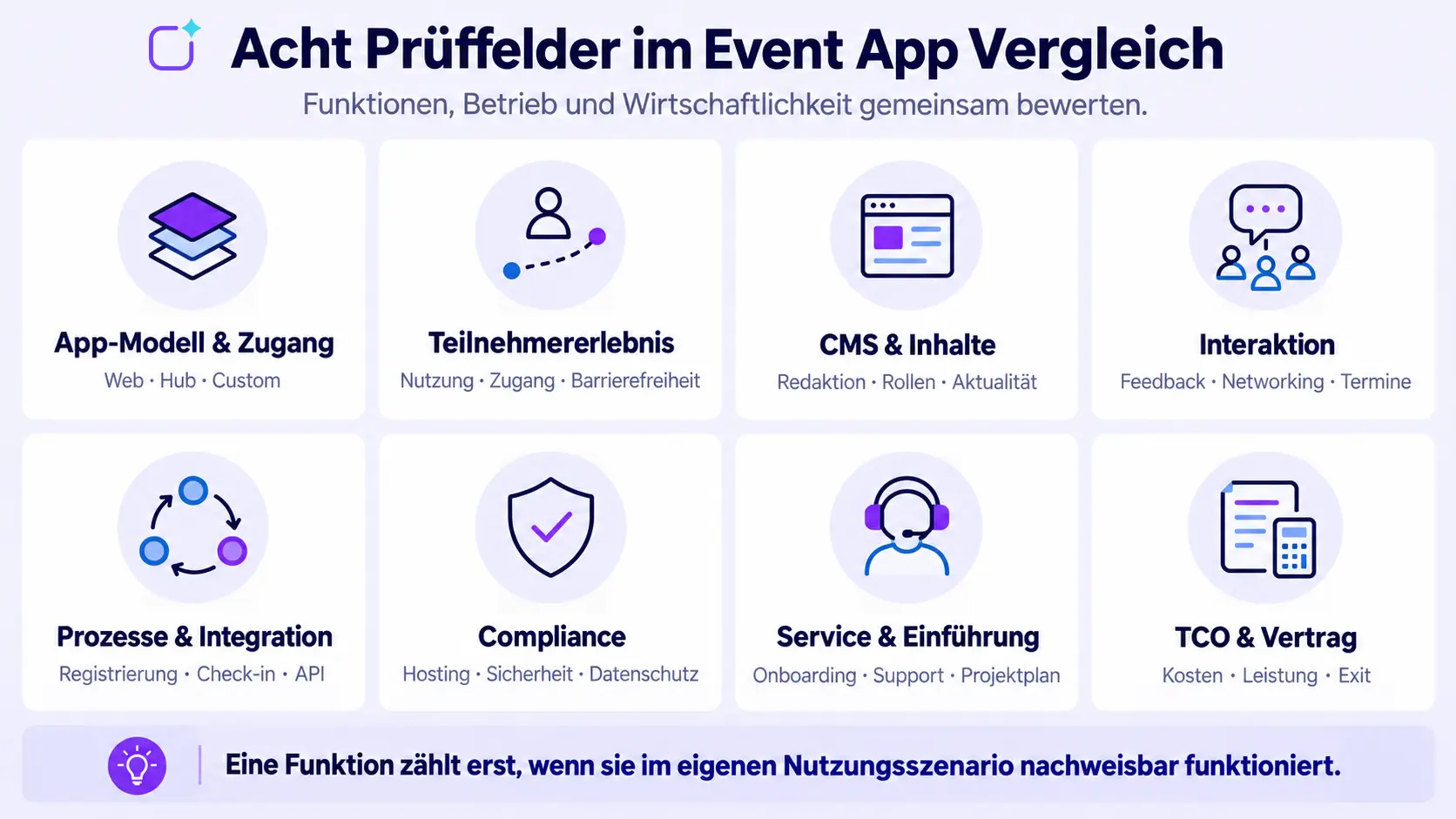
What criteria should be included in a comparison of event apps?
App model and access
Check whether a web app, a native hub app or a bespoke custom app is suitable for your use case. Key questions to consider are:
- Do participants open the app via a link or do they install a native application?
- Are native push notifications required?
- Does the app need to appear under its own name in the App Store?
- Are there public and restricted areas?
- How do login, event codes and guest access work?
The article on event app variants explains the differences between web, hub and custom apps.
User experience and usability
The app should allow users to carry out typical tasks without the need for instructions. Test it under realistic conditions:
- finding and amending your personal diary,
- locating a room or exhibitor,
- understanding a last-minute message,
- finding and messaging contacts,
- taking part in a survey or Q&A,
- retrieving documents and saved content,
- language, accessibility and different screen sizes.
Do not base your assessment solely on first impressions. Have several representative users carry out specific tasks and observe where they hesitate or stop.
Editorial team and CMS
The quality of the backend affects how quickly the events team can respond. During the demo, ask them to change content, create groups and send a message.
Questions to consider:
- Can editors work without developers?
- Are there previews, drafts and approval workflows?
- Can content be copied, imported and published on a scheduled basis?
- Can multiple events or sections be managed separately?
- Are roles and permissions structured in a clear and understandable way?
Agenda, content and communication
Check whether sessions, tracks, rooms, speakers, sponsors, exhibitors, documents and site plans fit the event model. It is also crucial to consider how changes are rolled out and whether content can be personalised for different target groups.
Interaction and networking
Surveys, Q&A, chat, appointment booking, matchmaking and gamification serve different purposes. Do not select features in isolation, but rather in line with your engagement strategy. A matchmaking algorithm alone will not generate meaningful conversations if profiles remain incomplete or no time slots are available.
Polario describes features such as appointment booking and gamification on dedicated feature pages. Use these detailed pages to understand the specific functionality before the demo.
Registration, check-in and data flow
An event app can be used on its own or integrated with invitation, registration and check-in functions. Please check:
- Where is participant data generated?
- What data is transferred and when?
- How are changes synchronised?
- What consents and authorisations apply?
- What happens in the event of incorrect or duplicate data records?
- What reports are returned?
Polario offers the option to integrate the event app with the registr participant management system. Technical integrations are described on the API and Integration page.
Integrations and technical architecture
An API shouldn’t just exist on a slide. Request documentation and a concrete integration plan. Check the authentication, endpoints, webhooks, limits, data mapping, logging, error handling, test environment and operational responsibilities.
Data Protection, Hosting and Security
Do not base your assessment solely on certification logos. For a specific project, the following factors are important: data types, storage locations, subcontractors, support access, encryption, roles, data erasure, backups, incident management processes and contractual evidence.
Polario publishes relevant information in the Compliance section. This review is not a substitute for legal advice and must be carried out on the basis of the actual contractual arrangements and data flows.
Service and project management skills
A comprehensive product will not solve a resource problem if the team is left to manage the set-up on its own. Check the following:
- dedicated points of contact and availability,
- onboarding workshops and training materials,
- content and configuration services,
- response times and escalation procedures,
- on-site support,
- experience with similar event formats,
- project plan and responsibilities.
The planning and implementation, as well as the range of services and support on offer, demonstrate what project deliverables Polario is fundamentally capable of providing. The specific scope should be set out in the quotation.
Costs and Total Cost of Ownership
Don’t just compare licence prices. Take into account set-up, branding, integrations, premium features, services, in-house content creation and recurring costs. The guide to event app costs provides spreadsheets and a TCO method for this purpose.
Reporting and Further Development
Check which metrics are available and can be exported. Reporting should contribute to the event objectives defined in advance. After the event, data export, archiving, reuse of content and improvements for the next event also become relevant. A structured feedback form for events can be added to facilitate content analysis.
How to create a robust evaluation matrix
Use the same matrix for each provider. To avoid overloading your page builder with wide tables, the template contains only four columns. For additional providers, the table is duplicated.
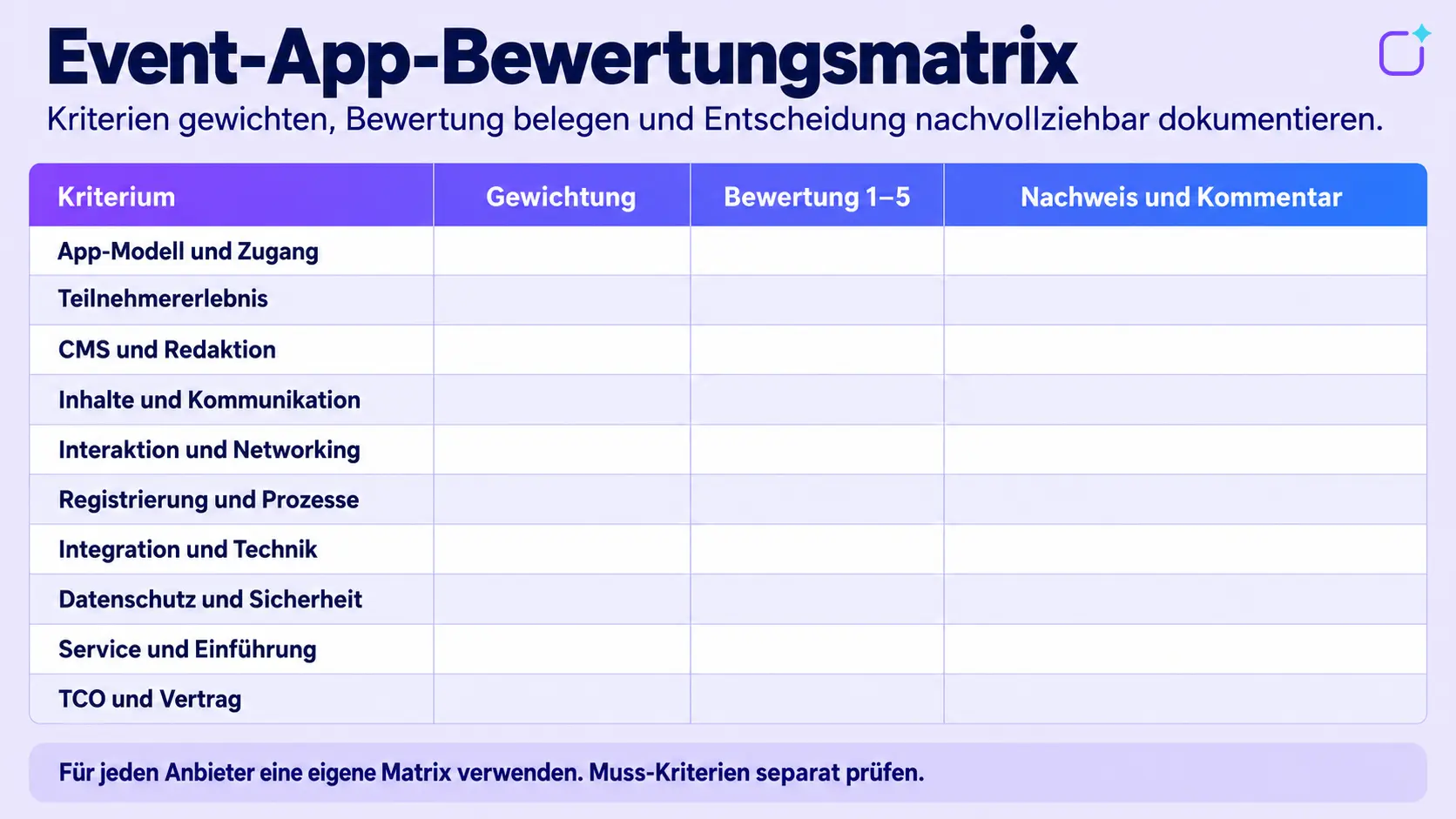
Calculate the weighted score
For example, use a rating scale of 1 to 5 and a percentage weighting.
Weighted score = rating × weighting
The total of the weightings should add up to 100 per cent. Mathematical precision must not create a false sense of security: a difference of just a few points is no substitute for a risk assessment or a professional discussion.
Treat mandatory criteria separately
Mandatory criteria are not included in the scoring system. If a solution fails to meet a mandatory criterion, this cannot be offset by high scores in less important areas. Permissible deviations or planned developments must be clearly documented and assessed in the contract.
Supporting documents rather than self-declaration
Every assessment should be based on evidence:
- demonstrated live in the demo,
- tested in a pilot,
- documented in documentation or a contract,
- confirmed by a reference interview,
- or flagged as an open acceptance or risk.
This ensures that it is clear why a particular assessment was given.
Demo script: All providers should demonstrate these tasks
Give each provider the same tasks:
- 1. Create a new event with two target groups.
- 2. Import the agenda and speaker details from a provided file.
- 3. Reschedule a session at short notice and inform the participants affected.
- 4. Make content visible only to a defined group.
- 5. Set up a survey or Q&A interaction.
- 6. Demonstrate a networking or booking process from the participants’ perspective.
- 7. Correctly handle a deactivated or cancelled account.
- 8. Export usage data and explain what it indicates.
- 9. Demonstrate roles, permissions and approvals within the CMS.
- 10. Explain the procedure in the event of a support request or critical change.
Don’t just let the sales representative do all the clicking. Ideally, future editors and administrators should carry out at least one task themselves.
When is a pilot worth undertaking?
A pilot is advisable if at least one of the following risks applies:
- complex roles or target groups,
- critical integration,
- large or inconsistent data imports,
- specific requirements regarding login or distribution,
- international deployment,
- significant internal uncertainty regarding usability,
- new processes such as matchmaking or appointment booking.
The pilot should test a critical end-to-end workflow, not replicate the entire platform. Define the participants, timeframe, test data, success criteria and decision points in advance. Document errors, workarounds and any remaining assumptions.
Common mistakes when selecting an event app
Choose a provider based on the best demo
A well-staged presentation can mask significant shortcomings. A shared demo script allows for comparison.
Giving equal weight to too many functions
If every feature is important, none of them are prioritised. Prioritise them according to business value and frequency of use.
Assess the app and the backend separately
Participants need a simple app; the event team needs an efficient CMS. Both sides are key to the project’s success.
Only document interfaces marked ‘yes’
A robust integration requires a data model, a process, clear lines of responsibility and an operational concept.
Treat hosting as the sole data protection issue
The location of the data is important, but it does not replace the need to review data flows, access rights, contracts, data erasure and security.
Compare only the entry-level price
Set-up, premium features, integrations, support and internal work can all affect the overall cost. Use the same TCO methodology for all quotations.
Assess future promises in the same way as existing features
Statements in a roadmap do not automatically form part of the scope of work. Identify planned features separately and clarify the timeline, scope and contractual implications.
How does Polario fare in the event app comparison?
Polario offers an event app platform comprising a web app, a native hub app and a bespoke custom app. Content is managed via a no-code CMS. According to the current price list, basic features and API access are included in the published event packages; premium features and white labelling may incur additional costs.
To ensure a fair comparison, Polario should be assessed using the same scenarios and evidence as any other provider. Key points to consider include, in particular:
- which app model suits the event portfolio,
- which features are included in the specific package,
- how registration and check-in are integrated,
- which integrations are implemented on a project-specific basis,
- which services are required,
- which hosting and compliance requirements apply,
- what the total cost of ownership (TCO) will be over the selected period.
Product information can be found on the Polario Event App page and in the price overview. Neither of these replaces an individual demo or a detailed specification.
Conclusion: A good comparison of event apps makes decision-making transparent
The right event app is not defined by the number of features it offers, but by its proven ability to fulfil relevant usage scenarios. A robust selection process combines objectives, essential criteria, weighted assessment, comparable demos, a targeted pilot, TCO and risk assessment.
Distinguish between operational readiness, qualitative strengths and residual risks. Document the evidence for each assessment. This ensures you end up not with a seemingly objective list of scores, but with a well-founded decision that the event team, IT, data protection and procurement can all support.
Sources and editorial basis
- Event App: https://polario.app/de/event-app/
- Comparison of event app providers: https://polario.app/de/event-app-anbieter-vergleich/
- Types of event apps: https://polario.app/de/event-app-varianten/
- Features: https://polario.app/de/features/
- Prices and versions: https://polario.app/de/preise/
- Planning and implementation: https://polario.app/de/planung-umsetzung/
- API and integration: https://polario.app/de/api-integration/
- Compliance: https://polario.app/de/compliance/
- Service and Support: https://polario.app/de/service-support/
- Participant management registr: https://polario.app/de/registr/
- Feedback form: https://polario.app/de/feedbackbogen/
- Booking an appointment: https://polario.app/de/features-terminvereinbarung/
- Gamification: https://polario.app/de/features-gamification/
- Software Sustainability Institute – Software Evaluation: Criteria-based Assessment: https://www.software.ac.uk/sites/default/files/SSI-SoftwareEvaluationCriteria.pdf
Frequently asked questions (FAQ)
What is the most important factor when comparing event apps?
The most important thing is to demonstrate that the app meets the critical usage scenarios. These include not only user functions, but also the CMS, data flows, support, security and operations. Mandatory criteria should be checked before the weighted assessment takes place.
How many providers should be shortlisted?
For an in-depth demo, three to five candidates is often a practical number. What matters is not the exact number, but that all shortlisted providers plausibly meet the essential criteria and are assessed using the same demo script.
What features does a good event app need?
That depends on the purpose of the event. Commonly relevant aspects include the agenda, content, notifications, attendee and exhibitor profiles, venue map, interaction, networking and analytics. A feature is only valuable if it supports a specific use case.
How are event app providers assessed?
Distinguish between exclusion criteria, weighted quality assessment and risks. Assess criteria on a standardised scale, multiply them by their weighting and document the evidence for each assessment.
Is a free trial sufficient?
A trial version can demonstrate usability and basic functions. It is usually not sufficient for integrations, roles, security, service and contractual matters. Critical processes should be tested in a structured demonstration or a limited pilot.
Should the cheapest provider be chosen?
Not necessarily. Compare the total cost of ownership and the extent to which the requirements are met. A low licence price may be offset by high internal costs, additional modules or integration costs.
When should you use a provider comparison?
Use the 2026 Event App Provider Comparison if you are looking for specific platforms to include on a longlist or shortlist. You can then use this selection guide to assess these providers against standardised criteria.