Skip to content


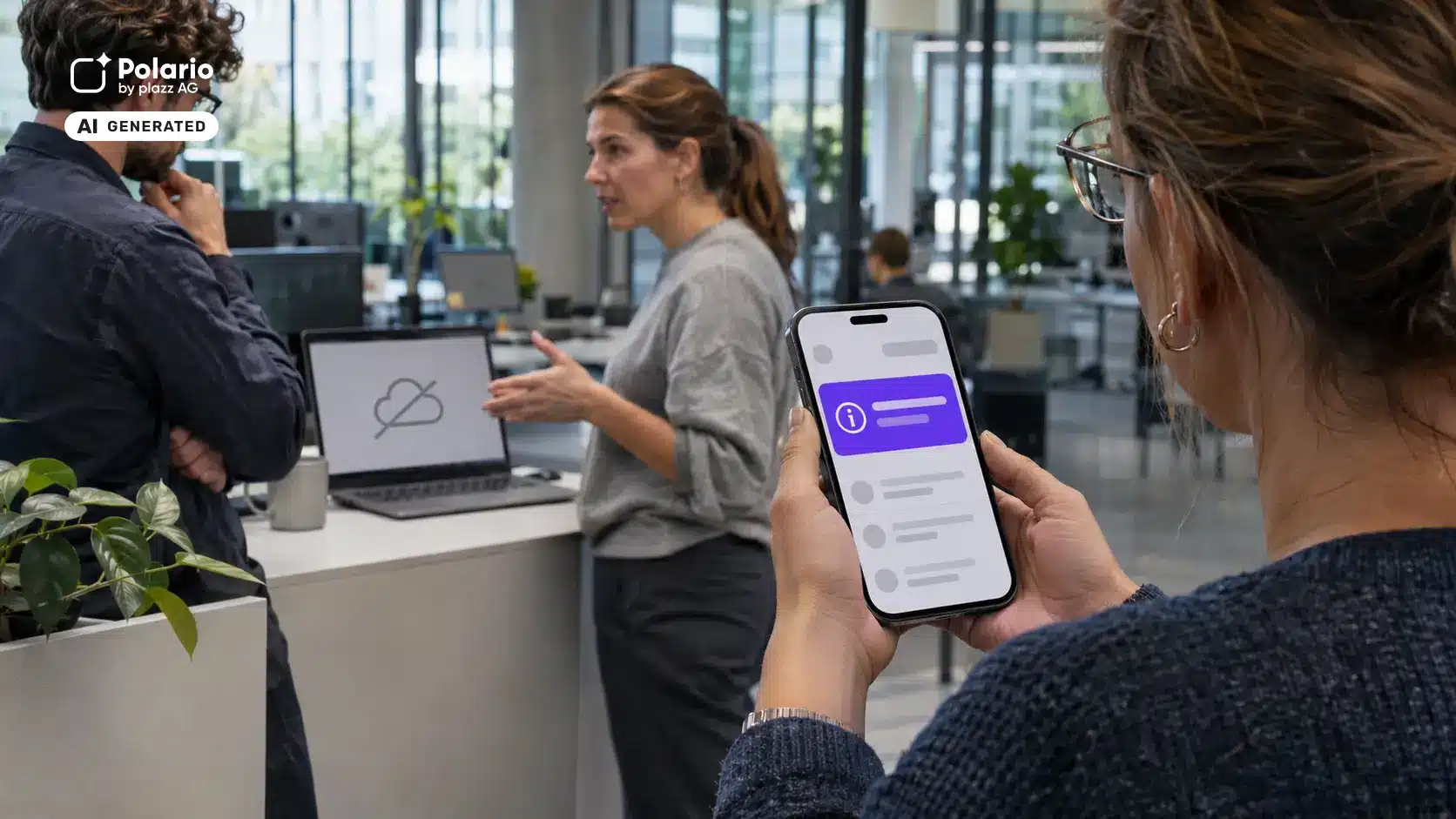

Outlook is not loading emails, meetings cannot be scheduled in Microsoft Teams, and even the calendar, Copilot and connected services are only functioning to a limited extent. The global Microsoft 365 outage on 13 November 2026 demonstrates how quickly a technical failure can become a communication problem for entire organisations.
This is not an argument against Microsoft 365. It is an argument against relying on just one communication channel. Anyone who, during an outage, has to use the very system affected to explain that this system is not working does not have a reliable emergency channel.
In short: Internal crisis communication requires at least one pre-established communication channel that is not affected by the same technical fault as the main channel. An employee app such as Polario can serve as a secondary mobile channel: for push notifications, status updates, instructions and updates tailored to specific target groups. This requires that hosting, login, content management and delivery are actually configured independently and tested regularly.
What happened with Microsoft 365 on 13 November 2026
According to consistent media reports, a global outage affected various Microsoft 365 services. Among those affected were Outlook, Microsoft Teams, calendar functions, Copilot, the administration portal and, at times, interfaces with third-party providers. According to the reports, Microsoft found no evidence of a cyberattack. The cause was described as an overloaded process involved in establishing secure connections; in addition, a previous configuration change was reversed. (WELT, ZDFheute, CHIP)
The consequences went beyond simply inconvenient video conferences. In some cases, companies and public authorities were unable to check their emails, schedule appointments or access their usual work systems. ZDFheute quoted IT security expert Dennis-Kenji Kipker as saying that this had left many people in organisations ‘digitally blind’. This is precisely where the role of internal crisis communication comes in: It must provide guidance, even when the usual channels of information are not functioning.
Important: A single outage does not prove that a platform is fundamentally unreliable. Alternative cloud and app services can also fail. The strategic lesson is therefore not to ‘replace Microsoft’, but to identify dependencies, prepare fallback options and test recovery processes.
What is internal crisis communication?
Internal crisis communication involves providing planned, prompt and reliable information to the organisation’s own staff during an exceptional situation. It answers at least five questions for clearly defined target groups:
- 1. What has happened?
- 2. Which departments or systems are affected?
- 3. What should staff do or refrain from doing now?
- 4. Where can they find the official, up-to-date information?
- 5. When will the next update be issued?
Such situations may include IT failures, cyber-attacks, power cuts or network outages, production disruptions, severe weather, security incidents, product recalls or short-term site closures. Internal communication forms part of business continuity management. The BSI 200-4 standard sets out a systematic approach enabling organisations to safeguard their time-critical business processes against disruptions and enhance their resilience.
A technical platform alone does not constitute crisis communication. It is only the interplay of responsibilities, approved messages, target audiences, channels, escalation procedures and drills that makes the process resilient.
The real risk: a single point of failure
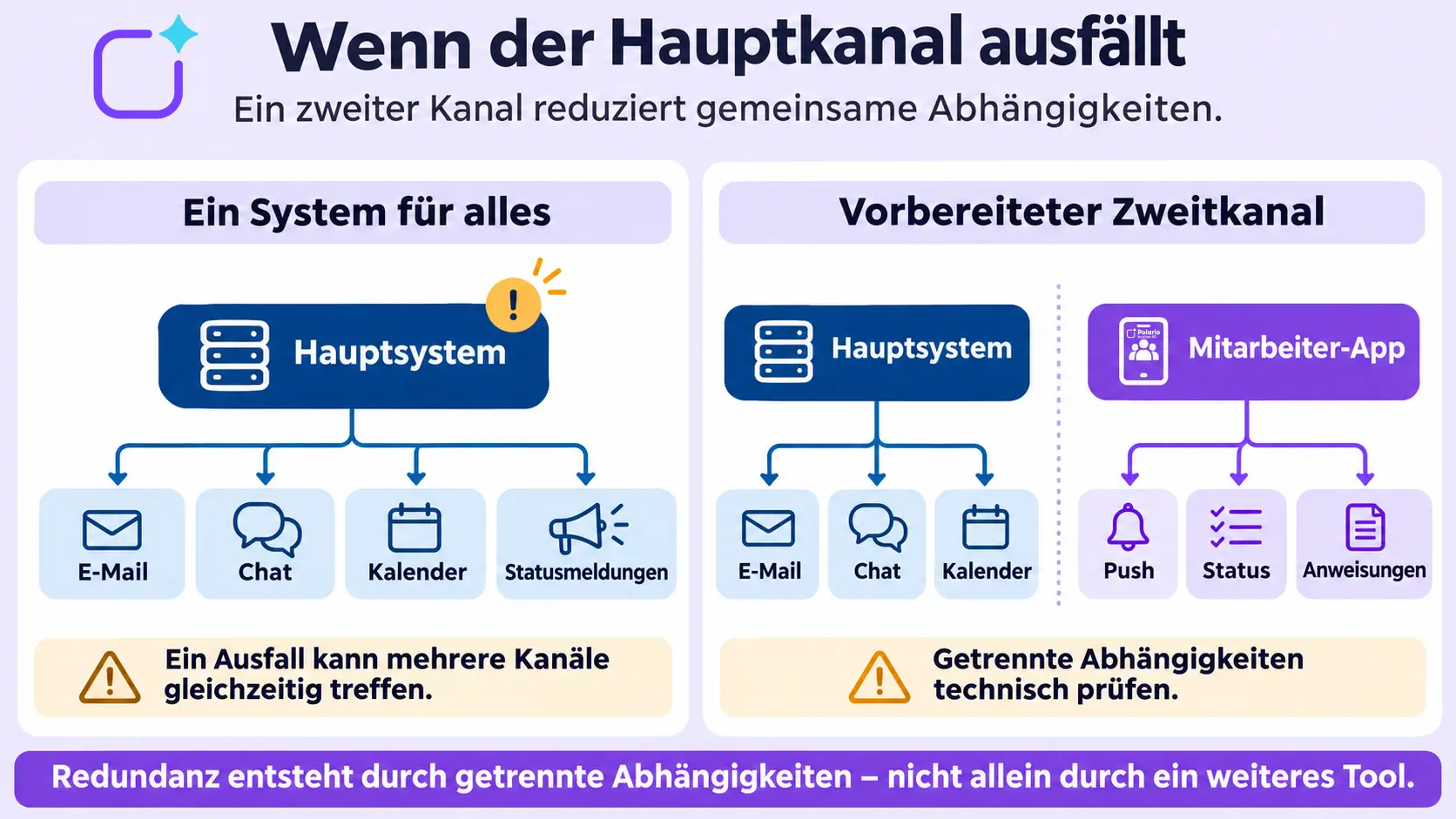
Many organisations use Microsoft 365 simultaneously for email, chat, meetings, calendars, files, identities and internal status updates. This integration is convenient during normal operations. However, in the event of a disruption, it can become a single point of failure.
The problem arises particularly when:
- the crisis management team only meets via Teams,
- alert distribution lists are maintained exclusively in Outlook,
- emergency documents are stored only in SharePoint,
- the alternative channel requires the same Microsoft login,
- contact details are not available outside the affected environment,
- staff without a company PC have no other reliable means of access.
A good mix of communication channels does not prevent every disruption. However, it does reduce the likelihood that a single technical fault will simultaneously disrupt communication, coordination and orientation. The Polario guide to internal communication tools and channels demonstrates how email, the intranet, chat, staff apps and traditional methods can work together effectively.
What role can Polario play in the event of a disruption?
The Polario employee app can complement the existing Microsoft environment. During normal operations, it is used for company-wide communication, mobile access to knowledge and the provision of digital services. In the event of a disruption, it can serve as a pre-prepared fallback channel.
Push notifications for time-sensitive messages
A push notification can alert staff directly on their smartphone to a fault, instructions or a new status update. The full message can then be found as a news item or on a page. This means there is no need to search for a critical message in a cluttered inbox or chat.
Target groups rather than a scattergun approach
Not every announcement is intended for the entire workforce. Groups can be used, for example, to send separate notifications to IT administrators, managers, specific sites, shifts or operational teams. A central status update and action instructions tailored to specific target groups can be sent out simultaneously.
Mobile access for frontline workers
Staff working in production, logistics, branches, care, service or in the field often do not work on a company computer all the time. A mobile app can reach these groups via a device that is readily available in their day-to-day work. Company policies on personal versus business use, data protection and alternative options for those without access to a smartphone remain crucial. The article on internal communication with frontline workers explains this in more detail.
A pre-prepared status area
Organisations can set up a section within the app containing emergency contacts, instructions, frequently asked questions, status updates and documents that can be accessed offline. Which content actually remains available without a network connection or in the event of isolated outages must be checked based on the specific configuration.
Consistent messaging across multiple formats
As part of its multi-channel communication, Polario includes features such as news, push notifications, social feeds, pages and forms. A crisis management team can use these to link a brief warning, a detailed situation report and feedback in a structured manner.
The key limitation: an app is not automatically independent
An additional channel is only a genuine secondary channel if it does not rely on the same critical components. This must be technically verified before deployment.
When configuring Polario, the following questions, amongst others, must be clarified:
- Is login carried out exclusively via Microsoft Entra ID, or is there a tested alternative method of access?
- Can authorised editors access the app if Microsoft services are disrupted?
- Are emergency contacts and pre-prepared content available outside the affected environment?
- Do push notifications, the app’s backend and hosting function independently of the main system?
- Are user groups still available even if a connected HR or identity system is temporarily out of sync?
- What dependencies exist in relation to mobile networks, the internet, app stores and end devices?
- Is there an analogue or telephone fallback in the event of a more widespread network outage?
On its compliance page, Polario states that development, support and server hosting take place in Germany. Whilst this can support organisational and infrastructural diversity, it is no substitute for a project-specific dependency analysis. ‘Independence’ should therefore never be advertised in general terms, but must be technically documented and demonstrated through exercises.
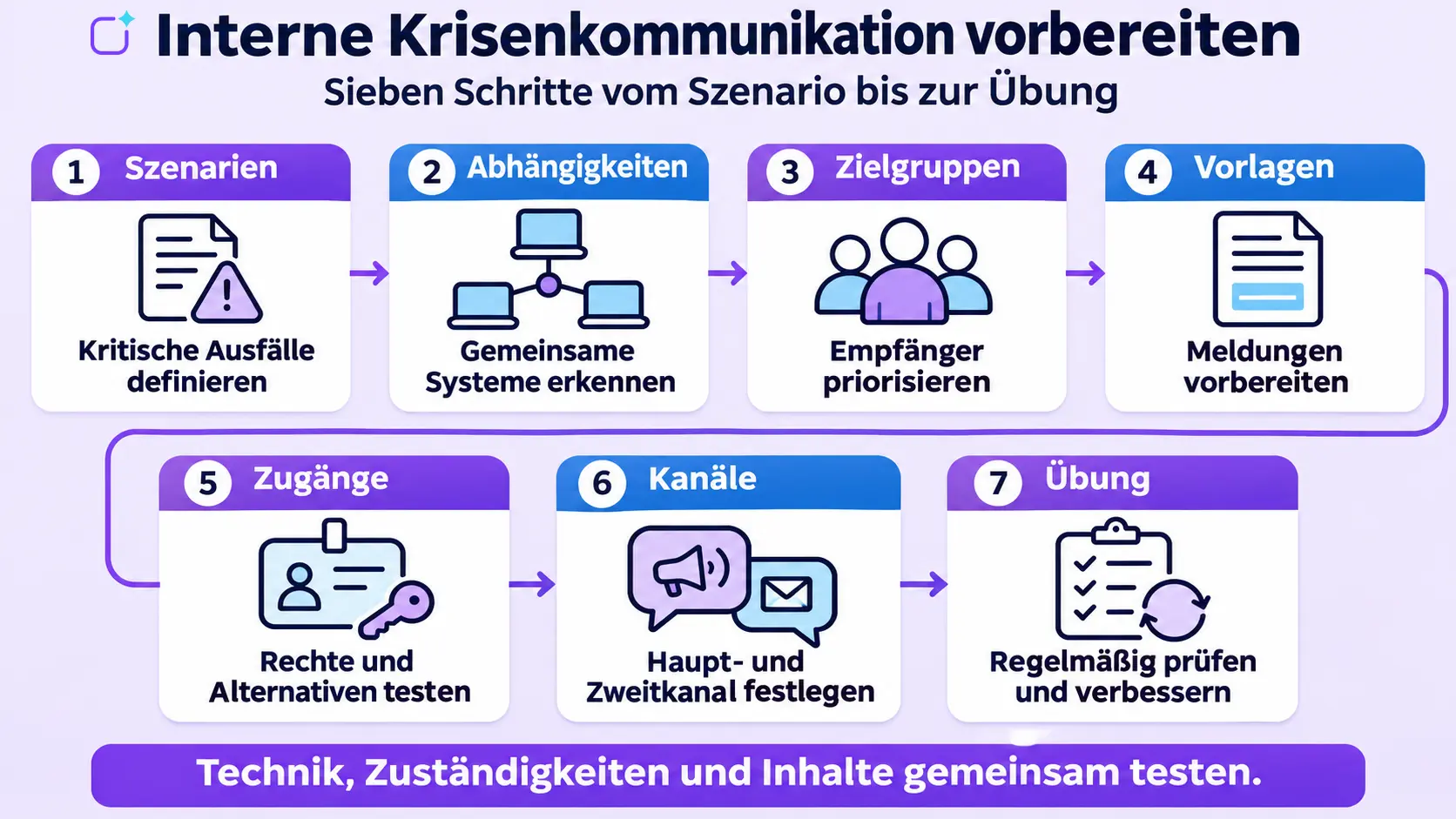
Seven steps to effective internal crisis communication
1. Defining critical scenarios
Do not just list cyber attacks. Also take into account cloud outages, misconfigurations, internet outages, power cuts, building closures and the failure of individual identity or messaging services.
2. Highlight technical dependencies
Document which channels use the same cloud, login, data source, network connection or device management. Two different apps do not constitute redundancy if both fail to connect to the same identity service.
3. Define target groups and priorities
The crisis management team, IT, senior management, operational teams, external service providers and the entire workforce all require different information. Decide who should be informed first and who should receive which instructions.
4. Preparing messages
- Templates save time and reduce errors. Useful templates include:
- Initial report containing confirmed facts,
- guidance for staff,
- a warning about potential phishing attempts,
- regular status updates,
- all-clear and a return to normal operations.
5. Securing access and rights
At least two trained individuals should be able to publish reports. Emergency access credentials must be kept secure, monitored and tested regularly. An improvised shared account is not a reliable solution.
6. Give channels official names
Employees need to know, before a crisis strikes, where authoritative information is published. An internal communication plan should clearly set out the primary channel, secondary channel, analogue fallback and escalation procedure.
7. Practise and review regularly
Do not simply test whether a push notification is sent from a technical point of view. Check the reach, response time, clarity, follow-up enquiries, barriers and the up-to-date status of the distribution lists. Every drill and every real-life incident should be followed by a documented improvement.
Example of an initial internal fault report
Microsoft 365 services are currently restricted
Outlook and Microsoft Teams have been partially unavailable since 08:15. Our IT team is investigating the impact. Please use only this section of the app for official status updates. Do not open any purported update links from unknown sources. For critical operational processes, the following applies until further notice: [implement specific alternative process]. Next update: 09:00.
A good initial announcement is brief, specific and action-oriented. It distinguishes confirmed facts from speculation, specifies a reliable source of information and announces when the next update will be provided. In this way, it reduces uncertainty and prevents staff from spreading contradictory information via private messaging apps or unofficial groups.
What companies should learn from the Microsoft outage
The global outage highlights three structural issues:
- 1. Collaboration and crisis communication are not the same thing. In a crisis, a high-performance work system may be precisely the channel that fails.
- 2. Redundancy is a matter of architecture.An additional tool only provides security if critical dependencies are separated.
- 3. Preparation is key. An untested app without up-to-date user profiles, responsibilities and templates is of little help in an emergency.
Polario should therefore not promote itself with the message ‘Microsoft goes down, but we don’t’. A more credible and strategically sound approach is to state that Microsoft Teams remains an important tool for collaboration. Polario can complement the communication architecture with a mobile, target-group-oriented secondary channel. The fundamental distinction between these two roles is explained in the article ‘Employee App vs. Microsoft Teams’.
Conclusion: Crisis communication requires a Plan B before a crisis strikes
The Microsoft 365 outage on 13 November 2026 provides a timely opportunity to review one’s own communication architecture. The most important question is not which provider never experiences an outage. No such guarantee exists. What matters is whether a company can continue to send clear, verified and actionable information to its employees despite the failure of a key service.
An employee app such as Polario can serve as a valuable secondary channel for this purpose. However, its value does not stem solely from the fact that it is installed. It is only through separate dependencies, alternative access points, pre-prepared content, clearly defined roles and regular drills that an app becomes a robust component of internal crisis communication.
Sources and editorial basis
- WELT: Global disruption affecting Outlook and Teams:https://www.welt.de/vermischtes/article6af64ed25a72dceba1d60d27/microsoft-zehntausende-nutzer-betroffen-weltweite-stoerung-bei-outlook-und-teams.html
- ZDFheute: Microsoft outages – disruption could last for hours:https://www.zdfheute.de/wirtschaft/stoerung-outlook-teams-microsoft-100.html
- CHIP: Global Microsoft outage: https://www.chip.de/news/software/weltweite-microsoft-stoerung-outlook-teams-und-copilot-betroffen_ed90e7c8-3af0-4f3b-a283-f6cff8177e9d.html
- BSI-Standard 200-4 – Business Continuity Management: https://www.bsi.bund.de/SharedDocs/Downloads/DE/BSI/Grundschutz/BSI_Standards/standard_200_4.html
- Polario employee app: https://polario.app/de/mitarbeiter-app/
- Polario Multi-Channel Communication:https://polario.app/de/features-multi-channel-kommunikation/
- Polario Compliance: https://polario.app/de/compliance/
- Employee app vs. Microsoft Teams: https://polario.app/de/mitarbeiter-app-vs-microsoft-teams/
Frequently asked questions (FAQ)
Why is Microsoft Teams not always sufficient as a crisis communication channel?
Teams can work very well for coordination and collaboration during normal operations. However, if an outage affects Microsoft 365, the sign-in process or associated services, even the crisis channel may be restricted. Organisations therefore need a pre-defined fallback plan.
Is an employee app automatically fail-safe?
No. Any cloud or app solution can fail. An employee app only improves resilience if its critical dependencies are separated from the main system, alternative access points are available, and the processes have been tested.
What information should be included in an initial crisis alert?
An initial report should specify the confirmed incident, the affected areas, specific instructions for action, the official status channel and the time of the next update. Speculation and technical details that do not contribute to taking action should be avoided.
How can you reach staff who do not have a work email address?
Possible methods include a staff app, text messages, telephone chains, notice boards, public announcements or managers acting as designated messengers. The right combination depends on the workplace, devices, data protection, urgency and target audience.
Should Polario replace Microsoft Teams?
Not necessarily. Teams is designed for collaboration, meetings, chats and Microsoft 365 processes. Polario can complement this by providing company-wide news, push notifications, mobile navigation and a pre-configured status section.