Skip to content



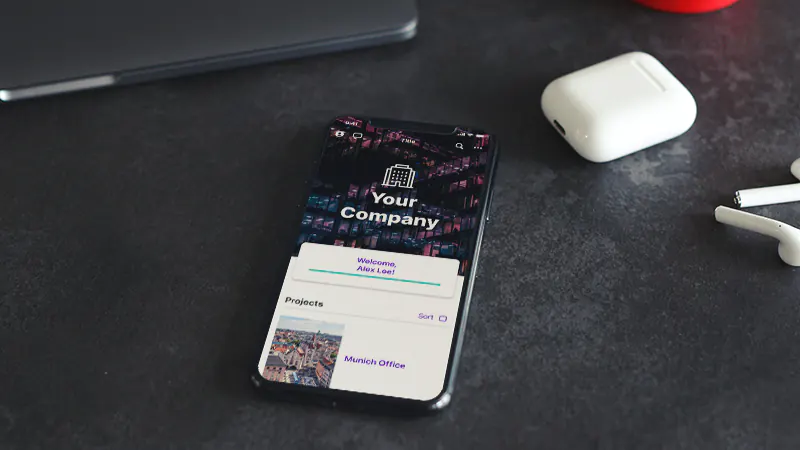

An employee app is designed to keep staff reliably informed, facilitate communication and provide mobile access to relevant services. However, the most suitable solution is not determined by the longest list of features. The key requirements for an employee app start with the organisation’s communication objectives, target audiences and usage scenarios. Only then do features, technology, data protection and operations come into play.
In short: an employee app should reach all relevant employee groups, enable targeted communication, be easy to use and secure, and fit into the existing system landscape. When making a selection, requirements are best formulated as verifiable ‘must’, ‘should’ and ‘could’ criteria. Each key requirement should also include a specific use case and an acceptance criterion.
This guide provides a structured list of requirements for project briefings, specifications and the selection of suppliers. It is not a substitute for an individual data protection, IT security or legal assessment. The requirements must always be tailored to the organisation, its workforce, its operating model and its risk profile.
What is a requirements specification for an employee app?
A requirements specification for an employee app sets out what the solution must deliver for the organisation and its staff. It covers functional requirements – such as news and push notifications – as well as non-functional requirements such as usability, availability, data protection, information security and support.
The requirements specification first sets out the ‘what’ and ‘why’ from the perspective of the client organisation. How the supplier will meet these requirements from a technical perspective is then set out in detail in the solution proposal, quotation or terms of reference.
A good requirement consists of four elements:
- 1. Context of use: Who needs this function and in what situation?
- 2. Objective: Which problem or process is to be improved?
- 3. Requirement: What, specifically, must the solution be able to do?
- 4. Acceptance criterion: How can it be clearly determined that the requirement has been met?
Example: “Production staff without a work email address must be able to use the app via an alternative registration method approved by the company. In the acceptance test, five test subjects without a work email address are able to activate an account and access the content authorised for their location.”
This phrasing is more meaningful than a standalone statement such as ‘Log in without an email address’, as it makes the target audience, purpose and verifiability clear.
First, clarify your objectives and target audiences
Before functions are compiled, the project team should describe the current situation. Otherwise, the requirements specification will quickly turn into a wish list without clear priorities.
What communication problems is the app designed to solve?
Typical starting points are:
- Staff working in production, care, logistics or in the field cannot be reliably reached via existing channels.
- Company information is spread across email, the intranet, instant messaging, notice boards and local files.
- Branches or departments receive information too late or without any clear relevance.
- It is difficult to collate enquiries, feedback and general impressions.
- Documents, contacts, appointments and services are not available on mobile devices.
- New staff members are unable to find important information and the relevant contact persons quickly enough.
Use this to define a few measurable project objectives. Examples include greater reach for important announcements, fewer parallel communication channels, faster dissemination of information, or higher participation in surveys. Metrics should reflect the purpose of the project and not merely aim to maximise app logins.
Which groups of employees need to be reached?
An employee app should not be designed solely for office-based roles. Among other things, it should include:
- Employees with and without a company email address,
- Frontline workers and deskless workers,
- Staff using personal or work devices,
- Shift work, field work and varying work locations,
- different locations, companies, languages and time zones,
- Trainees, temporary staff, seasonal workers or external groups of people,
- People with varying levels of digital literacy and access needs.
For each target group, access, relevant content, required services and potential barriers to use should be documented. The overview of the Polario staff app shows how mobile and web-based use can work together.
Employee App
Increase the communication in your company with the help of an employee app and reach everybody directly & independent of their location.
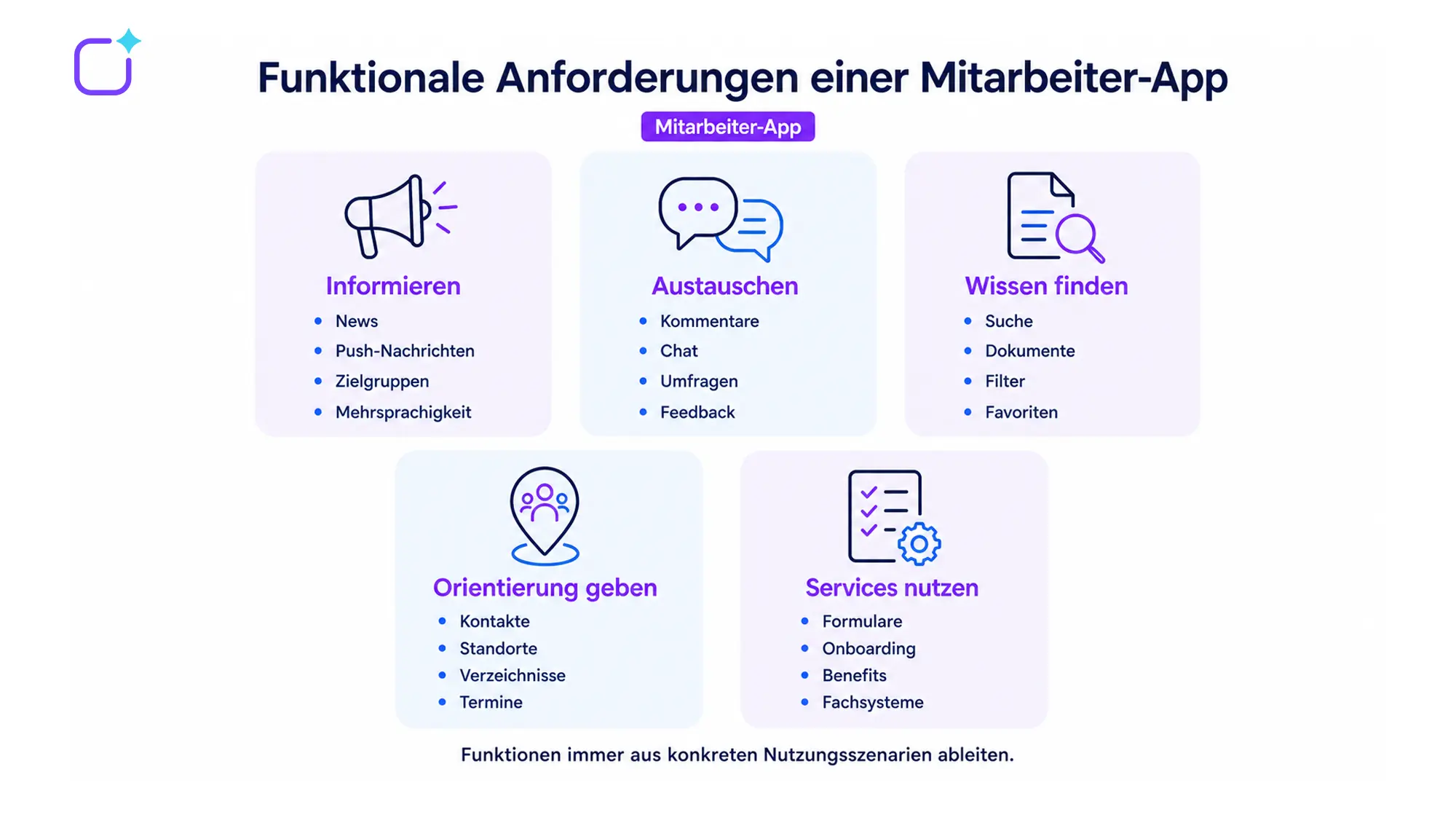
Functional requirements for an employee app
Functions should always be linked to a documented use case. Not every organisation needs a chat function, a social feed, shift planning or a comprehensive process platform.
Targeted news and push notifications
The app should be able to display editorial content based on defined criteria, such as location, subject area, role, language or interest group. The following points need to be clarified:
- Which editorial team is authorised to target which audiences?
- Can posts be scheduled, approved and set to expire?
- Can important messages be sent as push notifications?
- Are there any acknowledgements of receipt or mandatory information, where required for technical or legal reasons?
- How is multilingual content created and maintained?
- Can content be archived, searched for and updated?
One verifiable mandatory criterion could be: “Editors must be able to send a post exclusively to staff at a selected location. Users at other locations must not receive the post, either in their feed or via push notification.”
Exchange, feedback and participation
Depending on the communication culture, comments, reactions, chats, groups, polls or idea management may be useful. In this context, moderation and responsibilities must also be taken into account:
- Who is allowed to post or comment?
- Can functions be enabled or disabled for individual areas?
- How is inappropriate content reported and dealt with?
- What are the rules on data retention and deletion?
- How can we prevent urgent or sensitive matters from ending up in the wrong channel?
Comparing different internal communication channels helps to ensure that app features are not assessed in isolation, but rather in conjunction with email, the intranet, meetings and messaging services.
Search, documents and access to knowledge
Employees should not only receive information, but also be able to find it again later. Relevant requirements include:
- Full-text search and filters,
- Document storage and version control,
- visibility tailored to specific target groups,
- Download and offline rules,
- Favourites or personal folders,
- Expiry dates and editorial officers,
- Labelling of out-of-date content.
Directories, contacts and locations
Directories of staff, contact persons and locations can help people find their way around. It must be determined in advance which profile details may be made visible, which system they come from, and who is authorised to make changes. Particularly in the case of automatic synchronisation, the data source, update frequency and error handling must be specified.
Events and organisational services
Depending on the use case, appointments, registrations, forms, meal plans, benefits, links to HR services or structured onboarding processes can be integrated. It is important to clarify the distinction: should the app map the process itself, or simply provide a secure, user-friendly gateway to a leading specialist system?
Access and equipment requirements
Access is a key factor in determining whether an employee app actually reaches all relevant groups. Consider the following options:
- Log in with a company account and single sign-on,
- Access without a personal company email address,
- Invitation, code or registration procedures,
- Deployment on personal devices in accordance with an agreed BYOD policy,
- Use on devices managed by the organisation,
- Web app for desktops and shared workstations,
- Deactivation or revocation of access upon leaving the organisation,
- Restoring access when changing devices.
Not every login method is suitable for every organisation. IT, data protection, HR and, where applicable, the works council should therefore clarify at an early stage which identities the lead system provides and how new hires, role changes and departures are handled.
Editorial team, roles and governance
An employee app is not a one-off IT project, but a communication channel that is operated on an ongoing basis. The requirements specification should therefore describe not only user functions, but also the editorial and operational model.
Requirements for the content management system
The CMS should be easy to use for the relevant editors who have no development experience. The following points should be checked:
- Roles and permissions for centralised and decentralised editorial teams,
- Preview for the app and the web,
- Drafts, approvals and planned publication,
- Target audience segmentation and multilingualism,
- Media and document management,
- reusable content and templates,
- Searching for and locating existing content,
- Analysis of reach and engagement,
- Transparent changes and responsibilities.
The overview of the Polario no-code CMS highlights some of the editorial modules available. Before making a choice, prospective editors should try out typical tasks for themselves in a demo, rather than simply watching a product presentation.
Governance issues relating to day-to-day operations
Please clarify the following in writing:
- Who has technical responsibility for the app?
- Who is authorised to change target groups, roles and permissions?
- Which departments are authorised to publish material themselves?
- What content requires approval?
- Who moderates comments and groups?
- What are the response times for critical reports?
- Who checks for outdated content and documents?
- How are data protection requests, technical faults and security incidents handled?
Data Protection and Information Security
An employee app regularly processes personal data such as names, contact details, organisational units, device information and interactions. Data protection and information security must therefore be included in the project as verifiable requirements – not as a blanket statement that the app is ‘GDPR-compliant’.
Data protection requirements
In conjunction with data protection and legal advice, the following points, at the very least, should be clarified:
- Purposes and legal bases for processing,
- mandatory and optional profile details,
- The roles of the data controller and the data processor,
- Data Processing Agreement and Subcontractors,
- Data locations and possible international data transfers,
- Data deletion and retention policy,
- Access, rectification, export and erasure,
- Logging and access to log data,
- Privacy information for employees,
- The need for a data protection impact assessment in a specific context.
Data protection through technology design and privacy-friendly default settings should be taken into account right from the selection and configuration stage. However, the actual assessment under data protection law depends on the intended use.
Safety requirements
Possible safety criteria include:
- Encryption during transmission and storage,
- role-based access rights and the principle of least privilege,
- Multi-factor authentication for administrative accounts,
- secure session and password policies,
- documented backup and recovery procedures,
- Availability and agreed service levels,
- Vulnerability management and security updates,
- Logging of security-related actions,
- Incident response and reporting processes,
- independent audits or appropriate evidence of safety,
- Structured data export and exit process.
The BSI C5 criteria catalogue can serve as a guide for assessing information security in cloud services. Whether a specific test or other form of evidence is required must be determined on the basis of security needs, the sector and procurement requirements. Polario sets out its own information on data protection, data location and security in the area of compliance.
Take a closer look at hosting in Germany
‘Hosting in Germany’ is an important selection criterion for many projects, but it needs to be clarified. Don’t just ask about the location of the data centre; ask about data flows, backups, subcontractors, support access, encryption, data recovery and exit strategies. This turns a marketing claim into a verifiable requirement.
Accessibility and ease of use
Accessibility improves access for people with various disabilities and often enhances overall usability at the same time. WCAG 2.2 contains testable success criteria for web content; the W3C also provides guidance on their application to mobile apps. The specific legal and technical standards applicable to a particular project should be assessed by experts.
The following, amongst other things, are relevant to the requirements specification:
- sufficient contrast and scalable typeface,
- Screen reader-compatible labels and a logical focus order,
- Operation without relying solely on complex gestures,
- touch targets that are large enough,
- clear error and status messages,
- Support for different display orientations, where necessary,
- Subtitles or alternatives for audiovisual content,
- accessible authentication,
- plain language or clear editorial guidelines,
- Tests involving assistive technologies and real users.
The CMS must also be user-friendly. You should therefore ask editors to carry out a test task in which they create a post, select a target audience, check a preview and schedule a publication.
Integrations and data quality
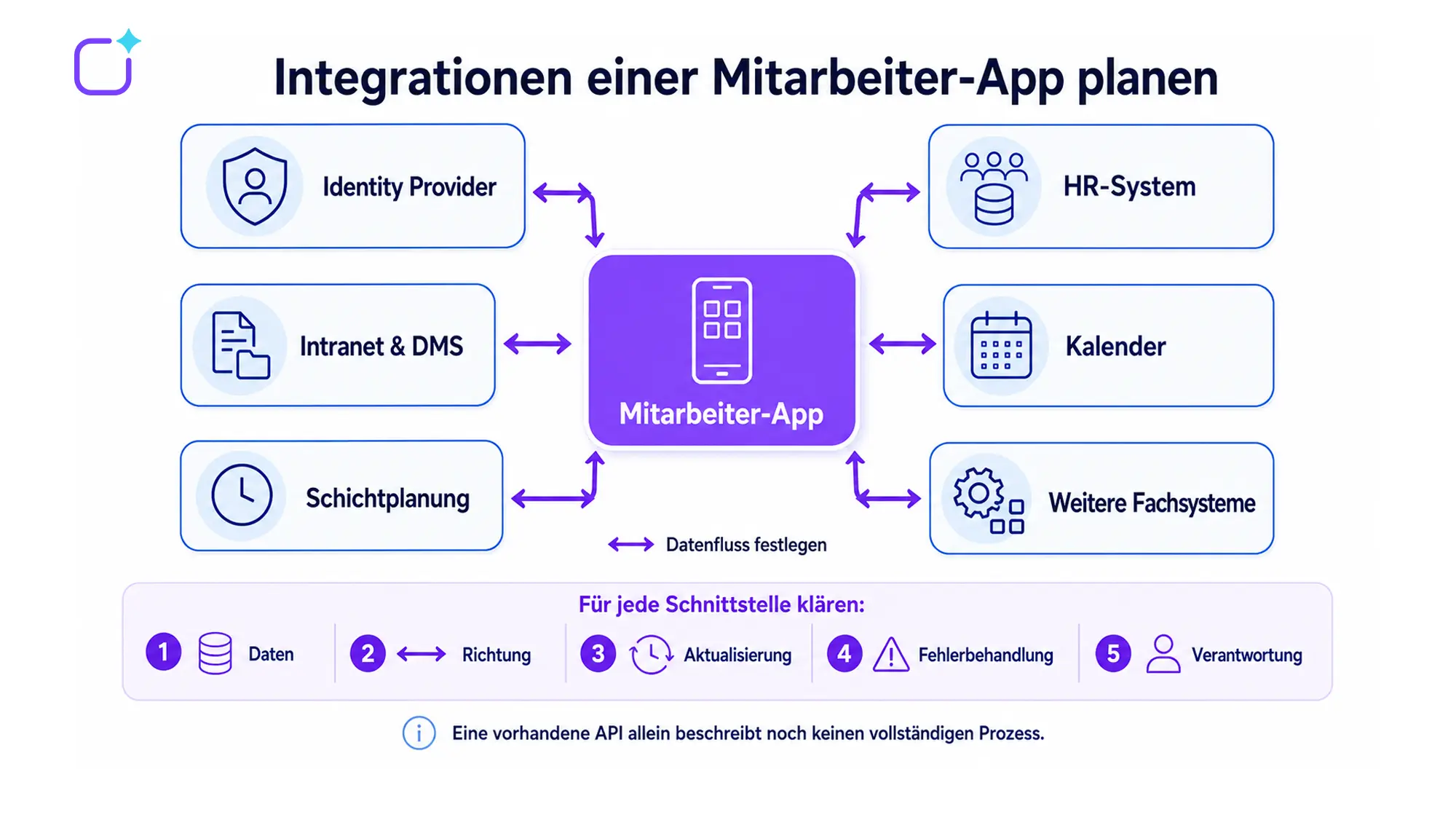
Interfaces can reduce the need for manual maintenance and keep content or user information up to date. However, an existing API alone does not confirm whether the specific process works.
For each integration, please describe:
- 1. leading source system,
- 2. required data fields,
- 3. Direction of transmission,
- 4. Frequency of updates,
- 5. Authentication and authorisation,
- 6. Validation and error handling,
- 7. Monitoring and accountability,
- 8. Conduct on entry, exit and re-entry,
- 9. Deletion and data export,
- 10. Costs relating to set-up, operation and modifications.
Typical systems include identity providers, HR systems, Active Directory, intranets, document management systems, calendars, newsletters, shift planning and ticketing systems. You can find information on possible technical integrations under ‘API and Integration’.

Formulating non-functional requirements in measurable terms
Non-functional requirements describe the quality and operating conditions of the solution. Terms such as ‘intuitive’, ‘secure’, ‘fast’ or ‘highly available’ cannot be verified without a benchmark.
| area | Wording that is too general | Wording that is easier to verify |
|---|---|---|
|
Operation |
The app must be intuitive. |
At least eight out of ten representative test subjects are able to find a news item and access a saved contact without assistance. |
|
Performance |
Content must load quickly. |
For defined test scenarios, a maximum loading time is agreed under specified network conditions. |
|
Availability |
The platform must be highly available. |
Availability, measurement methods, maintenance windows and the response when levels fall below the threshold are set out in the service level agreement. |
|
Support |
The provider must provide assistance promptly. |
Support hours, priority levels, response times, escalation procedures and contact channels are documented. |
|
Data export |
Data must be exportable. |
The export format, scope, deadline, costs and secure handover at the end of the contract are set out. |
|
Accessibility |
The app should be accessible. |
The target standard, the components concerned, the test procedures and the handling of non-conformities are agreed. |
Values and test conditions must be defined on a project-by-project basis. The table provides a method for formulating these, not universally applicable limit values.
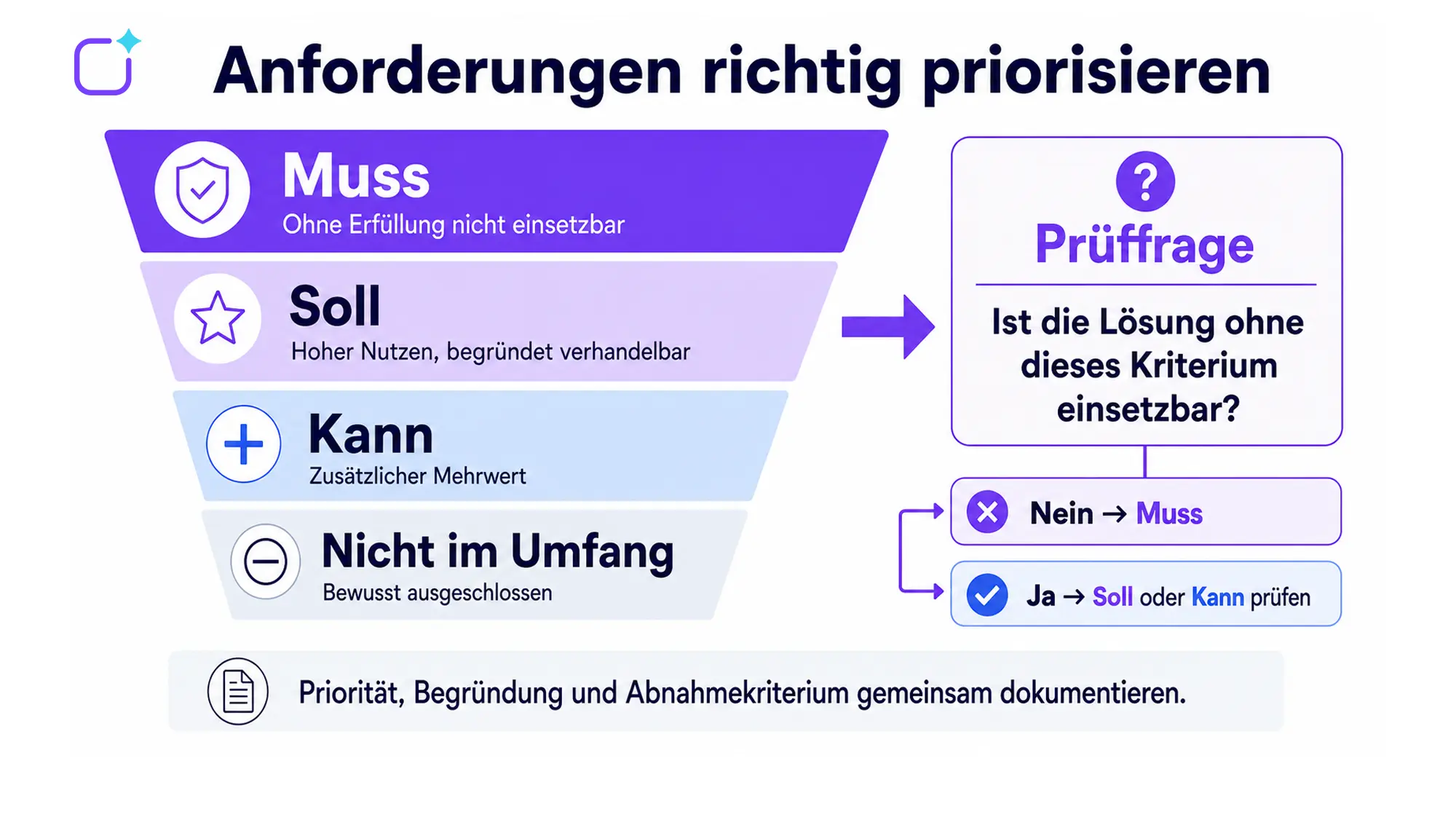
Must, Should or Can: Prioritising requirements
A clear system of prioritisation prevents all requests from appearing to be of equal importance.
- Mandatory criterion: If this criterion is not met, the solution cannot be implemented from a professional, legal or technical perspective.
- Target criterion: The requirement offers significant benefits, but is negotiable under justified circumstances.
- Non-mandatory criterion: The feature offers additional value, but does not determine whether the product is fundamentally suitable.
- Not included in the scope of the project: A requirement that has been deliberately excluded to avoid creating false expectations.
For each ‘must-have’ criterion, it should be assessed whether it is genuinely an exclusion criterion. Too many ‘must-have’ requirements shrink the market, increase the need for bespoke development and can make the selection process unnecessarily expensive. Conversely, too few clear ‘must-have’ criteria shift important conflicts to the implementation stage.
Drawing up specifications for a staff app
A specification document sets out the background, objectives, framework conditions and requirements from the company’s perspective. A concise description of the services required is often sufficient for an initial market survey. However, before a binding offer or a formal tender is issued, critical requirements must be sufficiently specific and verifiable.
Recommended structure
- 1. The company and the current situation: organisation, locations, employee groups and current communication channels.
- 2. Project objectives and scope: Expected outcomes, key performance indicators and processes deliberately excluded.
- 3. Users and demographic breakdown: user numbers, roles, regions, languages, devices and expected growth.
- 4. Functional requirements: information, exchange, search, documents, directories, events and services.
- 5. Access and identities: login, SSO, user creation, role changes and logout.
- 6. CMS and governance: editorial management, approvals, target audiences, moderation and analysis.
- 7. Integrations: systems, data fields, direction, timing and operation.
- 8. Data protection and security: processing, hosting, records, erasure, backups and exit.
- 9. Accessibility and usability: Target standards, test procedures and editorial requirements.
- 10. Implementation and migration: pilot, data migration, training, communication and roll-out.
- 11. Service and Operations: Support, service levels, updates and responsibilities.
- 12. Price list and TCO: one-off, recurring and internal costs over the same period under consideration.
- 13. Evaluation and acceptance: priorities, evidence, demonstration scenarios and acceptance criteria.
Formulate in a way that is open to different solutions, but not vague
When specifying technical requirements, describe the desired outcome wherever possible, rather than attempting to replicate an unknown product detail. At the same time, critical constraints must be clearly defined.
Too vague: “The app needs a chat function.”
Better: “Staff in selected organisational units must be able to exchange direct messages. It must be possible to configure which groups are permitted to use the chat function. Data retention, moderation and file attachments must be explained separately in the proposal.”
This approach allows scope for appropriate solutions without leaving the actual task open-ended.
Download the specification for an employee app
A structured scope of work helps you to fully identify functional, technical and organisational requirements and to set these out clearly to potential suppliers. Use our white paper as a practical template for your project planning, tendering and supplier selection.
Assess providers using real-life scenarios
A general product demonstration is not enough to make a sound choice. Give all suppliers the same tasks, for example:
- 1. An editor creates a news item for a location in two languages, has it approved and schedules a push notification.
- 2. A production worker without a company email address activates their account and finds a security document.
- 3. A local editor can publish content within their area, but cannot change global target audiences.
- 4. A user who has left the platform automatically loses their access.
- 5. The IT department demonstrates how to identify and resolve synchronisation errors.5. Die IT zeigt, wie eine fehlerhafte Synchronisierung erkannt und bearbeitet wird.
- 6. The provider demonstrates data export, role management and relevant security configurations.
You should then document whether the scenario is possible out of the box, through configuration, via an integration, or only through bespoke development. The article on selecting an employee app provides a more in-depth look at how to compare providers in a structured way.
Common errors in the requirements specification
Collect functions without a communication target
A long list of features may seem comprehensive, but it makes it difficult to prioritise. Each key feature should be linked to a specific problem, a target audience and an expected benefit.
Taking frontline workers into account too late
If issues such as access without a work email address, the use of personal devices, shift work or a lack of digital familiarity only come to light during the pilot phase, the concept often needs to be fundamentally revised.
Dealing with data protection using a yes-or-no question
‘GDPR-compliant’ is not a sufficient assessment criterion. Processing, roles, data flows, sub-processors, erasure and technical measures must be appropriate to the specific use case.
Underestimating the operations and editorial teams
Without clear lines of responsibility, content becomes outdated, approval processes become unclear and central editorial teams become overburdened. The operating model must therefore be considered as early as the selection phase.
Do not separate standard and bespoke development
Please ensure that the quotation specifies which requirements are included in the standard version, which are configurable, which can be met via interfaces, which are planned, and which require bespoke development. Please also clarify follow-up costs and the ability to update the system.
Just compare the licence price
Set-up, integrations, migration, training, support and in-house editorial work are all included in the total cost of ownership. All providers should be compared over the same period and based on the same scope of services.
From requirement to implementation
Once the selection has been made, requirements are translated into configuration, integrations, content, testing and roll-out. It makes sense to conduct a pilot with representative target groups – not just with the project team and office workstations. Feedback should be documented, prioritised and evaluated before the wider roll-out.
The phased roll-out of an employee app involves not only technology and content, but also governance, communication, training and continuous improvement.
Conclusion: Good requirements are objective-oriented and verifiable
An effective requirements specification does not begin with functions, but with communication tasks, target audiences and usage scenarios. Access, functions, governance, integrations, data protection, security, accessibility and operations are all built upon these.
Formulate critical requirements in such a way that suppliers can provide clear answers to them and project teams can test them later. The combination of usage context, objective, priority and acceptance criteria creates a robust basis for shortlisting, demonstrations, quotations and implementation.
Sources and editorial basis
- Existing post: https://polario.app/de/anforderungen-mitarbeiter-app/
- Staff app: https://polario.app/de/mitarbeiter-app/
- Choosing an employee app: https://polario.app/de/beste-mitarbeiter-app-finden/
- Launch of an employee app: https://polario.app/de/einfuehrung-mitarbeiter-app/
- Planning and implementation: https://polario.app/de/planung-umsetzung/
- Compliance: https://polario.app/de/compliance/
- API and Integration: https://polario.app/de/api-integration/
Frequently asked questions (FAQ)
What requirements must an employee app meet?
An employee app should reliably reach relevant employee groups, facilitate targeted information and communication, be easy to use and secure, and integrate seamlessly with the existing system landscape. In addition, requirements relating to the CMS, roles, data protection, accessibility, support and day-to-day operations must be met.
What features does an employee app need?
Commonly required features include news, push notifications, target audience management, search, documents, directories, feedback and surveys. Chat, social feeds, events and HR services depend on the use case. Features should only be included if they support a documented communication or process objective.
What should be included in the specifications for a staff app?
A specification document sets out the background, objectives, target groups, scope, functional and non-functional requirements, access, roles, integrations, data protection, security, accessibility, implementation, support, pricing, evaluation and acceptance criteria.
What is the difference between a specification and a requirements specification?
The terms of reference set out the requirements and objectives from the client’s perspective. The specification or solution concept describes how the supplier will meet these requirements. The terminology and binding nature of these documents should be clearly defined within the specific procurement process.
How do you prioritise requirements for an employee app?
Requirements can be categorised as ‘must’, ‘should’ and ‘may’. ‘Must’ criteria are essential for operational capability, legal compliance or safety. ‘Should’ criteria are highly beneficial but remain negotiable. ‘May’ criteria provide additional value. Each classification should be justified.
Which data protection requirements are important?
In particular, the following aspects must be assessed: purposes, legal bases, data minimisation, data processing on behalf of others, sub-processors, data flows, storage locations, erasure, data subjects’ rights, logging and technical safeguards. The assessment must be based on the specific use case.
Does an employee app need to be accessible?
The legal requirements that apply depend on the organisation and the specific application. Regardless of this, accessibility improves usability. The target standard, the components concerned, the test procedures and the acceptance criteria should therefore be explicitly set out in the requirements specification.
How do you assess providers during a demo?
All providers should demonstrate the same real-world tasks: targeted publication, access by a typical frontline staff member, role management, user deactivation, integration and data export. This will document whether the solution works out of the box, through configuration, integration or bespoke development.