Skip to content


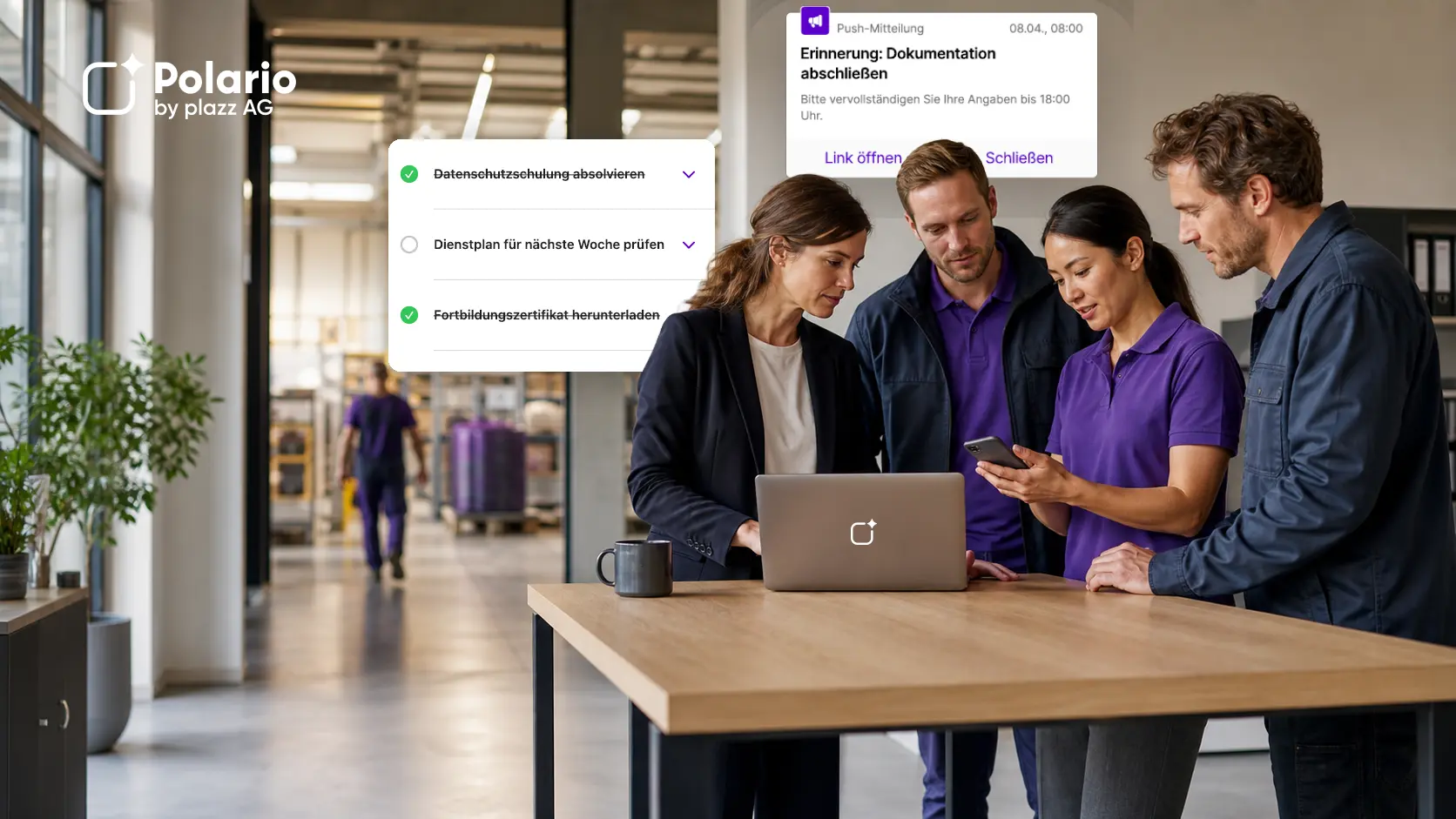

Many companies already have an intranet. Nevertheless, important messages do not automatically reach all employees. Particularly in production, logistics, branch offices, care settings, field service or shift work, employees often lack regular access to a PC, a company email account or the existing portal. This raises the question: is a modern intranet sufficient – or is an employee app the better solution?
In short: An intranet is particularly well suited as a centralised solution for knowledge, documents and portal functions. An employee app is useful when company news and relevant information need to reach all staff on the go, in a way tailored to their specific needs and delivered directly to them. Many companies combine both approaches: the intranet remains the main source of information, whilst the app serves as a mobile access point and communication channel.
What is the difference between an intranet and a staff app?
An intranet is a non-public, digital environment for an organisation’s employees. It typically brings together company information, policies, documents, applications, forms and knowledge resources. Modern intranets can include personalised pages, company news, search functions, mobile views and social features. An intranet app also makes such content accessible via mobile devices.
An employee app is a mobile or cross-platform application provided for the workforce. It often focuses on direct internal communication: news, push notifications, content tailored to specific target groups, feedback, surveys, calendars, contacts and mobile access to other systems.
A social intranet extends the traditional information and knowledge platform to include interactive features, such as comments, community areas or social feeds. This brings its functionality closer to that of an employee app. The product name alone is therefore of little significance. More important factors are access, usage scenarios, information architecture, governance and integrations.
The fundamental difference can be summarised as follows:
- Above all, the intranet answers the question: Where can I find reliable information, documents and applications?
- Above all, the employee app answers the question: How can the company reach the right staff quickly and via mobile devices?
The intranet and the staff app are just two components of a comprehensive communications architecture. Our overview compares other internal communication channels and outlines their respective functions.
Employee App
Increase the communication in your company with the help of an employee app and reach everybody directly & independent of their location.

Employee app and internal communication channels in comparison
Comparison of internal communication channels: analyse the pros and cons to find the best solutions for your company.
Why is an existing intranet often not enough for all staff?
An intranet may be technically advanced, yet still only reach parts of the workforce on an irregular basis. The problem often lies not with the content, but with access and the context in which it is used.
Typical obstacles include:
- Employees do not regularly work on their own computers.
- Not everyone has a work email address or an existing user account.
- Access via personal devices is not provided for or is cumbersome.
- Important news items have to be actively searched for on the intranet.
- Content is organised according to the organisational structure rather than the users’ tasks.
- Too many sections, pages and document versions make it difficult to find your way around.
- Responsibilities for maintenance, approval and archiving are not clearly defined.
These issues do not apply to every intranet. Modern solutions can offer mobile apps, personalised messages, audience targeting and analytics. SharePoint, for example, supports a mobile intranet, company news, audience targeting and usage analytics. What matters, therefore, is not the term ‘intranet’, but whether the specific design is suited to the workforce. (Microsoft Learn: Intelligent Intranet). Our article on Microsoft 365 as a social intranet provides a more in-depth analysis.
Nevertheless, the challenge of frontline communication is very real. In a 2021 Microsoft study conducted by Edelman Data x Intelligence among 9,600 frontline staff and managers, 58 per cent of non-managerial staff surveyed said that communication was not reaching the frontline. Whilst this figure is not a universal benchmark for every organisation, it does illustrate why access and reach should be assessed before deciding on a system. (Microsoft Work Trend Index).
When is an intranet sufficient?
An intranet may be the most suitable solution if the following conditions are largely met:
- Almost all employees have straightforward, regular access.
- The workforce mainly works on computers or actually uses the intranet on mobile devices as part of their day-to-day work.
- The focus is on knowledge, documents, guidelines, processes and applications.
- Company news does not need to be distributed via a separate push channel.
- The content is well-structured, up to date and can be found using a powerful search function.
- Roles for editorial work, approval, page management and archiving have been established.
- Usage and search behaviour are analysed and continuously improved.
A well-managed intranet is therefore by no means an outdated medium. It can serve as the central digital gateway to information and applications. However, its effectiveness depends on information architecture, governance and actual usage – not solely on its technical implementation.
When does it make more sense to use an employee app?
An employee app becomes particularly important when internal communication does not work reliably via a traditional portal.
This is often the case when:
- a large number of frontline workers or deskless workers need to be reached,
- Employees who do not have a work email address or their own computer,
- important information is to be delivered via push notifications to mobile devices,
- if different locations, roles or employee groups require different content,
- News and guidance take centre stage rather than complex document processes,
- Feedback, surveys and interaction should be easily accessible,
- the company wishes to provide a simple mobile gateway to other systems.
However, an employee app does not automatically solve every communication problem. Without clear editorial responsibilities, relevant content, straightforward access rules and a well-planned roll-out, even an app can end up as yet another underused channel. Companies should therefore document their requirements for an employee app in advance.
Employee app vs. intranet: a direct comparison
| Decision criterion | Intranet | Dedicated staff app |
|---|---|---|
|
Main task |
Bringing together knowledge, documents, portals and applications |
Informing, engaging and reaching staff on the move |
|
Typical approach |
Browser, corporate network or platform account; depending on the solution, also on mobile devices |
native app, mobile web app or browser access |
|
Frontline reach |
depending on the account, device, mobile usage and barriers to access |
often specifically designed for mobile and decentralised target groups |
|
Company News |
Homepages, news sections and personalisation |
via news feeds, push notifications and target-group-specific channels |
|
Documents and knowledge |
Robust information architecture, libraries, search and version control available |
Frequently curated access; in-depth document management often via integration |
|
Interaction |
depending on the platform and social intranet features |
Comments, polls, feeds and feedback are often considered core features |
|
Target audience targeting |
depending on the identity model and configuration |
frequently regarding groups, roles, locations and visibility settings |
|
Editorial Policy and Governance |
Page, document and portal governance required |
Channel, role, approval and notification rules required |
|
Integration |
often acts as a central link to specialist applications and document management systems |
can link to existing systems and content as a mobile interface |
|
Introduction |
Information architecture, migration and responsibilities are key |
Activation, mobile use, communication and support are key |
The table outlines typical areas of focus, not fixed product boundaries. Modern intranets can be highly mobile and interactive; staff apps can simultaneously display structured pages, documents and processes. The specific solution must therefore be assessed on the basis of real-world use cases.
When does it make sense to combine an intranet with an employee app?
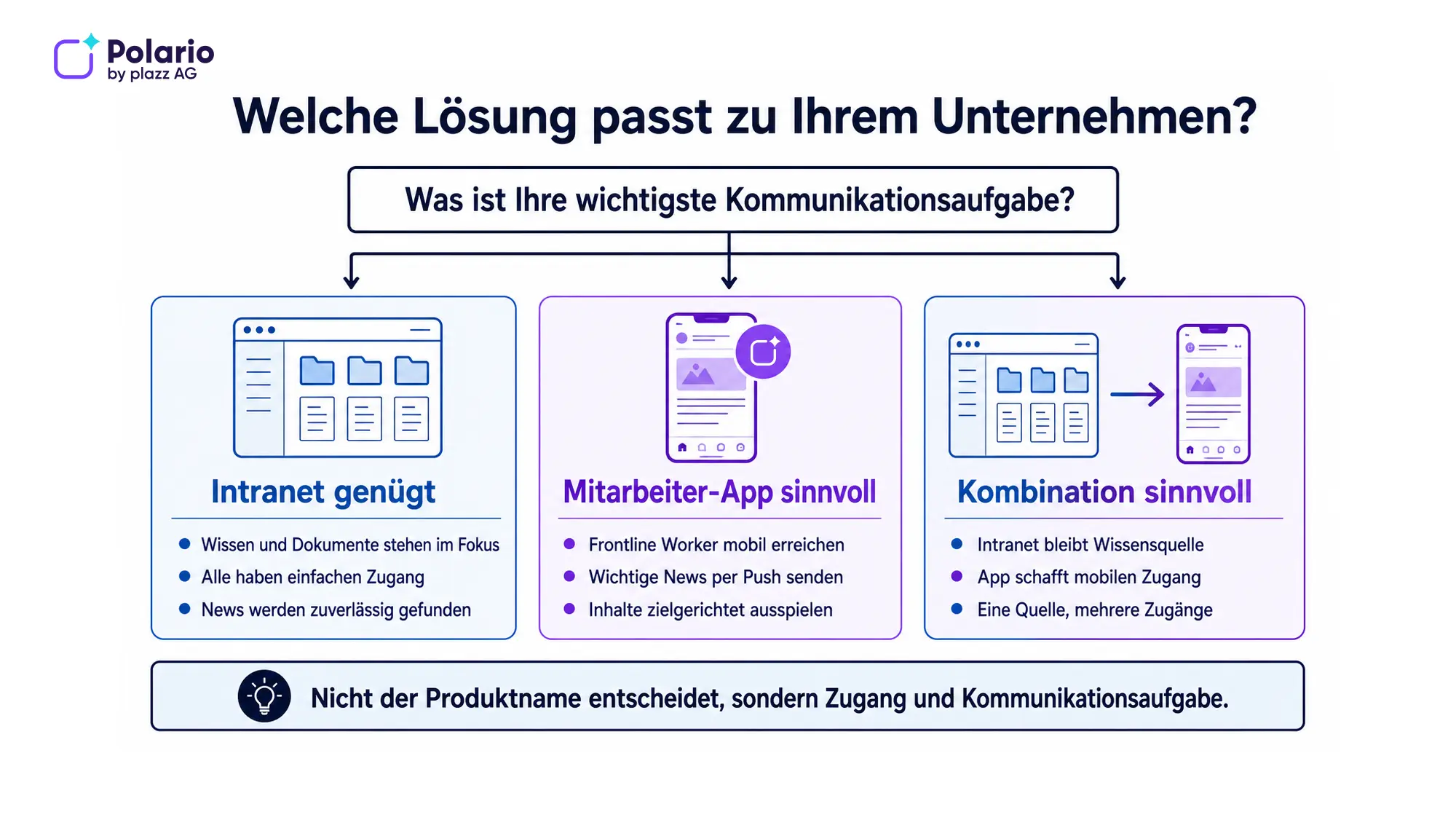
In many organisations, this combination is more robust than a complete replacement. Each system performs a clearly defined task:
- The intranet remains the reliable source for policies, comprehensive documents, knowledge pages and specialist applications.
- The staff app distributes relevant news, highlights new content and provides easy access via mobile devices.
- Employees can use links or integrations to navigate from an app notification to the authoritative source on the intranet.
- Roles, target audiences and publication processes are coordinated across systems wherever possible.
This model follows the principle of ‘one source, multiple appropriate access points’. Content should not be copied uncontrollably into multiple systems. Otherwise, this leads to duplicate maintenance, conflicting versions and unclear responsibilities.
Polario cites Microsoft 365, SharePoint Online, identity services and other systems, amongst others, as potential integration points. Which content is to be embedded, synchronised or simply linked must be assessed from both a technical and organisational perspective on a project-by-project basis. (Polario: Platform and Integrations)
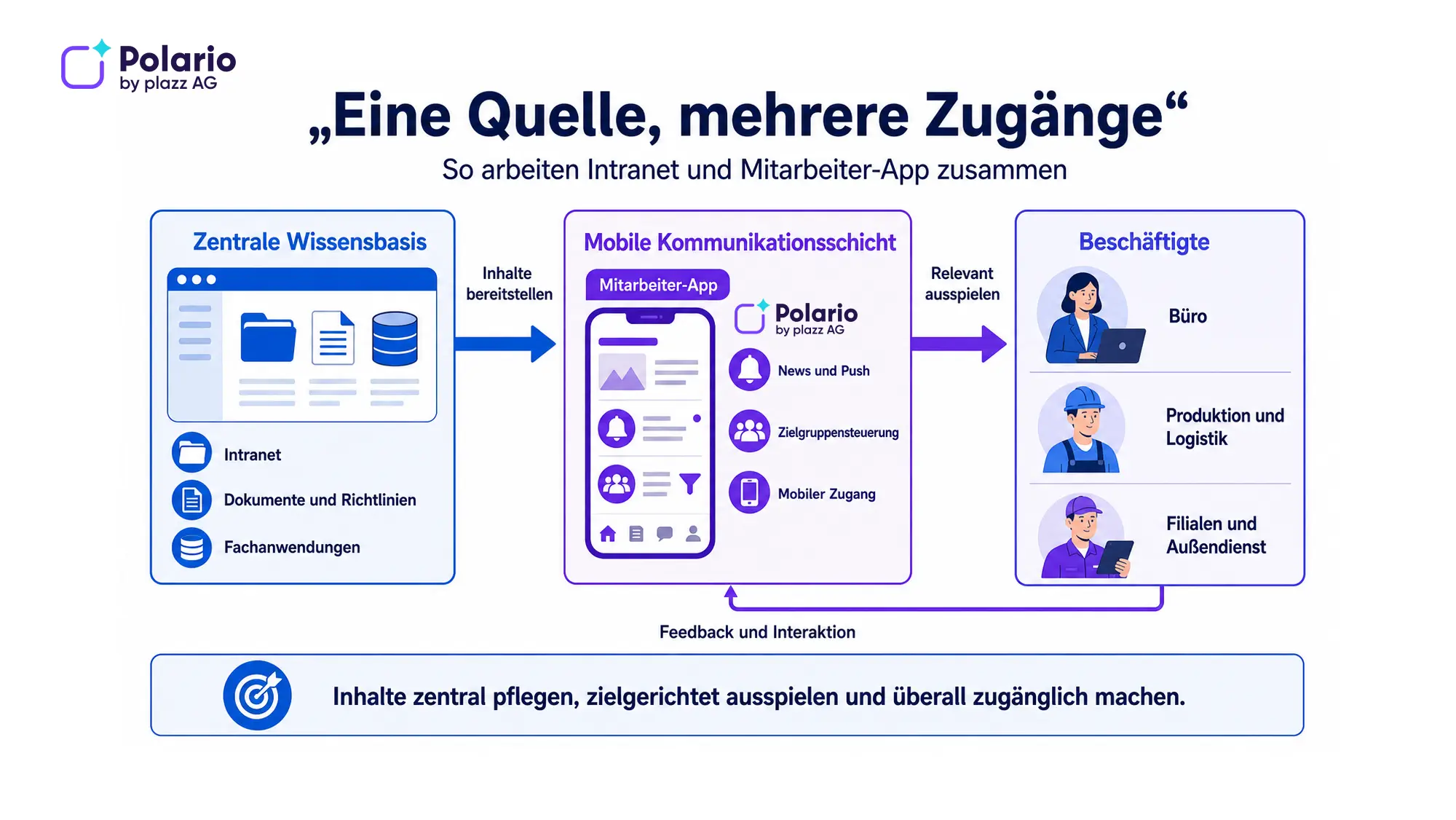
Three decision-making processes
1. The intranet is sufficient
This approach works well if all relevant staff use the intranet regularly and without any obstacles, if the focus is on knowledge and documents, and if news about the existing solution is reliably noticed.
2. An employee app is a good idea
This approach is suitable when mobile reach, push notifications and easy access for frontline workers are the main challenges, and the existing intranet is virtually unable to reach these target groups.
3. This combination makes sense
This approach is suitable if the intranet is to be retained as a knowledge and document repository, but staff require better mobile access and a more active channel of communication.
It is not the longest list of features that matters, but rather the question of which communication and information task within the company remains unresolved.
Ten questions before making a decision
1. Are we really reaching all employees today?
Don’t just check who, in theory, has access. Analyse which groups of staff regularly use the existing system and which key pieces of information are actually being taken on board.
2. Do all employees have a suitable account and device?
Check whether a work email address, personal login, personal smartphone, work device or shared device is required. Access barriers determine the actual reach.
3. Is the focus primarily on knowledge or on active communication?
An intranet is often well suited to comprehensive policies, documents and knowledge structures. An employee app may be a better fit for mobile news, push notifications and interaction.
4. What information must remain accessible at all times?
Establish a single source of authority for policies, forms and documents. Avoid duplicate copies without clear responsibility for version control.
5. What kind of content should push notifications include?
Not every message is urgent. Decide what information warrants a notification and how to avoid notification overload.
6. Does the content need to vary according to location, role or language?
Identify relevant target audiences and assess how visibility, personalisation and translation work within the respective solution.
7. What kind of interaction is actually required?
Comments, polls, feedback, chats and communities serve different purposes. Choose features based on specific scenarios, not on availability.
8. Which systems need to be integrated?
Check identity management, HR systems, document repositories, calendars and specialist applications. For each integration, specify the data source, the person responsible and the update method.
9. Who is responsible for content and governance?
Appoint owners for pages, channels, shared content, archiving, moderation and analytics. Technology is no substitute for editorial organisation.
10. How do we measure success?
Suitable key performance indicators may include active usage, the reach of important news items, search success, feedback rates, the timeliness of key content and successfully completed tasks. Registration figures alone are not sufficient proof of success.
How can this be introduced or combined?
A pragmatic approach consists of seven steps:
1. Identify employee groups, work locations and access arrangements.
2. Prioritise communication and information tasks.
3. Define key sources and channels.
4. Clarify requirements regarding accounts, devices, data protection and integrations.
5. Conduct a pilot with representative user groups.
6. Prepare editorial teams, managers and support staff for their roles.
7. Measure usage and comprehensibility, and make targeted improvements.
A detailed step-by-step guide can be found in our article on introducing an employee app. Our guide to choosing the right employee app will also help you with the initial product selection.

Introducing an employee app: How to ensure successful planning, pilot and roll-out
Successfully rolling out an employee app: planning step by step – objectives, project team, data protection, content, pilot, go-live and measuring success.
The best employee app: how to make the right choice
The search ends here: Discover the top employee app for your company from our comparison of well-known providers!
In practice: What companies can learn from implementing MVB
Magdeburg Transport Authority introduced a Polario staff app, primarily to improve communication with transport services, administration and maintenance teams. According to the published interview, more than 80 per cent of staff had downloaded the app within the first six months. At the same time, usage subsequently fell by around 20 per cent; this was attributed to integrations that were not working properly. (MVB interview on Polario)
This example illustrates two important points:
- A company communication channel can also reach staff who are not in the office.
- An introduction and downloads alone are not enough; relevant content, effective integrations and ongoing maintenance are what determine long-term usage.

Interview: Effective internal communication through the MVB employee app
With the Polario employee app, MVB improves internal communication, reduces information loss and increases operational efficiency.
MVB Employee App
At Magdeburger Verkehrsbetriebe, Polario connects employees in real time, increases efficiency and saves time – digitally and sustainably!
Conclusion: Approach and task are key
An intranet is particularly well suited when companies wish to make knowledge, documents, policies and applications available in a structured manner. An employee app comes into its own when information needs to be delivered to a diverse workforce on the move, directly and in a way that is tailored to the target audience.
Many companies therefore do not have to choose between an employee app and an intranet. They need a clear communication architecture: a reliable source of content, appropriate access for each group of employees, and clear rules for publishing, notifications and maintenance.
Would you like to assess whether your intranet is sufficient, whether an employee app would be useful, or whether the two systems should be combined? In a Polario demo, you can work with us to evaluate target audiences, content, access methods and integration requirements.
Sources and editorial basis
- Existing Polario article ‘A comparison of employee apps and internal communication channels’: https://polario.app/de/mitarbeiter-app-und-interne-kommunikationskanale-im-vergleich/
- Microsoft Learn – Intelligent intranet overview: https://learn.microsoft.com/en-us/sharepoint/intelligent-intranet-overview
- Microsoft Learn – SharePoint News und Freigaben: https://learn.microsoft.com/en-us/sharepoint/guided-walkthrough-set-up-news-with-hub-site
- Microsoft Work Trend Index – Frontline Workers: https://www.microsoft.com/en-us/worklab/work-trend-index/technology-unlocks-a-new-future-for-frontline
- Polario employee app: https://polario.app/de/mitarbeiter-app/
- Polario Intranet-App: https://polario.app/de/intranet-app/
- Polario Platform and Integrations: https://polario.app/de/api-integration/
Frequently asked questions (FAQ)
Does an employee app completely replace the intranet?
Not necessarily. An employee app can replace an existing intranet if it fully replicates its main functions. More often, however, it complements the intranet as a mobile channel for communication and access. The key factor is where official content is maintained and how users access it.
Is an intranet still relevant today?
Yes. A well-structured, well-maintained and accessible intranet can be a powerful knowledge and portal solution. Problems arise primarily due to a lack of governance, confusing content or barriers to access – not simply because it is an intranet.
Is an intranet app the same as an employee app?
The terms overlap. An intranet app makes intranet content accessible on mobile devices. An employee app often places greater emphasis on news, push notifications, targeted communication and interaction. What matters most are the actual functions and usage scenarios.
Do frontline workers need a work email address for a staff app?
This depends on the chosen solution and the identity management approach. Possible options include, for example, a work email address, staff number, one-time code, single sign-on or other methods. Access, security and offboarding must be assessed prior to implementation.
Can the intranet and the staff app use the same content?
Yes, provided there is a suitable integration or a regulated linking process in place. Ideally, a primary source should remain in place, whilst the app curates, promotes or makes content accessible on mobile devices. Uncontrolled copies should be avoided.
Which option is cheaper?
This cannot be answered on the basis of product category alone. Factors such as licences, implementation, content migration, integrations, operation, support, editorial effort and the device or identity strategy are all relevant. The total costs for clearly defined usage scenarios should be compared.