Skip to content





Launching an employee app is not simply a matter of rolling out software. The project changes the way information is disseminated, content is managed and, where appropriate, internal processes are made accessible via mobile devices. For a successful launch, therefore, the communications, HR, IT, data protection, employee representative bodies and operational departments must work together.
In short: An employee app is rolled out in eight steps: clarifying objectives and target groups, establishing the project team and governance structure, defining requirements and the budget, assessing data protection and technical aspects, configuring the app and its content, conducting a representative pilot, supporting the roll-out with communication, and evaluating usage and impact after the go-live. Clear lines of responsibility, relevant initial content and measurable benefits for employees are crucial.
This guide takes you through the process from the initial project idea to stable operation. Companies that have yet to select a system will find the right evaluation method in the guide ‘Finding the Best Employee App’. The in-depth article ‘Using the Employee App – Not Just Installing It’ explains how to ensure the app remains firmly embedded in day-to-day working life following its roll-out.
What does the launch of an employee app mean?
The roll-out involves more than simply making an app available in the app store or browser. It begins with the business objectives and does not end with the go-live, but rather with the app running smoothly. Typical components include:
- Project brief and success criteria,
- Requirements and selection of providers,
- Data protection, information security and employee participation,
- App structure, user management and integrations,
- Content strategy and editorial responsibilities,
- Pilot, troubleshooting and acceptance testing,
- Launch communications, training and support,
- Analysis and ongoing development.
The roll-out is complete when not only does the technology work, but responsibilities, support, editorial processes and measurement are also firmly established in day-to-day operations.
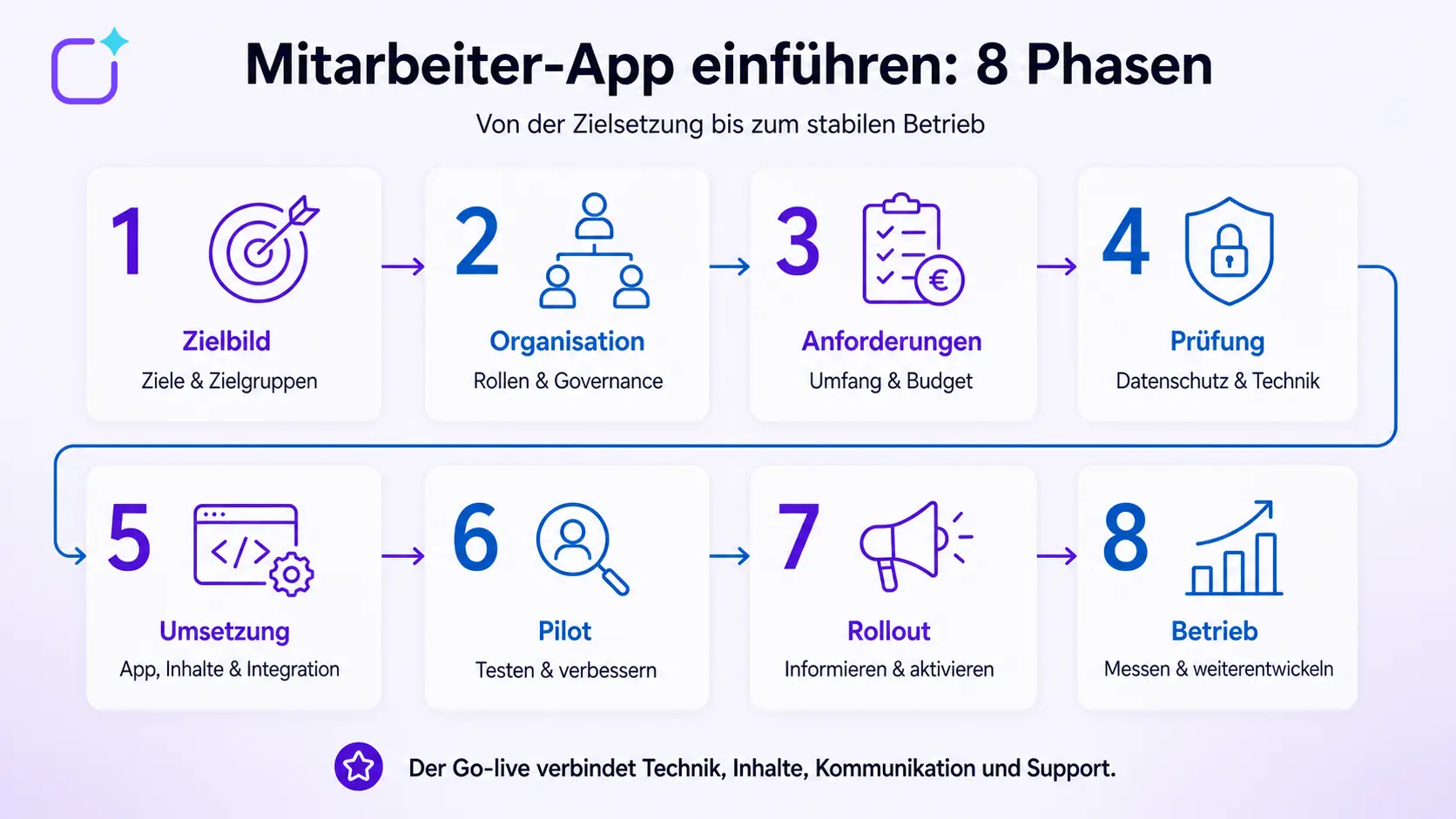
An overview of the eight phases of implementation
| Phase | Key task | Result |
|---|---|---|
|
1. Vision |
Clarify problems, target groups and benefits |
Project brief with measurable objectives |
|
2. Organisation |
Defining the project team, roles and decisions |
Governance and accountability matrix |
|
3. Requirements |
Prioritising mandatory, recommended and optional criteria |
Specifications and budget framework |
|
4. Examination |
Clarify data protection, security, the works council and technical matters |
Approvals and technical specifications |
|
5. Implementation |
Configure the app, access, content and integrations |
Testable app with initial content |
|
6. Pilot |
Test real-world usage scenarios with a test group |
Prioritised improvements and acceptance |
|
7. Rollout |
Informing, training and engaging staff |
controlled go-live |
|
8. Operation |
Managing support, editorial work and key performance indicators |
a platform that can be used in the long term |
The phases may overlap. However, it is risky to only involve data protection and the works council immediately before the launch. Similarly, the content concept should not be left until the technical configuration has been finalised.
1. Clarify objectives, target groups and the current situation
The starting point is not the list of features, but the problem. Should the app reliably reach employees who do not have a dedicated PC? Does security information need to be distributed more quickly? Should documents be easier to find, or should forms be accessible on mobile devices? Each objective should lead to an observable usage scenario.
An initial analysis should answer at least the following questions:
- 1. What communication channels are already in place?
- 2. Which groups of employees are currently difficult to reach?
- 3. Which pieces of information or processes give rise to a particularly high number of queries and data inconsistencies?
- 4. Which channels should the app complement, integrate with or replace?
- 5. What devices and access options are available to the target groups?
- 6. How will we be able to tell later on that the situation has improved?
A specific objective, for example, is not ‘improve communication’, but rather: ‘Shift workers at seven sites receive safety-related information via mobile devices, tailored to their specific needs and presented in a clear and comprehensible manner.’ A baseline, a target value and a measurement point can be defined for this. Target values must be derived from the organisation’s own project and must not be adopted wholesale from other organisations.
2. Define the project team and governance structure
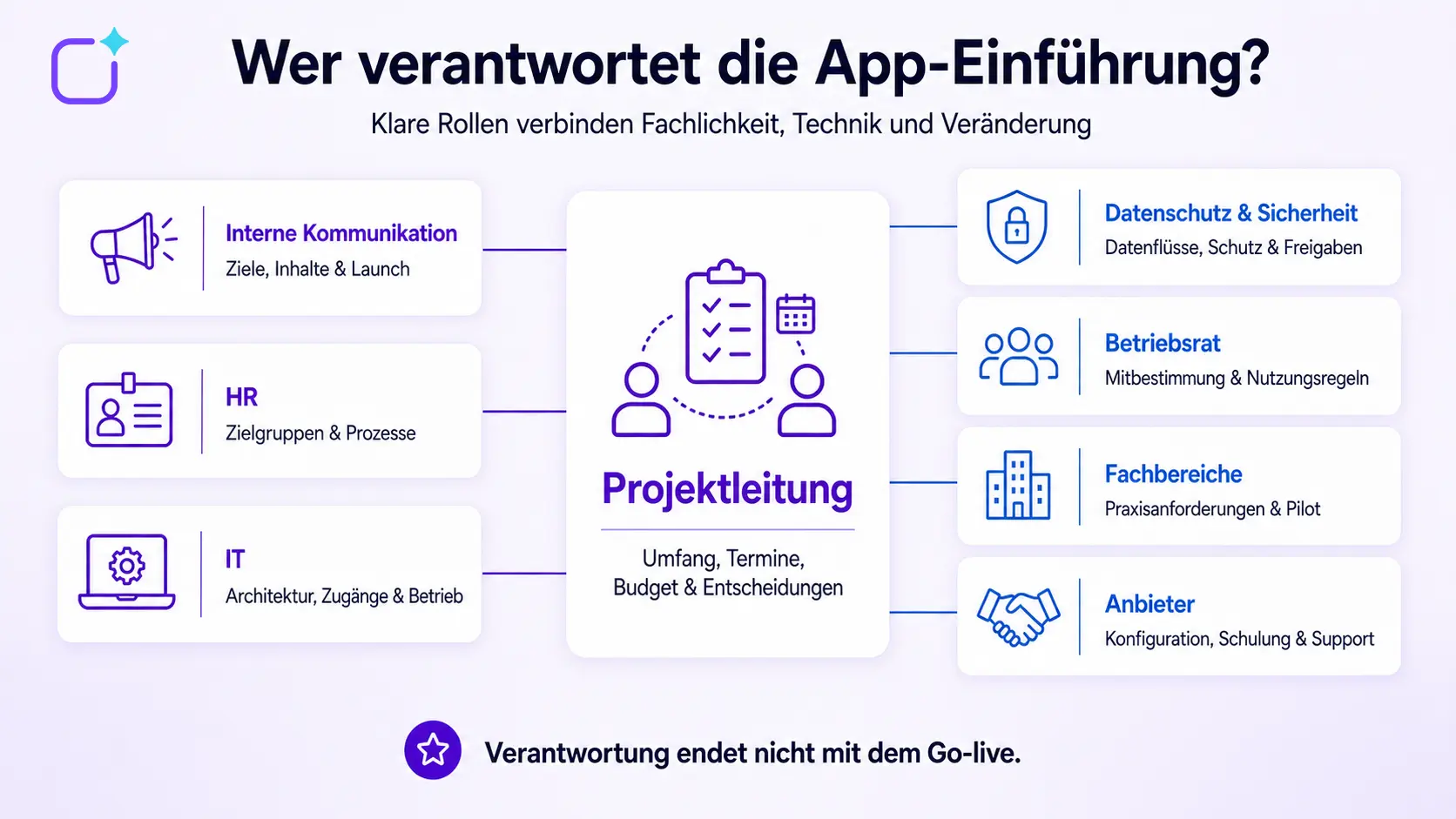
An employee app involves several areas of responsibility. Without clearly defined roles, delays, duplicate coordination or content without an owner can arise. A functional core team typically comprises:
- Project management: coordinates scope, budget, deadlines, risks and decisions.
- Internal communications: responsible for communications objectives, content strategy, launch and editorial model.
- HR: contributes expertise on staff processes, target groups and organisational requirements.
- IT: assesses architecture, identities, integrations, end devices and operations.
- Data protection and information security: assess data processing, protection requirements, contracts and technical measures.
- Works council or staff representative body: is involved in accordance with the company’s and legal framework.
- Departments and frontline staff: test real-world processes and provide the perspective of future users.
- Provider: responsible for the agreed configuration, technical deployment, training and support services.
For key work packages, it should be documented who is responsible for the work, who makes decisions, who is involved in a technical capacity, and who is kept informed. This allocation of responsibilities also applies after go-live: Who approves content? Who manages groups? Who responds to support enquiries? Who decides on new features?
3. Define requirements, scope and budget
The requirements should be derived from objectives and usage scenarios. The detailed article on the requirements for an employee app shows how functional, technical and organisational criteria are set out in a specification document.
The following decisions are particularly relevant to the implementation:
- Which features are essential for the first release?
- Which content and processes will be added at a later stage?
- Do you need a web app, an app within a hub, or your own white-label app?
- How are employees created, updated and removed?
- Which systems need to be integrated at the outset?
- Which languages, roles, groups and locations need to be included?
- What internal resources are available for project management, editorial work, IT and support?
A clearly defined initial release reduces complexity. However, ‘minimal’ must not mean ‘useless’. The launch package must fully address at least one relevant use case. An app that, at launch, contains only general company news may not yet provide frontline workers with a reason to use it regularly.
The budget must also take into account the total implementation costs. In addition to licensing and set-up, the calculation should include, amongst other things, branding, migration, integrations, training, internal content creation and ongoing operations. The cost guide ‘How much does an employee app cost?’ provides a three-year TCO for this purpose.
4. Clarify data protection, employee participation and technical issues before configuration
Data protection and information security are not tasks to be dealt with at the last minute before launch. It must be clear from the outset what personal data will be processed, who will have access to it, how long it will be required for, and which systems are involved.
Data protection and data flows
Please document at least the following:
- Categories of employee and usage data,
- Purposes and legal bases for processing,
- The roles of the data controller, data processor and sub-processors,
- Hosting regions, data flows and retention periods,
- Extinguishing and discharge processes,
- Permissions, logging and reports,
- technical and organisational measures,
- Procedures for handling data subject requests and security incidents.
On its compliance page, Polario describes, amongst other things, development and support in Germany, server hosting in Germany, as well as certifications and security measures. However, for any specific project, the agreed contractual documents and the configuration actually used are always decisive.
Works Council or Staff Representative Committee
The employee representative body should be involved at an early stage. Section 87(1)(6) of the Works Constitution Act (BetrVG) provides for a right of co-determination regarding the introduction and use of technical devices designed to monitor employees’ behaviour or performance. The organisation must assess, from both a legal and operational perspective, whether and which co-determination rights apply to the specific project. This article does not constitute legal advice.
Transparency builds trust: Explain clearly what data is collected, what analyses are possible, who can view private messages, how voluntary and mandatory use is handled, and what alternatives are available to staff without a suitable device.
Devices, registration and identities
Clarify whether the plan involves the use of personal smartphones, company-issued devices, shared devices or browser access. This will determine the requirements for login, multi-factor authentication, mobile device management, offline use, support and the separation of personal and work-related data. The BSI points out that mobile devices and applications present specific security risks and entail particular requirements for secure operation and management.
User management should not be planned solely for the initial import. New hires, departures, changes of location and changes in roles must be reliably tracked. Via APIs and integrations, Polario can be connected to, amongst other things, import functions, notifications and external login services; the specific scope must be clarified on a project-by-project basis.
5. Implement the app’s structure, content and integrations
Configuration begins as soon as the target design, requirements and approvals are finalised. Technical and editorial work should be carried out in parallel.
Building an information architecture
The menu, groups, roles and page structure are organised around the tasks carried out by staff. It is not the organisational structure alone that matters, but rather how quickly relevant content can be found. Test typical workflows: opening a safety document, finding a contact person, retrieving shift information or opening a form.
Preparing the initial content
An empty app doesn’t make a good first impression. At launch, it should at least include the following:
- a brief explanation of its purpose and benefits,
- Help with registration, navigation and data protection,
- up-to-date news tailored to specific target groups,
- relevant contacts, locations or directories,
- frequently used documents and services,
- a clear channel for feedback and support,
- a robust editorial plan for the first few weeks.
Every piece of content requires an owner, an approval process, a target audience and an update schedule. Out-of-date documents should not be migrated without being checked first.
Testing integrations
When it comes to SSO, HR systems, Microsoft 365, calendars or specialist applications, a successful data import alone is not enough. Check permissions, the direction of updates, error handling, logging and behaviour upon joining, changing roles and leaving. Each integration requires a business and a technical point of contact.
On the ‘Planning and Implementation’ page, Polario describes its typical process, from kick-off, deployment and CMS implementation, through content creation and publication, to evaluation and further development.
6. Carry out a representative pilot study
A pilot is not a demonstration for project members who are particularly tech-savvy. Its purpose is to show whether the app works under real-world conditions. The test group should therefore represent a range of locations, roles, shift patterns, languages, devices and levels of digital experience.
What should be tested in the pilot scheme
- Registration via the designated access channels,
- Clarity of navigation and terminology,
- correct target groups and permissions,
- Push notifications and delivery,
- Searching for and locating important content,
- real-world core processes and integrations,
- What to do in the event of a poor connection or shared devices,
- Privacy information and support channels,
- Accessibility and ease of use,
- Costs relating to editorial and administrative work.
Define acceptance criteria in advance. A pilot does not end simply with a feedback session, but with documented findings, priorities, designated responsible parties and a decision: go-live, further refinement or retesting.
Feedback should include observations and tasks, not just general satisfaction. “Find the current safety instructions” provides more insight than “Do you like the app?”.
7. Preparing for go-live and roll-out
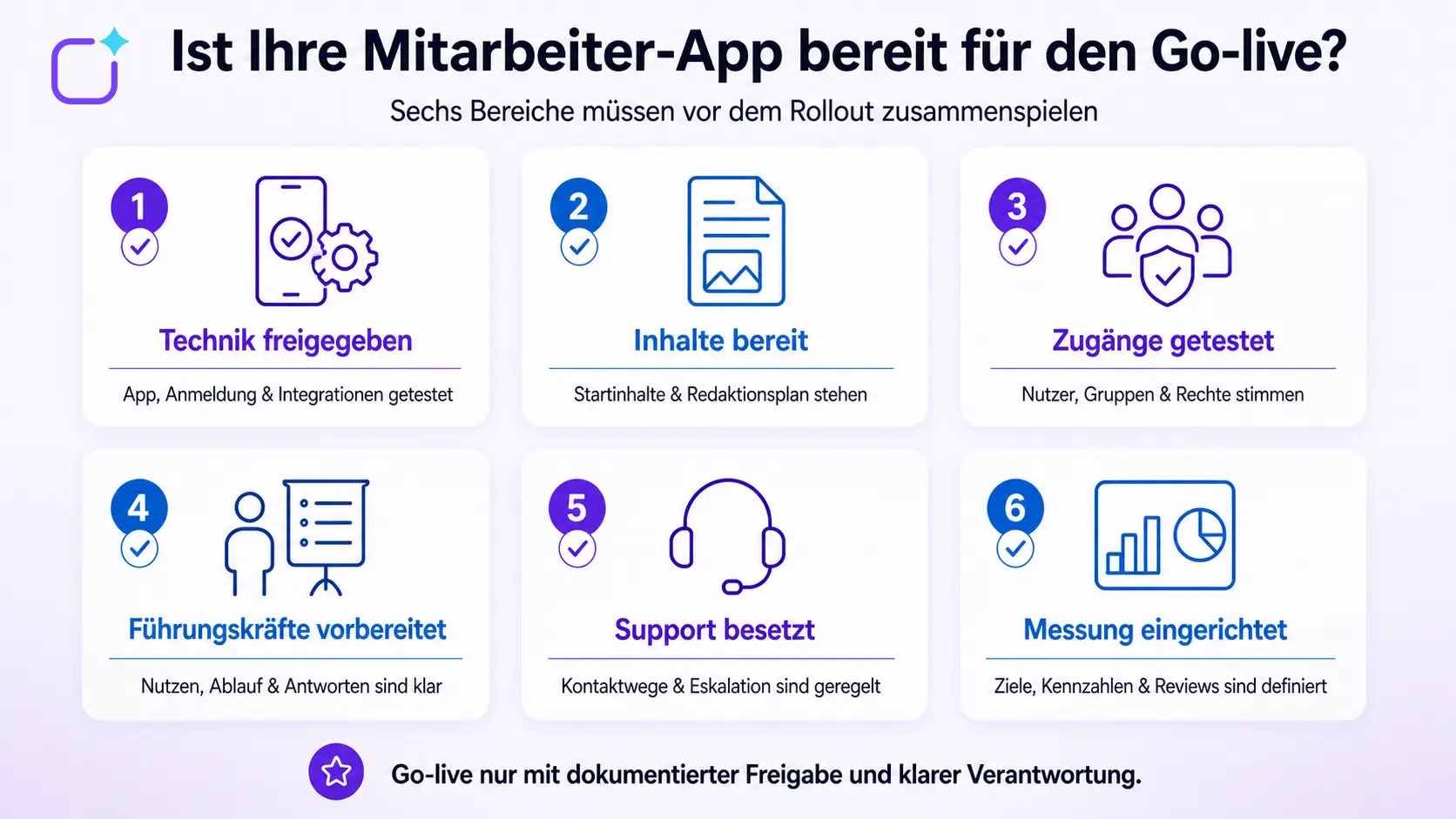
The launch combines technical approval, content, communication, training and support. All staff must know why the app is being introduced, what specific benefits it offers, how to access it and where help is available.
Rollout-Plan
A practical plan includes:
- 1. Target groups and rollout sequence,
- 2. Launch date and possible downtime,
- 3. Communication channels before, during and after the launch,
- 4. Invitation and registration process,
- 5. Training courses for administrators, editors, managers and end users,
- 6. local influencers or key users,
- 7. Support channels, escalation and response times,
- 8. Emergency and relapse procedures,
- 9. Key figures and review dates.
Depending on the organisation, a phased roll-out by site or employee group may be more appropriate than a company-wide launch. The decision depends, amongst other things, on the number of users, technical complexity, support capacity and urgency.
Launch communications
Frontline workers often cannot be reliably reached by email. You should therefore use a combination of management communications, team meetings, shift handover briefings, notice boards, QR codes, letters and existing digital channels. The message should highlight the personal benefits rather than simply announcing the new tool.
Managers and local points of contact must be prepared before the general launch. If they are unable to answer questions or continue to use conflicting channels at the same time, the new app will quickly lose credibility. You should also agree on which tasks the internal helpdesk will handle and when external service and support will be brought in.
8. Managing usage, impact and operations after launch
Once the app has been launched, it will enter regular operation. Technical stability and download figures alone do not yet indicate whether the app is fulfilling its purpose. Key performance indicators must align with the target vision.
Useful key figures
| Objective | Possible key figure | Supplementary qualitative assessment |
|---|---|---|
|
Increase Range |
activated accounts, active users, target audiences reached |
Who is still not being reached, and why? |
|
Making information accessible |
Search usage, views of key content, unsuccessful search queries |
Can staff carry out tasks without assistance? |
|
Encouraging participation |
Replies, survey responses, comments |
Is participation constructive and representative? |
|
Simplifying processes |
completed tasks, processing time, error rate |
Are media breaks and follow-up enquiries really a thing of the past? |
|
Stabilise operations |
Support cases, resolution time, technical faults |
Which causes recur? |
Key performance indicators must not be used in isolation to monitor individual performance or behaviour. Their purposes, access rights, analysis and communication must be aligned with data protection requirements and the representation of employees’ interests.
Schedule regular reviews, for example after the pilot phase, shortly after launch and after a suitable period of operation. The frequency of these reviews depends on the size of the project and the risk of changes. A prioritised roadmap is drawn up based on key performance indicators, feedback and support cases. The article ‘How to ensure your employee app is used – not just installed’ explores how to maintain engagement in day-to-day working life.
How long does it take to roll out an employee app?
There is no standard timeframe. A small-scale Hub project with just a few groups and no integrations can be launched much more quickly than an international white-label app with SSO, HR integration, multiple languages and complex governance.
The following factors have the greatest influence on the timetable:
- Availability and priority of internal project members,
- The speed of data protection, security and employee participation assessments,
- The quality and scope of the content to be migrated,
- App model and store release,
- The number and complexity of the integrations,
- Scope of the pilot, training and phased roll-out,
- necessary individual developments.
Rather than promising a flat weekly figure, the project plan should set out milestones, dependencies, acceptance criteria and buffers. It is particularly advisable to allow for contingencies in relation to approvals, data cleansing, App Store processes and feedback from the pilot.
Common mistakes made during implementation
Treating the app as a purely IT project
Technical implementation is no substitute for either a content strategy or change communication. Communication, HR and operational target groups must all be involved on an equal footing.
Running too many functions at the same time
An overloaded initial release makes testing, training and familiarisation more difficult. Prioritise a small number of comprehensive core applications and expand as and when the need arises.
Inform the works council only just before the launch
Getting involved at a late stage can jeopardise trust and the timetable. Data protection, analytics, personal devices and rules of use should be discussed openly at an early stage.
Going live with an empty app
Without relevant initial content and clear everyday benefits, there is no reason for users to return. Content production and technical implementation should be included in the same project plan.
Conduct the pilot only with project participants
A standardised test fails to take into account barriers to entry and actual working conditions. Pilot groups must be representative of the future workforce.
Continue parallel channels indefinitely
If the same information is constantly updated via the app, email, messaging services and notice boards, the workload and the risk of inconsistencies increase. Define a clear channel architecture and transition rules.
Do not assign responsibility after go-live
Without an editorial team, administration, support and a decision-making process, the platform will become obsolete. The day-to-day operation must be secured, both organisationally and financially, before the launch.
Conclusion: An employee app is rolled out as an organisational initiative, not just a technical one
A successful roll-out involves eight key tasks: vision, project organisation, requirements, approvals, configuration, pilot, roll-out and operation. The app must solve real-world communication or process problems and be accessible to different groups of staff.
Early involvement, a representative trial phase, relevant initial content and clear lines of responsibility following the go-live are particularly important. This ensures that the software provided becomes a reliable tool in day-to-day work.
Sources and editorial basis
- Staff app: https://polario.app/de/mitarbeiter-app/
- Planning and implementation: https://polario.app/de/planung-umsetzung/
- API and Integration: https://polario.app/de/api-integration/
- Compliance: https://polario.app/de/compliance/
- Service und Support: https://polario.app/de/service-support/
- Costs of an employee app: https://polario.app/de/kosten-mitarbeiter-app/
- Section 87 of the Works Constitution Act: https://www.gesetze-im-internet.de/betrvg/__87.html
- IT-Grundschutz module APP.1.4 Mobile Applications: https://www.bsi.bund.de/SharedDocs/Downloads/DE/BSI/Grundschutz/IT-GS-Kompendium_Einzel_PDFs/06_APP_Anwendungen/APP_1_4_Mobile_Anwendungen.pdf
- Minimum standard for mobile device management: https://www.bsi.bund.de/DE/Themen/Oeffentliche-Verwaltung/Mindeststandards/Mobile_Device_Management/Mobile_Device_Management.html
Frequently asked questions (FAQ)
How do you roll out an employee app?
The implementation takes place in eight steps: defining objectives, setting up the project team, prioritising requirements, clarifying data protection and technical aspects, configuring the app and content, conducting a pilot, supporting the roll-out, and evaluating operations and impact.
Who should be involved in the project?
The core team comprises project management, internal communications, HR and IT. Data protection, information security, the works council or staff representatives, specialist departments, frontline representatives and the service provider are involved at an early stage in accordance with their respective roles.
When should the works council be involved?
Employee representatives should be involved as early as the objectives and requirements phase. Whether specific rights of co-determination apply depends on roles, evaluation options and the organisational context, and must be assessed from a legal perspective.
How large should the pilot group be?
It is not a fixed number of participants that matters, but representativeness. The group should reflect relevant locations, roles, shifts, languages, device types and varying levels of digital experience, whilst still being manageable.
What content needs to be in place for the launch?
The launch includes the app’s purpose and benefits, registration and privacy notices, up-to-date information tailored to specific target groups, important contacts and documents, key services, and clear support and feedback channels.
How can we increase acceptance?
Acceptance is fostered through early involvement, clear communication, a straightforward sign-up process, credible leaders, helpful introductory content and immediately recognisable benefits. Download figures alone are not proof of long-term use.
Which key performance indicators are useful following the roll-out?
Suitable metrics include those related to specific objectives, such as target audiences reached, active usage, the ease of finding key content, completed processes, support cases and processing times. These should be supplemented by feedback and usability tests.
How long will the roll-out take?
The duration depends on the app model, the number of users, approvals, data quality, integrations, languages, the amount of content required and the roll-out. A robust project plan therefore incorporates milestones, dependencies, acceptance tests and buffers rather than a blanket time commitment.