Skip to content




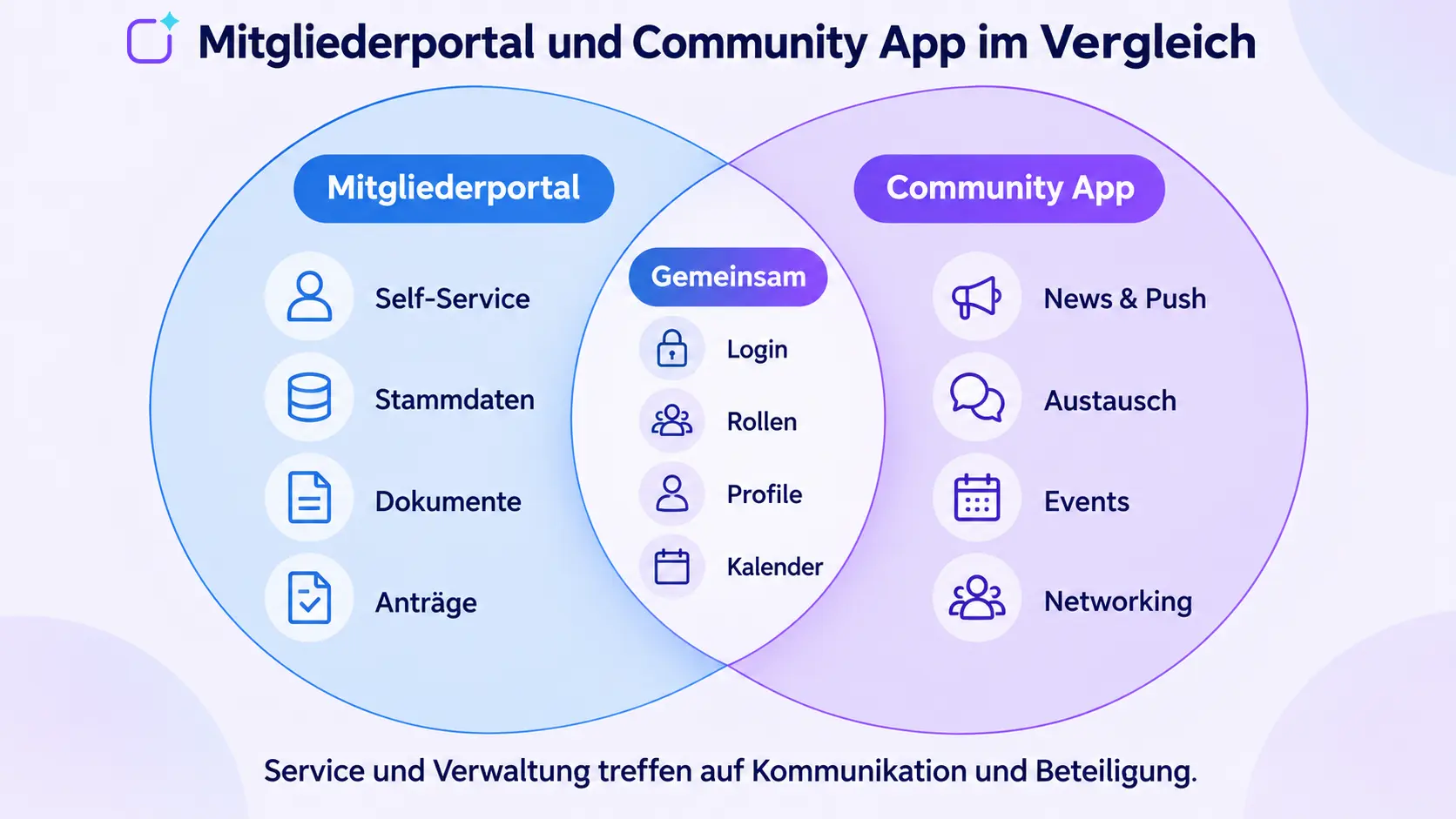
A members’ portal provides secure digital access to data, documents and services. A community app places greater emphasis on regular communication, mobile accessibility, interaction and engagement. The functions of both solutions may overlap – and for many associations, clubs or business networks, a combination makes more sense than a strict ‘either/or’ approach.
In short: A members’ portal is particularly suitable for secure self-service functions such as master data management, membership fee information, certificates, applications and documents. A community app is useful when members need to be kept regularly informed, reached via mobile devices, connected with one another and encouraged to get involved. If both administrative functions and community features are required, the portal and app should be integrated or implemented on a shared platform.
This article compares categories of solutions, not fixed product standards. The term ‘member portal’ is used in various ways in the market: some portals are limited to login and self-service, whilst others already include news, events or forums. What matters, therefore, is not the label, but the specific process.
What is a members’ portal?
A members’ portal is a secure digital space where members can access organisation-related information and personal services. Access is usually granted following login via a web browser. The portal may be linked to a digital membership management system or may incorporate such functions itself.
Typical functions of a members’ portal include:
- view or update your personal details and contact information,
- View membership status, contributions or invoices,
- Access certificates, forms and confidential documents,
- Submit applications or book services,
- Manage events, training courses and committee meetings,
- Control access by member type, role or organisational unit.
The key benefits lie in self-service and secure processes. Members carry out tasks themselves, whilst the administrative office can reduce the need for manual enquiries and duplicate data entry. Whether a portal also facilitates active communication depends on the specific product.
What is a community app?
A community app is a digital space for information, discussion, networking and engagement. It is available as a native app, a web app or a combination of the two, and is regularly used by members on smartphones, tablets and desktops.
Typical functions include:
- News, content tailored to specific target groups and push notifications,
- Social feed, comments, chats and groups,
- Directories of members and contact persons,
- Calendar, events and personal appointments,
- Documents, videos, podcasts and educational content,
- Surveys, feedback, forms and engagement formats,
- Networking, matchmaking or arranging meetings.
The focus is on reach, engagement and activation. The Polario Community App combines a web app and a native app with a no-code CMS, roles, groups and various communication and interaction modules. Which features are included or optional must be checked in the specific quote.
Further reading: If you’d like to compare not just categories of solutions but specific platforms, you’ll find a structured shortlist organised by app model, hosting, integrations and pricing structure in the article ‘Community app providers compared’.

A comparison of community app providers: Which platform is right for your organisation?
A comparison of six community app providers: use cases, apps, branding, integrations, hosting and pricing. Find the right platform for you.
A comparison of the members’ portal and the community app
| Criterion | member portal | Community App |
|---|---|---|
|
Main task |
Secure services and administrative processes |
Communication, interaction and member retention |
|
Typical approach |
Log in via a web browser |
native app and/or web app |
|
Frequency of use |
often on an ad hoc basis |
Aiming for regular to daily |
|
Personal details |
Master data, status, posts and documents |
Profiles, interests, groups and visibility settings |
|
Communication |
Notices and documents, depending on the portal |
News, Push notifications, Feeds, Chat, Groups and Comments |
|
Interaction |
Forms, applications and bookings |
Discussions, surveys, feedback and networking |
|
Events |
Registration or administration available |
Application, support, agenda, discussion and follow-up |
|
Mobile accessibility |
depending on responsive web design or an additional app |
often a central component of the model |
|
Back-end specialism |
Membership management, CRM or ERP |
Content, Community and Communications Management |
|
Performance measurement |
digitised processes and reduced administrative burden |
Reach, activation, usage and retention |
The table outlines typical areas of focus, not rigid boundaries. A modern member portal may include community features. A community app can support forms, profiles, documents and service processes. Organisations should therefore translate their requirements into specific usage scenarios.
When is a members’ portal sufficient?
A members’ portal may be the right solution if the organisation primarily wishes to digitise administrative processes and communication with members is already handled via existing, well-established channels.
A portal is often sufficient if:
- Members only check data, posts or documents from time to time,
- Certificates, applications and downloads provide the greatest benefit,
- when little editorial content is published,
- exchange between members is not a strategic priority,
- an existing membership management system provides suitable portal access,
- the organisation does not wish to establish regular mobile use.
The limitation often becomes apparent when it comes to engagement: a portal can be extremely valuable, but is often only accessed when a specific task needs to be carried out. Anyone wishing to keep members continuously informed or to build an active community needs additional channels of communication and interaction.
When does it make more sense to use a community app?
A community app is more useful if the aim is not just to manage members, but to engage with them regularly and connect them with one another. The app becomes the organisation’s regular digital meeting place.
A community app is particularly suitable if:
- time-sensitive or target-group-specific messages are to be delivered directly,
- Members mainly communicate via mobile devices,
- where groups, departments, regional associations or committees require their own rooms,
- Events should be permanently linked to the community,
- Exchange, networking and knowledge transfer are strategic objectives,
- participation and feedback are to be systematically encouraged,
- the brand should be visible as an app.
For clubs and organisations run by volunteers, the Polario Club App demonstrates how communication, events, documents, groups and roles can be brought together in a single mobile solution.
When is a combination of a portal and an app the best solution?
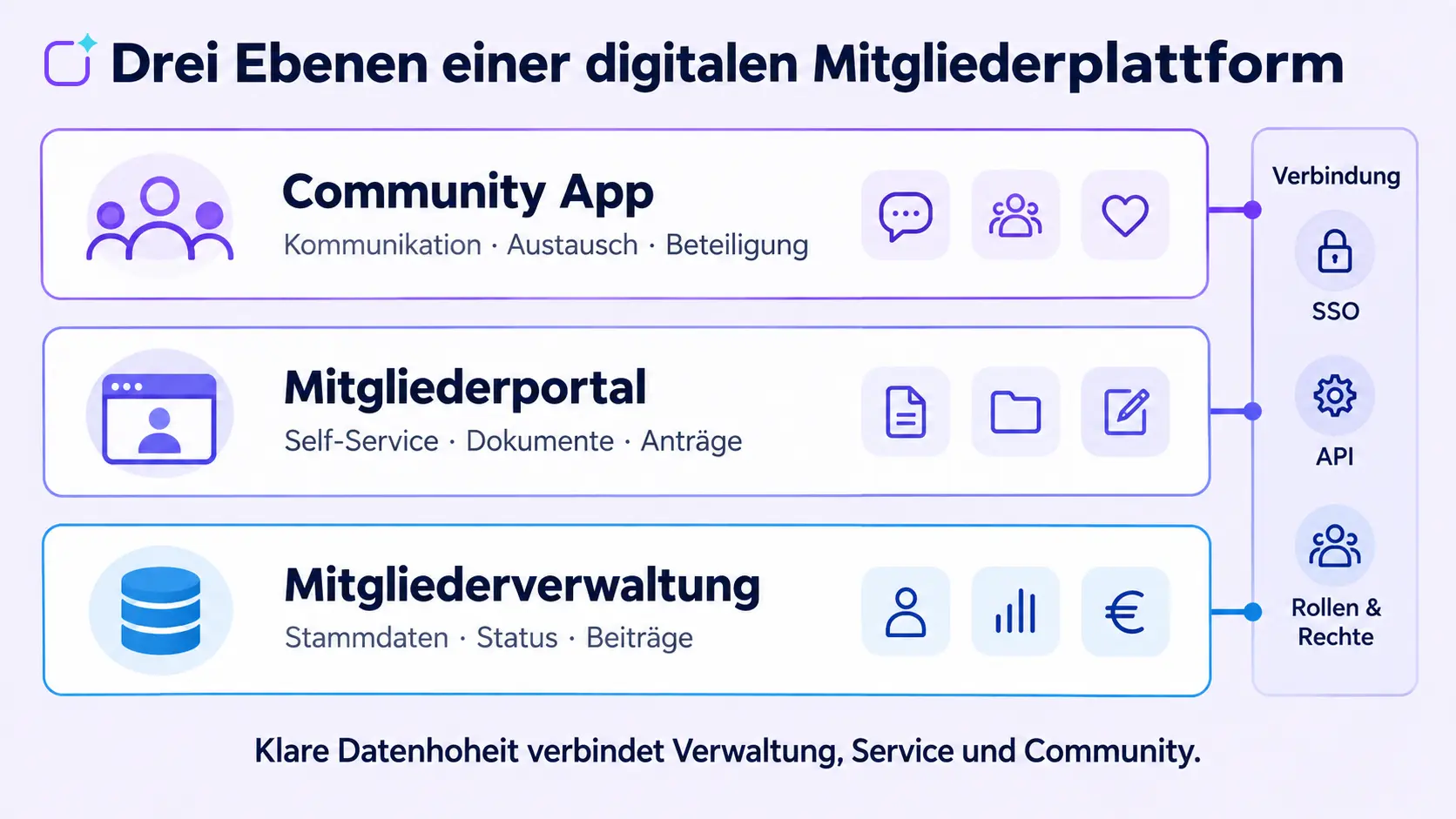
Many member organisations need both: reliable administrative processes and an active community. In that case, one should not try to cram every task into a single front-end. What is more important is a clear architecture with consistent access and defined data flows.
One possible vision consists of three levels:
- 1. Membership management as the master system: It holds authoritative master data, membership status, and information on membership fees and contracts.
- 2. Members’ portal as a service area: It enables users to manage their personal details, submit applications, access certificates, view invoices and access secure documents.
- 3. Community app as a platform for communication and interaction: It distributes content, sends push notifications, and supports groups, events, discussion and networking.
The different levels can be linked via interfaces, imports or single sign-on. It must be clearly defined which system holds which data and which changes are written back. Duplicate, uncontrolled master data maintenance should be avoided.
Which solution is best suited to which objective?
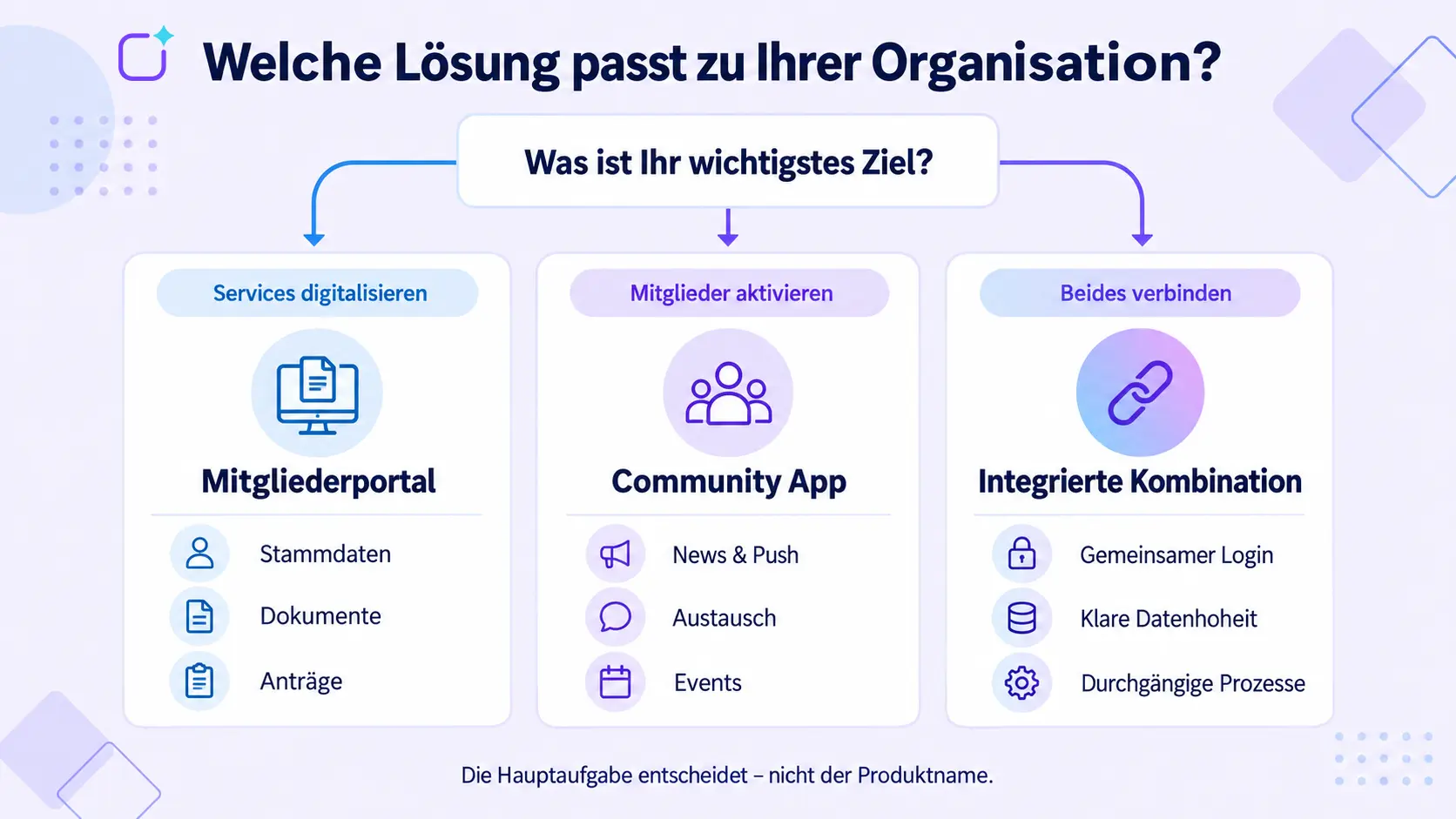
| Main objective | Recommended starting point |
|---|---|
|
Maintain master data yourself |
member portal |
|
View contribution details and certificates |
member portal |
|
Distribute news reliably via mobile devices |
Community App |
|
Connecting members with one another |
Community App |
|
Providing communication support for events |
Community App |
|
Digitising applications and administrative processes |
member portal |
|
Improving administration and member retention together |
Combination or integrated platform |
|
Add a mobile component to the existing membership management system |
Community app with verified integration |
What requirements should you clarify before making your choice?
Objectives and measurable benefits
First, define the problem you want to solve: fewer administrative enquiries, greater reach, more event registrations, stronger networking, or a central digital hub. Each objective requires different functions and key performance indicators.
Target groups and roles
Full members, prospective members, volunteers, committees, partners and staff may require different content and access rights. Document roles, groups, visibility settings and access permissions before selecting a product.
Data and leading systems
Clarify where master data, membership status, subscription details and consents are stored. Identify the lead system for each data object and check the import, export and API processes, as well as the synchronisation direction.
Access and Identity
A single login reduces friction. Review single sign-on, invitation processes, password policies, multiple memberships, members who have left the organisation, and how to deal with people who do not have a regularly used email address.
Editorial Policy and Governance
Decide who is responsible for managing news, documents, groups and events. Moderation rules, approval processes, responsibilities and response times are just as much a part of day-to-day operations as the technical platform itself.
Data Protection, Hosting and Security
Member data may contain personal and, in some cases, sensitive information. Check the types of data, purposes, legal bases, data processing on behalf of others, sub-processors, data location, erasure, roles and technical measures. Polario provides its own information on the compliance page; however, the project-specific contracts and supporting documentation remain authoritative.
Introduction and Activation
A portal or app does not automatically generate usage. Plan for pilot groups, onboarding, initial editorial content, a communication campaign and recurring triggers for usage. A clear activation plan is particularly important for community features.
How much does a members’ portal or a community app cost?
The costs depend on the number of users, modules, integrations, branding, migration, support and internal operating costs. A portal may already form part of a membership management system or be costed as a separate project. In the case of a community app, there are different models: hub, white-label and bespoke.
Polario has announced a starting price of from €1.90 per user per month for the Hub version of an employee or community app, for small communities of up to 500 users on a 12-month contract. The Custom App is offered on an individual basis. Premium features and white labelling may incur additional costs. The current Polario pricing page and the specific quote are decisive.
To ensure a fair comparison, the following cost categories, at the very least, should be taken into account:
- Licence or platform fee,
- Set-up, configuration and branding,
- Migration and data cleansing,
- Interfaces and single sign-on,
- Training, induction and activation,
- Support and further development,
- In-house editorial, administration and moderation.
Don’t just compare the initial price; compare the total cost of ownership over a standard period and for the same usage scenario.
Practical examples: When does communication become a community?
According to Polario, the Professional Association for Orthopaedics and Trauma Surgery gradually developed a solution – initially used for events – into a staff and members’ app. This example illustrates how a temporary digital touchpoint can become a communication platform used on a long-term basis. Specific functions and results should only be described on the basis of the approved reference material.
According to a published interview, the Polario Community App supports networking and the exchange of knowledge amongst members at SPOBIS Club. This example highlights a different focus: the emphasis is not on member management, but on the added value of the network and regular interaction. Further information can be found in the interview about the SPOBIS Club App.

Interview: Efficient networking and exclusive knowledge exchange for the SPOBIS Club
Find out how the SPOBIS Club is redefining networking and knowledge sharing in the sports business with the Polario Community App.

SPOBIS Club App
The SPOBIS Club uses the Polario Community App to connect members, organise events and promote networking and knowledge sharing.
Conclusion: It’s the main function that counts – not the product name
A members’ portal is the right choice when the focus is on secure self-service options, personal data and administrative processes. A community app is more effective when the aim is to keep members regularly informed, reach them via mobile devices, connect them with one another and encourage them to get involved.
Many organisations require both capabilities in the long term. In such cases, it is not the longest list of features that matters, but rather a clear division of responsibilities between membership management, the portal and the community app. Shared access, defined data sovereignty and appropriate governance transform individual tools into a sustainable digital membership platform.
Sources and editorial basis
- Community App: https://polario.app/de/community-app/
- A comparison of community app providers: https://polario.app/de/community-app-anbieter-vergleich/
- Club app:https://polario.app/de/vereins-app/
- Digital membership management: https://polario.app/de/mitgliederverwaltung/
- Features: https://polario.app/de/features/
- Prices and versions: https://polario.app/de/preise/
- Compliance: https://polario.app/de/compliance/
- Service und Support: https://polario.app/de/service-support/
- SPOBIS Club App: https://polario.app/de/interview-spobis-club-app/
Frequently asked questions (FAQ)
What is a members’ portal?
A members’ portal is a secure digital space for personal information and services. Depending on the solution, members can, for example, update their personal details, access documents, view contributions, submit applications or manage events.
What is the difference between a members’ portal and members’ administration?
Membership management is the internal system for master data, statuses, membership fees and organisational processes. The members’ portal provides selected data and self-service options for members. Both components can form part of the same software.
Is a community app a members’ portal?
Not automatically. A community app usually focuses on communication, interaction, events and networking. It may include portal and self-service functions, or be linked to a members’ portal via integration.
Can the members’ portal and the community app be used together?
Yes. This combination makes sense when administrative services and active communication with members are equally important. SSO, APIs, roles and clear data responsibilities should be defined in advance.
Does a members’ portal need a native app?
Not necessarily. For occasional self-service use, a responsive web portal may be sufficient. A native app becomes a more attractive option when mobile visibility, regular use and push notifications are important.
What features should a members’ portal include?
That depends on the usage scenario. Commonly relevant features include login, profile and master data management, documents, membership information, forms, bookings, roles, search, export and integration with the membership management system.
How can we increase usage?
The platform needs to offer clear practical benefits in everyday life. Helpful features include comprehensive initial content, clear onboarding, regular relevant information, easy access, and recurring events such as meetings, groups or exclusive services.