Skip to content




TL;DR
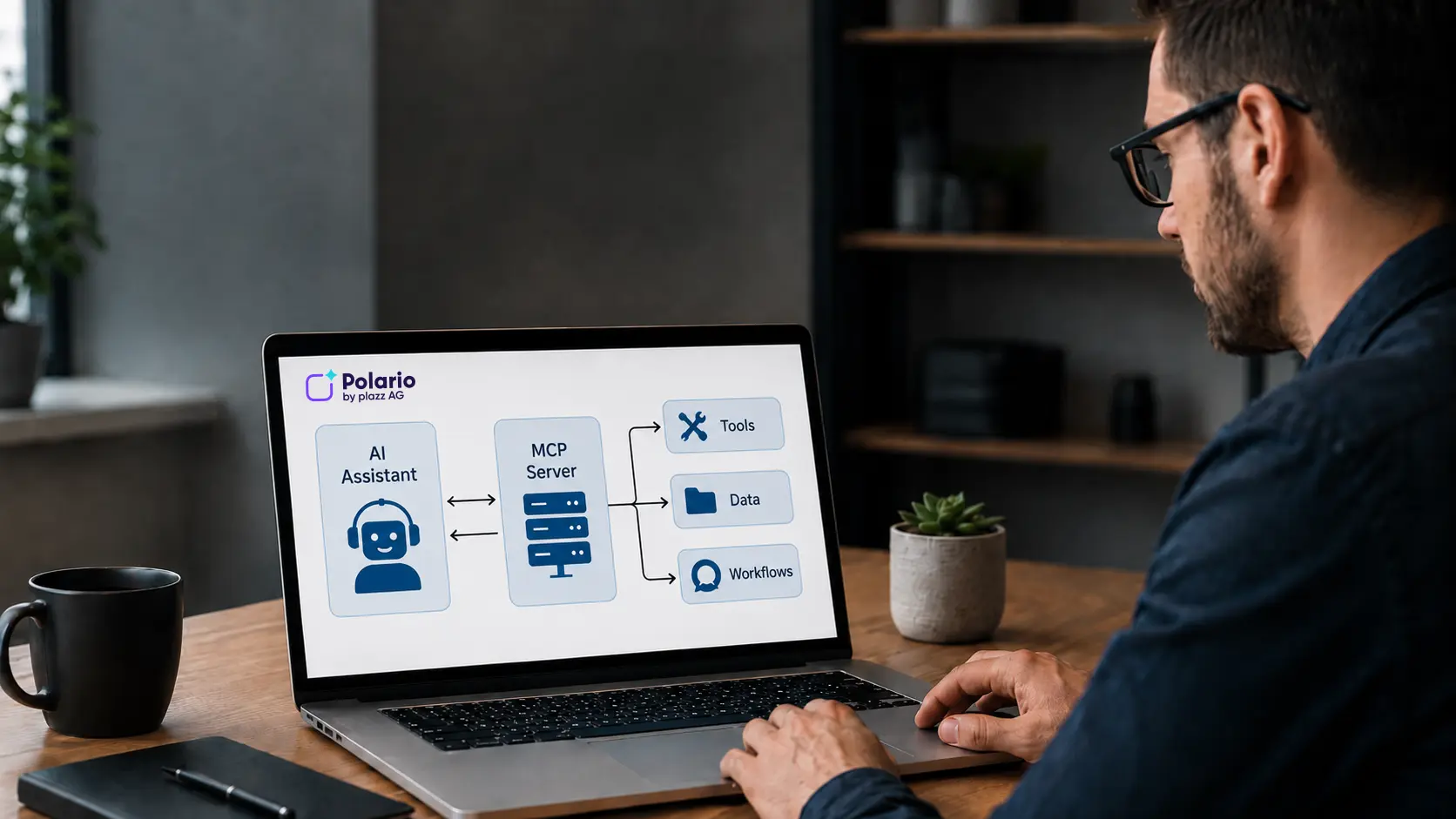
An MCP server is the component that connects AI assistants to external systems. It provides data, tools and workflows so that AI can not only provide answers but also perform tasks within connected systems, such as creating content in the Polario CMS, importing agendas or maintaining directories.
An MCP server connects AI assistants to external systems, data and tools. It ensures that an AI assistant is not only able to provide general answers, but can also utilise a system’s defined functions in a secure and structured manner.
This is particularly relevant for platforms such as Polario. A Polario MCP server can provide Polario CMS functions for AI-powered workflows: creating news items, importing agendas, setting up directories, uploading media, or preparing demo content.
This article explains what an MCP server is, what tasks it performs, how it differs from a traditional API, and when an MCP server is a worthwhile investment for businesses.
Polario approaches MCP from a practical, product-focused perspective: How can complex CMS functions be delivered in such a way that AI assistants can use them productively, in a controlled manner and with full traceability?
If you would like to start by understanding the basics of the standard, you can find them in the article What is MCP? The Model Context Protocol explained simply . The main article, ‘AI in the Polario CMS: How MCP simplifies complex platform operation’, demonstrates how this works in practice within Polario.
In a nutshell: What is an MCP server?
An MCP server is a service that provides an AI assistant with selected capabilities from an external system. These include data, executable functions and reusable workflows.
Put simply: the MCP Server acts as the bridge between the AI application and the software.
Without MCP Server, an AI assistant can explain how to complete a task. With MCP Server, it can assist with the task itself within defined rules, for example by creating a calendar entry or importing a file.

AI in Polario CMS: How MCP simplifies complex platform operation
Polario MCP simplifies AI-powered content management within the CMS – from calendars and directories to imports, bulk actions and demo content.
What is MCP? The Model Context Protocol explained simply
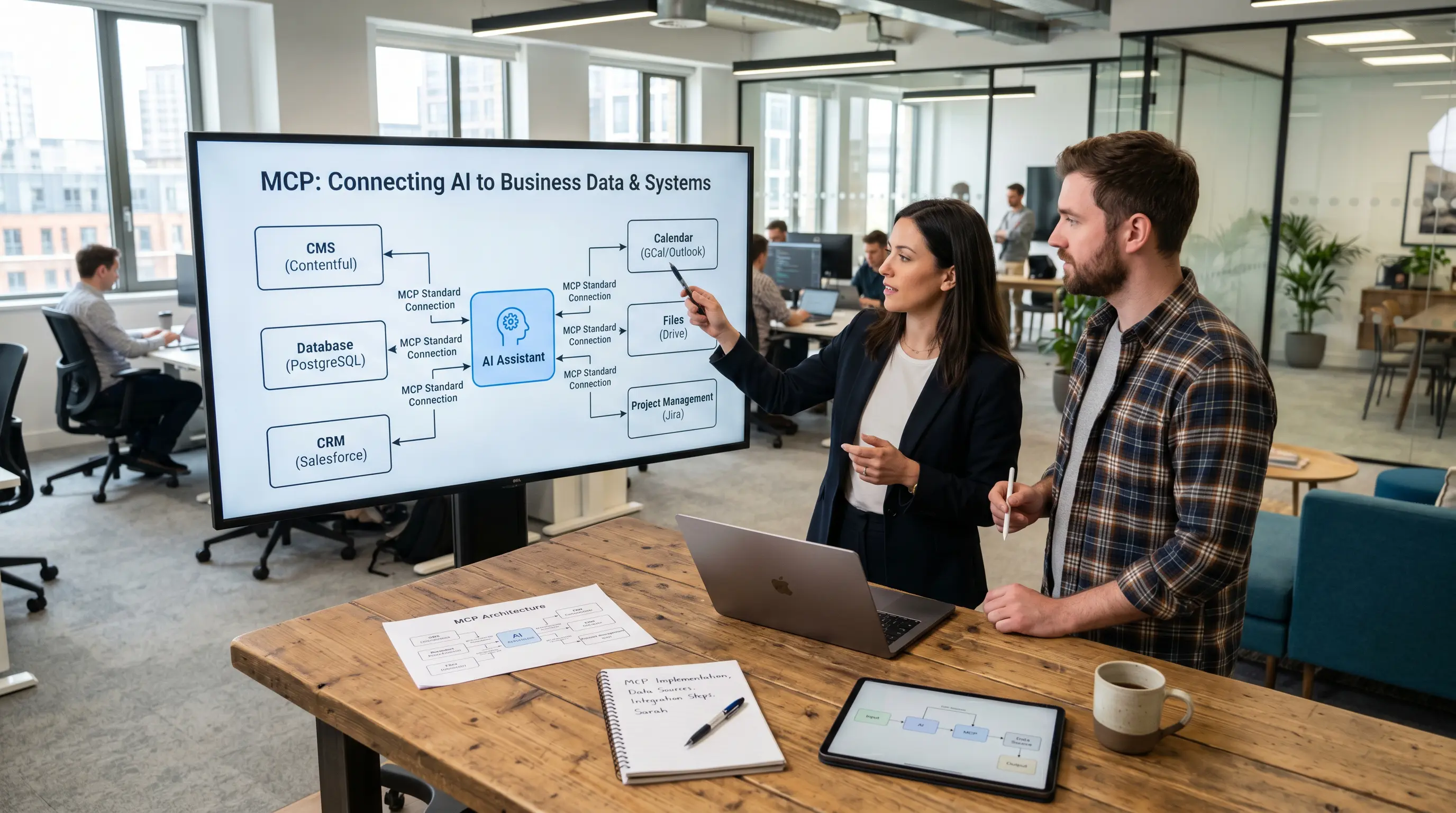
What is MCP? The Model Context Protocol connects AI assistants with external systems, data and tools. Explained simply with examples.
What is an MCP server?
An MCP server is a programme or service that makes the capabilities of an external system available via the Model Context Protocol. It makes data, tools and workflows available for AI applications.
An MCP server is not the AI itself. Nor is it a traditional chatbot. It is the technical interface between an AI assistant and a connected system.
For example, an MCP server can provide:
| Term | In a nutshell | Example |
|---|---|---|
|
Resources |
Data or contextual information |
existing CMS content, project information, files |
|
Tools |
Executable functions |
Create a news item, upload a file, create a calendar entry |
|
Prompts |
Ready-made templates or workflows |
Import agenda, prepare demo content |
This structure makes MCP Server particularly useful for systems that contain a large number of functions and data, but which cannot be utilised directly by AI assistants.
Why do you need an MCP server?
An AI assistant understands language, can formulate content and organise tasks. However, it does not automatically have access to company systems.
Without an MCP server, AI is often limited to providing advice or generating text.
Example without an MCP server:
“To create an event in the CMS, open the Calendar module, click on ‘New entry’ and fill in the fields.”
Example using MCP Server:
“I have prepared 42 calendar entries. Three of them do not have an end time and should be checked.”
The MCP Server enables AI to take action. It provides the assistant with the appropriate functions, checks inputs, carries out actions and returns results.
This creates a new level of interaction for businesses: users describe a task, and the AI assistant uses the appropriate system functions via the MCP Server.
An early practical example: Polario MCP Server
The Polario MCP Server demonstrates how an MCP Server can be used in a real-world CMS scenario.
A user might say to an AI assistant:
“Import this list of exhibitors, create a directory from it, and use the ‘Industry’ column as the category.”
The AI assistant analyses the file, identifies relevant columns and uses the appropriate functions in the CMS via the Polario MCP Server. This results in structured directory entries without the need to enter each piece of information manually.
Typical MCP-based tasks for Polario include:
| Task | Example |
|---|---|
|
Content management |
Create news items, update pages, search for content |
|
Agenda |
Create calendar entries, import an agenda, allocate rooms |
|
Directories |
Import exhibitors, speakers, sponsors or partners |
|
Media |
Upload images, process formats, assign media |
|
Demo-Content |
prepare customised content for sales demos |
|
Bulk actions |
Create or edit multiple items at once |
This makes it clear from the outset why an MCP server is not merely a technical concept, but can actually make day-to-day work in the CMS easier.
What role does the MCP Server play in the MCP architecture?
MCP operates using a client-host-server architecture.
| Components | Task |
|---|---|
|
MCP Host |
The AI application the user is working in |
|
MCP Client |
The connection between the host and a specific MCP server |
|
MCP Server |
The service that provides data, tools and workflows |
The host is, for example, an AI application such as Claude. The client establishes a connection to a specific server. The server provides the capabilities of the connected system.
A host can use multiple clients. This means that, in theory, an AI assistant can work with several systems, such as a calendar, database, file system, CRM and CMS.
The article “How MCP Works: Architecture, Process and Components Explained Simply” explores the technical interplay between host, client and server.
What does an MCP server provide?
An MCP server does more than just establish a connection. It also describes which features are available and how they can be used.
Resources, data as context
Resources are data or information provided by an MCP server. They help the AI assistant to categorise a task.
In a Polario MCP server, resources could include, for example:
| Resource | Benefits |
|---|---|
|
Project information |
The assistant knows which project you are working on |
|
Latest news |
Content can be searched for, checked or updated |
|
Calendar dates |
Agendas can be added to or amended |
|
Directory listings |
existing speakers or exhibitors can be identified |
|
Media information |
Images and files can be assigned appropriately |
|
Keywords and categories |
Content can be structured more consistently |
Resources are important because, without them, AI often doesn’t know which context is being referred to.
Tools, executable functions
Tools are functions that an AI assistant can call via an MCP server.
Examples of tools in a Polario MCP server:
| Tool | Purpose |
|---|---|
|
search_project |
Search for a project |
|
create_news |
Create a news article |
|
create_calendar_entry |
Create a calendar entry |
|
bulk_create_events |
create several calendar entries |
|
upload_media |
Upload media |
|
create_directory_entry |
Create a directory entry |
|
search_content |
Search content |
Tools are the part of an MCP server that uses AI to create an action interface.
Prompts and skills, structured workflows
Prompts are pre-defined templates or workflows. They help to carry out recurring tasks more consistently.
In Polario, such processes might look like this, for example:
| Workflow | Result |
|---|---|
|
Import calendar |
Calendar entries are created from an Excel file |
|
Import directory |
Structured entries are generated from a CSV file |
|
Create demo content |
A customised demo is being prepared |
|
Create a news series |
Multiple posts are created for an event |
Prompts and skills are not the same thing, but they are closely related. Skills tend to be more like reusable work instructions. The feature article “MCP Skills: Why AI assistants need reusable work instructions” explains how such instructions work.
MCP Server vs. traditional API: What is the difference?
An MCP server does not necessarily replace an API. In many cases, an MCP server utilises existing APIs in the background. The difference lies in how the functions are provided and used.
Comparison between API and MCP Server
| Classic API | MCP Server |
|---|---|
|
Designed for developers |
Made available for AI applications |
|
Consists of technical endpoints |
Provides tools, resources and workflows |
|
This requires specific programming |
Can be used by the AI assistant for specific tasks |
|
Usually built for a specific use case |
Intended as a reusable bonding layer |
In technical terms, an API states: This endpoint can be called using these parameters.
An MCP server makes this feature accessible and easy to use for the AI assistant. The model can identify which tool is best suited to the task, prepare the parameters and process the result.
How does an MCP server work in practice?
A typical procedure looks like this:
The process of making a request via an MCP server
| Step | What's happening? |
|---|---|
|
1. User enquiry |
The user formulates a task in an AI application |
|
2. Analysis |
The model recognises that external data or actions are required |
|
3. Connection |
The MCP Client connects to the appropriate MCP Server |
|
4. Skills |
The MCP Server provides tools, resources and prompts |
|
5. Selection |
The model selects suitable tools or data |
|
6. Implementation |
The MCP server executes the action in the external system |
|
7. Result |
The user receives feedback or a summary |
“Import this list of exhibitors and use it to create a directory with categories and brief descriptions.”
The AI assistant identifies the import process, analyses the file, organises the data and uses the appropriate tools via the MCP Server.
What added value does an MCP server offer?
An MCP server is particularly valuable when AI is required not only to provide answers but also to interact with real-world systems.
Key benefits at a glance
| added value | What will improve? |
|---|---|
|
Latest data |
AI can work with system data, not just general knowledge |
|
Specific actions |
Content, files or records can be created and edited |
|
Less manual work |
You don’t need to click on recurring tasks individually |
|
More consistent workflows |
Processes run more smoothly |
|
Reusable integration |
The same server logic can be used by multiple AI clients |
|
Fewer mistakes |
Structured workflows reduce copy-and-paste and media breaks |
|
Better scalability |
large amounts of data can be processed more efficiently |
Content management, in particular, involves a great many repetitive tasks. An MCP server can consolidate these tasks and integrate them into controlled workflows.
When is an MCP server a good investment?
The question here is not what an MCP server generally offers, but when the effort involved is justified.
An MCP server is particularly worthwhile if several of the following points apply:
| Situation | Why an MCP server is a good idea |
|---|---|
|
Many recurring tasks |
Processes can be standardised |
|
Large amounts of data |
Imports and bulk actions save a lot of time |
|
Complex software |
AI can serve as a simpler user interface |
|
Valuable internal data |
AI obtains relevant context from real-world systems |
|
Several teams are working using the same processes |
Workflows are becoming more consistent |
|
Existing APIs are available |
MCP can build on this |
|
AI should not just advise, but take action |
Tools become ready for productive use |
This is precisely the case with Polario. The platform is flexible and feature-rich. An MCP server can make this range of features available to AI assistants without simplifying or limiting the platform itself.
AI in Polario CMS: How MCP simplifies complex platform operation
Polario MCP simplifies AI-powered content management within the CMS – from calendars and directories to imports, bulk actions and demo content.
Who builds an MCP server?
An MCP server is usually built by the provider, the in-house development team or a technical partner who is familiar with the target system.
With a SaaS product such as Polario, it makes sense for development to be handled by the product team or a specialist technical team, as they are familiar with the system logic, permissions, data models and workflows.
An MCP server typically requires:
| Area | Why it is important |
|---|---|
|
Product knowledge |
Which AI-powered features should be available? |
|
API knowledge |
Which existing interfaces can be used? |
|
Understanding of the data model |
What objects, fields and relationships are there? |
|
Security policy |
Who is allowed to carry out which actions? |
|
Understanding of UX |
How should the user view queries, previews and results? |
|
Testing |
How are error cases, imports and bulk actions checked? |
A basic MCP server can be set up relatively quickly. A production-grade enterprise server is more complex, as it must properly handle permissions, error handling, logging, stability and domain logic.
What are the limitations of an MCP server?
An MCP server does not automatically make AI error-free. It provides capabilities, but the quality of the results still depends on data, permissions, tool descriptions and process logic.
Typical constraints and limitations
| Border | Meaning |
|---|---|
|
Data quality |
Incorrect or incomplete entries will result in queries or errors |
|
Rights and permissions |
The assistant must only do what is permitted |
|
Tool-Design |
Unclear tools lead to poorer results |
|
Business logic |
Complex business rules must be accurately mapped |
|
Error handling |
Import errors, duplicate entries and mandatory fields must be dealt with carefully |
|
Safety |
Critical actions require preview, confirmation and logging |
|
User control |
AI should not publish, delete or overwrite content without supervision |
How secure is an MCP server?
An MCP server can be very useful because it connects AI assistants with real system functions. That is precisely why it needs clear security rules.
Roles and permissions
An MCP server should only allow actions that are appropriate to the user’s role. If a user is not permitted to publish content in the CMS, they should not be able to do so via an AI assistant either.
Preview and confirmation
For critical actions, the wizard should not proceed immediately. It makes sense to provide a preview: what content is being created, modified or skipped? Only then should the user be asked to confirm.
Logging and traceability
Every relevant action should be logged. This includes the time, the user, the tool used, the data modified and the result. This helps with support, quality assurance and governance.
Protection during mass operations
Bulk operations are efficient, but delicate. When large amounts of content are created or modified at once, limits, validation, error reports and clear feedback are essential.
Secure processing of external data
When importing files, the wizard must distinguish between the two: the contents of a file are data, not instructions. This is important to ensure that imported text does not trigger any unintended actions.
MCP should therefore not be interpreted as meaning that “AI can do anything”. A better way of looking at it is that AI provides support within clearly defined roles, processes and approval procedures. The feature article “MCP Security: What companies should look out for when integrating AI” explains which security mechanisms companies should pay particular attention to.
AI in Polario CMS: How MCP simplifies complex platform operation
Polario MCP simplifies AI-powered content management within the CMS – from calendars and directories to imports, bulk actions and demo content.
Key Takeaways
| statement | Meaning |
|---|---|
|
An MCP server connects AI with software |
It provides system functions for AI assistants |
|
MCP servers provide resources, tools and prompts |
Data, actions and workflows become usable |
|
MCP servers are more than just APIs |
They make functions accessible to AI in a task-oriented way |
|
Polario MCP is a specific use case for a CMS |
Content management, imports and demo content can be made more efficient |
|
Safety is paramount |
Roles, permissions, previews and logging are all part of productive use |
|
Boundaries must be taken into account |
Data quality, tool design and business logic remain crucial |
|
A good MCP server needs product knowledge |
Technology alone is not enough; domain logic is important |
Conclusion
An MCP server is the component that connects AI assistants to external systems. It provides data, tools and workflows so that AI can not only respond, but also assist with tasks in connected systems.
This is particularly useful for businesses when there are many recurring tasks, large volumes of data or complex systems involved. An MCP server can make software more accessible without reducing its range of functions.
For Polario, this means that the Polario MCP Server can transform complex CMS functions into AI-powered workflows. Content, agendas, directories, media, imports and demo content can be created and managed more efficiently.
Anyone wishing to understand the technical principles behind this will find further details in the article “How MCP works: architecture, workflow and components explained simply”. The main article “AI in the Polario CMS: How MCP simplifies complex platform operation” describes its specific application in Polario.
AI in Polario CMS: How MCP simplifies complex platform operation
Polario MCP simplifies AI-powered content management within the CMS – from calendars and directories to imports, bulk actions and demo content.
Sources and further information
Official MCP introduction: The MCP documentation describes the Model Context Protocol as an open standard that enables AI applications to be connected to external systems.
https://modelcontextprotocol.io/docs/getting-started/intro
Official MCP specification: The specification describes MCP as a standardised way of sharing contextual information with language models, providing tools and building workflows.
https://modelcontextprotocol.io/specification/2025-06-18
MCP Server Concepts: The official documentation describes MCP Servers as programmes that provide specific capabilities for AI applications via standardised protocol interfaces.
https://modelcontextprotocol.io/docs/learn/server-concepts
MCP Tools: The MCP specification defines tools as functions that can be called by language models to interact with external systems, for example through database queries, API calls or calculations.
https://modelcontextprotocol.io/specification/2025-06-18/server/tools
MCP Architecture and JSON-RPC: The official specification describes MCP as a client-host-server architecture and explains that communication takes place via JSON-RPC 2.0 messages.
https://modelcontextprotocol.io/specification/2025-06-18
Set up an MCP server: The official MCP documentation includes a tutorial showing how to set up your own MCP server and connect it to a host such as Claude Desktop.
https://modelcontextprotocol.io/docs/develop/build-server
Anthropic announcement regarding MCP: In November 2024, Anthropic introduced MCP as an open standard for secure, bidirectional connections between data sources and AI-powered tools.
https://www.anthropic.com/news/model-context-protocol
Security and Trust & Safety in MCP: The current MCP specification notes that MCP enables powerful capabilities through data access and code execution, and therefore security and trust aspects must be carefully addressed.
https://modelcontextprotocol.io/specification/2025-11-25
Frequently Asked Questions (FAQ)
What is an MCP server?
An MCP server is a service that provides an AI assistant with data, tools and workflows from an external system. It makes functions from software, data sources or APIs available to AI applications via the Model Context Protocol.
What is an MCP server used for?
An MCP server is required so that AI assistants can not only respond but also interact with external systems. This enables them to retrieve data, create content, process files or carry out defined actions.
Is an MCP server the AI itself?
An MCP server is required so that AI assistants can not only respond but also interact with external systems. This enables them to retrieve data, create content, process files or carry out defined actions.
What is the difference between an MCP and an MCP server?
MCP is the protocol, i.e. the standard for connecting AI applications to external systems. An MCP server is the specific technical component that uses this protocol to make a system’s capabilities available.
What does an MCP server provide?
An MCP server can provide resources, tools and prompts. Resources provide contextual data, tools perform actions, and prompts or skills structure recurring workflows.
What are MCP Tools?
MCP Tools are executable functions that an AI assistant can use. Examples include searching for a project, creating a news article, uploading a media file, or creating multiple calendar entries.
What are MCP Resources?
MCP Resources are data or information provided by an MCP server. They help the AI assistant to process tasks using up-to-date context, such as project information, existing CMS content or calendar data.
What is the difference between an MCP server and an API?
An API provides technical endpoints for developers. An MCP server makes system functions available in such a way that AI assistants can use them as tools, resources or workflows. An MCP server often utilises existing APIs in the background.
How does an MCP server work at Polario?
A Polario MCP Server provides Polario CMS functions for AI-powered workflows. An AI assistant can, for example, create news items, import agendas, create directories, upload media or prepare demo content.
Who builds an MCP server?
An MCP server is usually built by the software provider, an in-house development team or a technical partner. Key requirements include product knowledge, familiarity with APIs, an understanding of data models, security concepts and real-world workflows.
When is an MCP server a good investment?
An MCP server is worthwhile when there are many recurring tasks, large volumes of data, complex systems or valuable internal data involved. It is particularly useful when AI is required not only to provide advice but also to take controlled action.
What are the limitations of an MCP server?
An MCP server does not automatically make AI error-free. Data quality, permissions, tool design, business logic, error handling and user control remain crucial. A good MCP server must take these limitations into account.
Is an MCP server secure?
An MCP server can be used securely provided that authentication, authorisation, role-based permissions, logging, preview and confirmation are properly implemented. Security depends heavily on the specific implementation.
Why is an MCP server a good choice for content management?
An MCP server is useful for content management because many CMS tasks are repetitive and structured. These include content maintenance, imports, media assignment, directory data, calendar entries and bulk actions.