Skip to content



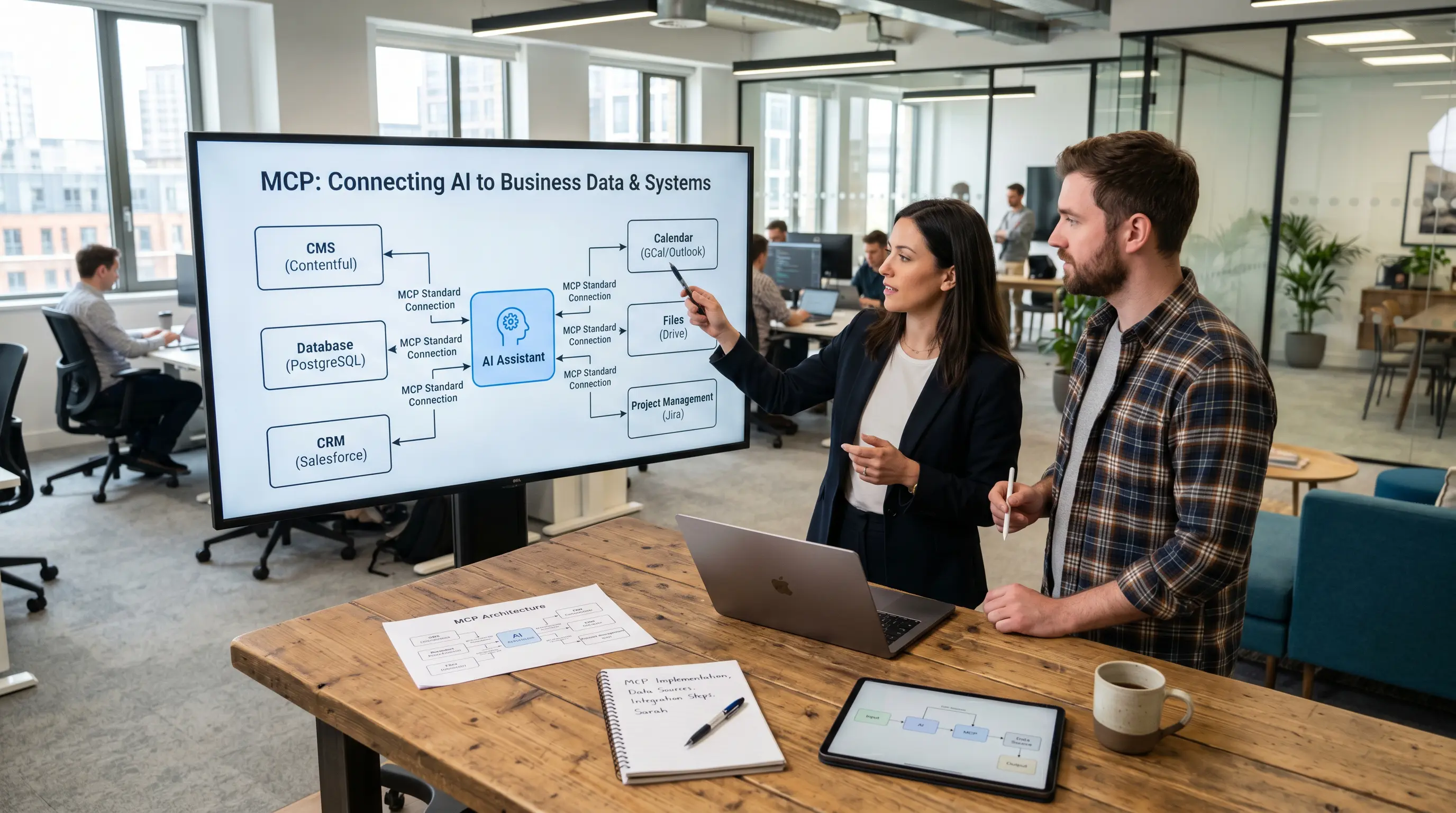

AI assistants are becoming increasingly powerful. They can write texts, summarise information, organise data and prepare complex tasks. In many companies, however, they quickly reach their limits: they do not automatically have knowledge of internal systems, up-to-date data or specific work processes.
This is exactly where MCP comes in. The Model Context Protocol establishes a standardised connection between AI applications and external systems. This enables an AI assistant not only to provide general answers, but also to work with relevant data, tools and workflows.
This article explains what MCP is, why the standard is becoming relevant for businesses, and how MCP helps to integrate AI more effectively into existing software environments. Using Polario as an example, the article also demonstrates how MCP can be put into practice in content management, data imports and AI-powered CMS workflows.
Polario is developing its own MCP server for AI-powered content management within the CMS. The insights presented in this article are based on the practical implementation of MCP for content, import and editorial processes at Polario.
MCP in a nutshell: MCP stands for Model Context Protocol. It is an open standard that enables AI applications to access external systems, data sources and tools. This allows AI assistants to utilise business data, perform actions and support workflows.
What is the Model Context Protocol (MCP)?
MCP stands for Model Context Protocol. It is an open standard that enables AI applications to access external systems, data sources and tools. These include, for example, files, databases, content management systems, calendars, project management tools, search systems and APIs.
The official MCP documentation describes MCP as an open standard that connects AI applications such as Claude or ChatGPT with external data sources, tools and workflows. As a simple analogy, MCP is often compared to a ‘USB-C port for AI applications’: a single, universal connection for many different systems.
The basic idea is simple: AI should not operate in isolation, but should be able to assist where company data, content and processes are actually located.
An overview of MCP terms
| Term | In a nutshell |
|---|---|
|
MCP |
Model Context Protocol: an open standard for connecting AI applications with external systems, data sources and tools. |
|
MCP Host |
The AI application or environment in which users work, such as a chat interface or Claude Desktop. |
|
MCP Client |
The connection component in the host that communicates with a specific MCP server. |
|
MCP Server |
Provides the capabilities of an external system, such as data, tools or workflows. |
|
Resources |
Readable data sources or information that provide context to an AI assistant. |
|
Tools |
Executable functions that enable an AI assistant to interact with external systems. |
|
Prompts |
Ready-made templates or workflows for recurring tasks. |
Why was the Model Context Protocol (MCP) developed?
AI assistants can draft texts, organise information and plan tasks. However, without a connection to external systems, their capabilities remain limited. They do not automatically know what content is maintained in a CMS, what appointments are listed in a calendar or what data records are available on a platform.
Before MCP, such connections usually had to be built on a case-by-case basis. Every AI application required its own integrations with individual systems. This is time-consuming, difficult to maintain and, in the long term, not very scalable for businesses.
The Model Context Protocol (MCP) solves this problem by providing a standardised connection layer. Instead of building numerous individual bespoke solutions, systems can be connected via an MCP server. AI applications can use these servers to access data and functions.
MCP vs. traditional API
| Classic API | MCP |
|---|---|
|
Technical interface for developers. |
Standardised interface layer for AI assistants. |
|
It must be specifically programmed and called directly. |
Can be used by AI clients as tools, resources or prompts. |
|
Often closely tailored to a specific use case. |
Reusable across various AI applications and workflows. |
|
Provides endpoints and technical data structures. |
Makes functions available as tools and context sources that can be used by AI. |
|
Focus on system integration. |
Focus on the AI-driven use of systems, data and workflows. |
What exactly is the Model Context Protocol (MCP)?
The Model Context Protocol (MCP) enables AI applications to do three key things:
Firstly, an AI assistant can retrieve relevant information. This could include documents, database content, system information or specific content from a platform.
Secondly, an AI assistant can use tools. A tool is an executable function, such as launching a search, creating a dataset, calling an API or updating content. The MCP specification describes tools as functions that enable models to utilise external systems, for example for database queries, API calls or calculations.
Thirdly, the Model Context Protocol (MCP) can provide workflows and templates. These help users to carry out recurring tasks in a more structured way. The official specification describes prompts as pre-defined messages and workflows that clients can discover, retrieve and customise with arguments.
The article “How does MCP work? Architecture, processes and components explained simply” explains how these three levels – data, tools and workflows – interact technically and which components play a role in this.

AI in Polario CMS: How MCP simplifies complex platform operation
Polario MCP simplifies AI-powered content management within the CMS – from calendars and directories to imports, bulk actions and demo content.
What is a Model Context Protocol (MCP) server?
An MCP server is the component that provides an AI assistant with specific capabilities from an external system. For example, it can provide data, tools and workflows.
The official MCP documentation explains that MCP Servers can provide three main types of capabilities: Resources, Tools and Prompts. Resources are readable data, Tools are callable functions, and Prompts are pre-built templates for tasks.
A Polario MCP server can, for example, provide tools for creating news items, managing calendars, importing directories or uploading media.
The blog post ‘What is an MCP server?’ explains in detail how an MCP server is structured and what role it plays in practice.
AI in Polario CMS: How MCP simplifies complex platform operation
Polario MCP simplifies AI-powered content management within the CMS – from calendars and directories to imports, bulk actions and demo content.
What exactly does the Model Context Protocol (MCP) mean for Polario?
The Model Context Protocol (MCP) is not an abstract concept. For platforms such as Polario, which bring together content management, event apps, community communication and staff apps under one roof, MCP serves as a practical infrastructure for AI-powered workflows.
With the Polario MCP Server, AI assistants such as Claude can access the Polario CMS directly – importing calendars, creating directories, drafting news articles or preparing demo content for client meetings. All this is done using natural language, without having to open the CMS manually.
The result: tasks that used to take hours can now be completed in 15 to 45 minutes. The editorial team, customer service and sales all benefit equally.
The main article explains exactly how Polario MCP puts this into practice, which tools and skills are already available, and for which teams it is worth using:
AI in Polario CMS: How MCP simplifies complex platform operation
Polario MCP simplifies AI-powered content management within the CMS – from calendars and directories to imports, bulk actions and demo content.
Conclusion
MCP is an open standard that connects AI applications with external systems. This enables AI assistants not only to answer questions, but also to utilise data, access tools and support workflows.
MCP is relevant for businesses because it brings AI closer to real-world business processes. For Polario, MCP is particularly exciting because it can make content management, imports, bulk actions and demo content significantly more efficient. Anyone wishing to use MCP in a production environment should also be aware of the security aspects: MCP Security: What businesses should look out for when integrating AI.
AI in Polario CMS: How MCP simplifies complex platform operation
Polario MCP simplifies AI-powered content management within the CMS – from calendars and directories to imports, bulk actions and demo content.
In short: MCP makes AI interoperable. And it is precisely this interoperability that enables AI to be used effectively within complex platforms.
For MCP to be productive in day-to-day business operations, more than just tools are needed – reusable work instructions are required. The article ‘MCP Skills’ explains what this means:
AI in Polario CMS: How MCP simplifies complex platform operation
Polario MCP simplifies AI-powered content management within the CMS – from calendars and directories to imports, bulk actions and demo content.
Sources and further information
Official MCP documentation: What is MCP?: https://modelcontextprotocol.io/docs/getting-started/intro
Anthropic: Introducing the Model Context Protocol: https://www.anthropic.com/news/model-context-protocol
MCP Specification: Tools: https://modelcontextprotocol.io/specification/2025-06-18/server/tools
MCP-Spezifikation: Resources: https://modelcontextprotocol.io/specification/2025-06-18/server/resources
MCP-Spezifikation: Prompts: https://modelcontextprotocol.io/specification/2025-06-18/server/prompts
Frequently asked questions (FAQ)
What does MCP stand for?
MCP stands for Model Context Protocol. It is an open standard that enables AI applications such as Claude or ChatGPT to access external systems, data sources and tools in a standardised way, without the need to build a separate integration for every combination.
Who developed MCP?
MCP was developed by Anthropic and released as an open standard. The aim was to create a common interface layer between AI assistants and external systems. Today, many AI providers and software platforms support the protocol.
What is the difference between MCP and a traditional API?
A traditional API provides technical endpoints – it must be explicitly called and requires programming knowledge. An MCP server makes these endpoints accessible to AI assistants: the model automatically identifies which tool is relevant for a task, prepares the parameters and carries out the actions. The user formulates their request in natural language – the AI assistant handles the technical translation.
What is an MCP server?
An MCP server is the component that provides an AI assistant with specific capabilities from an external system. It can provide data (resources), executable functions (tools) and predefined workflows (prompts). For Polario, this means that the Polario MCP server provides tools that enable an AI assistant to generate news, import agendas or create directories.
Which AI applications does MCP support?
MCP is natively supported by Claude (Anthropic) and is designed as an open standard. Other AI applications and development environments that offer MCP-compatible clients can also access MCP servers. The implementation depends on the respective provider.
Is MCP safe?
MCP was designed as a standard for secure, bidirectional connections between AI applications and external systems. The security of a specific integration depends on how it is implemented – that is, on the permissions, access controls, logging and approval processes defined by the MCP server provider.
What is the difference between MCP Tools and MCP Prompts?
MCP is relevant for companies that wish to integrate AI assistants more effectively into their existing software environments. MCP is particularly useful for teams that regularly work with content management systems, data imports, editorial processes or the maintenance of structured platform content.
Who is Polario MCP particularly relevant for?
Tools are executable functions – for example, creating a record, calling an API or updating content. Prompts are pre-defined templates and workflows that help users carry out recurring tasks in a more structured way. Both concepts form part of the official MCP specification.
How does Polario MCP help with imports?
Polario has developed its own MCP server, which enables AI assistants to access the Polario CMS. This allows editors, administrators, customer service teams and sales staff to manage content, imports and configurations using natural language – directly from an AI assistant such as Claude. Read more in the article ‘AI in the Polario CMS: How MCP simplifies complex platform operations’ →.
What is the difference between MCP and a traditional API?
A traditional API provides technical endpoints. An MCP server makes these functions accessible to AI assistants. The assistant can identify which tool is relevant for a task, prepare parameters, structure data and execute actions within the connected system.
Why is Polario MCP a good choice for complex platforms?
Polario covers a wide range of communication scenarios, such as events, internal communication, communities and digital information platforms. This flexibility comes with a wealth of features and customisation options. Polario MCP helps to make this complexity more user-friendly without compromising the platform’s performance.
How secure is Polario MCP?
Security depends on how the system is actually implemented. Key factors include role-based permissions, approval processes, logging, previews before publication, confirmation for bulk changes, and separate permissions for reading, creating, editing and publishing. MCP should not mean that AI is allowed to do anything it likes, but rather that AI provides support within clearly defined roles and processes.
What is the biggest advantage of Polario MCP?
The biggest advantage lies in the combination of efficiency and usability. Routine CMS tasks can be completed more quickly, large volumes of data can be processed in a more structured way, and complex workflows can be managed more easily. This reduces the amount of manual work involved and frees up more time for content, quality and communication.