Skip to content


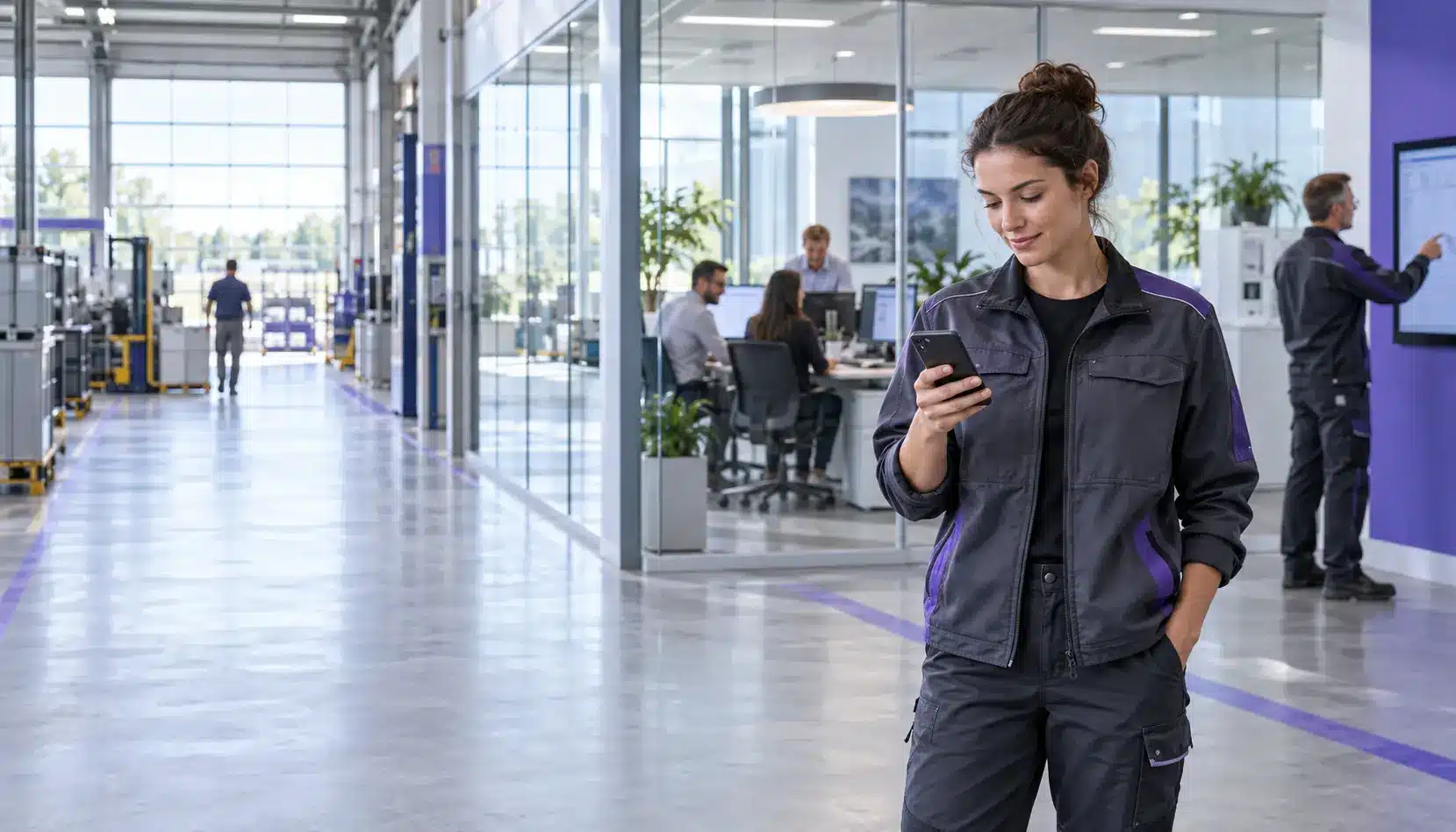

A digital workplace is designed to provide employees with simple, secure and, as far as possible, consistent access to information, collaboration, knowledge and digital services. In practice, it rarely consists of a single application. What matters most is how well the staff app, intranet, collaboration tools and specialist systems work together – including for employees without a fixed PC workstation.
In short: a digital workplace is a company’s interconnected digital working environment. It links communication, knowledge, collaboration, processes and specialist systems via appropriate access points. An employee app such as Polario can provide the mobile access and user experience layer: it reaches frontline workers, aggregates relevant content and makes connected services more easily accessible.
What is a digital workplace?
A digital workplace is the entirety of the digital working environment through which employees find information, collaborate, communicate and carry out business tasks. This includes applications, content, data, access, integrations and rules. The German term ‘digitaler Arbeitsplatz’ describes the same concept, but does not refer solely to the technical equipment on an individual desk.
A robust digital workplace answers five questions:
- 1. How do employees obtain the information relevant to them?
- 2. How do they find knowledge, documents and the right people to contact?
- 3. How do teams and departments collaborate digitally?
- 4. How do they access processes and specialist systems?
- 5. How are identities, authorisations, security and governance managed?
The digital workplace is therefore not a single product. It is a coordinated system comprising technology, content, processes and responsibilities. A large collection of tools alone does not make for a good digital workplace.
How do ‘digital workplace’, ‘modern workplace’, ‘intranet’ and ‘employee app’ differ?
The terms overlap, but fulfil different functions:
| Term | Main function | Typical components | Delimitation |
|---|---|---|---|
|
Digital Workplace |
Connecting the entire digital working environment |
Communication, knowledge, collaboration, processes, specialist systems, identity |
overarching vision and operating model |
|
Modern Workplace |
Enabling modern, often cloud-based office work |
Microsoft 365, Teams, devices, hybrid collaboration, security |
is often more closely associated with productivity and collaboration |
|
Intranet / Staff Portal |
Providing centralised information and services |
News, pages, search, documents, directories, self-service options |
is a component or access point within the Digital Workplace |
|
Staff App |
Reach staff on the go in a targeted way |
News, push notifications, feeds, chat, documents, forms, links and services |
provides mobile access, not the entire system landscape |
An employee portal can serve as the central web portal. An employee app complements this portal for smartphones, tablets and staff who rarely use a desktop computer in their day-to-day work. Depending on the architecture, both interfaces can access shared content and services.
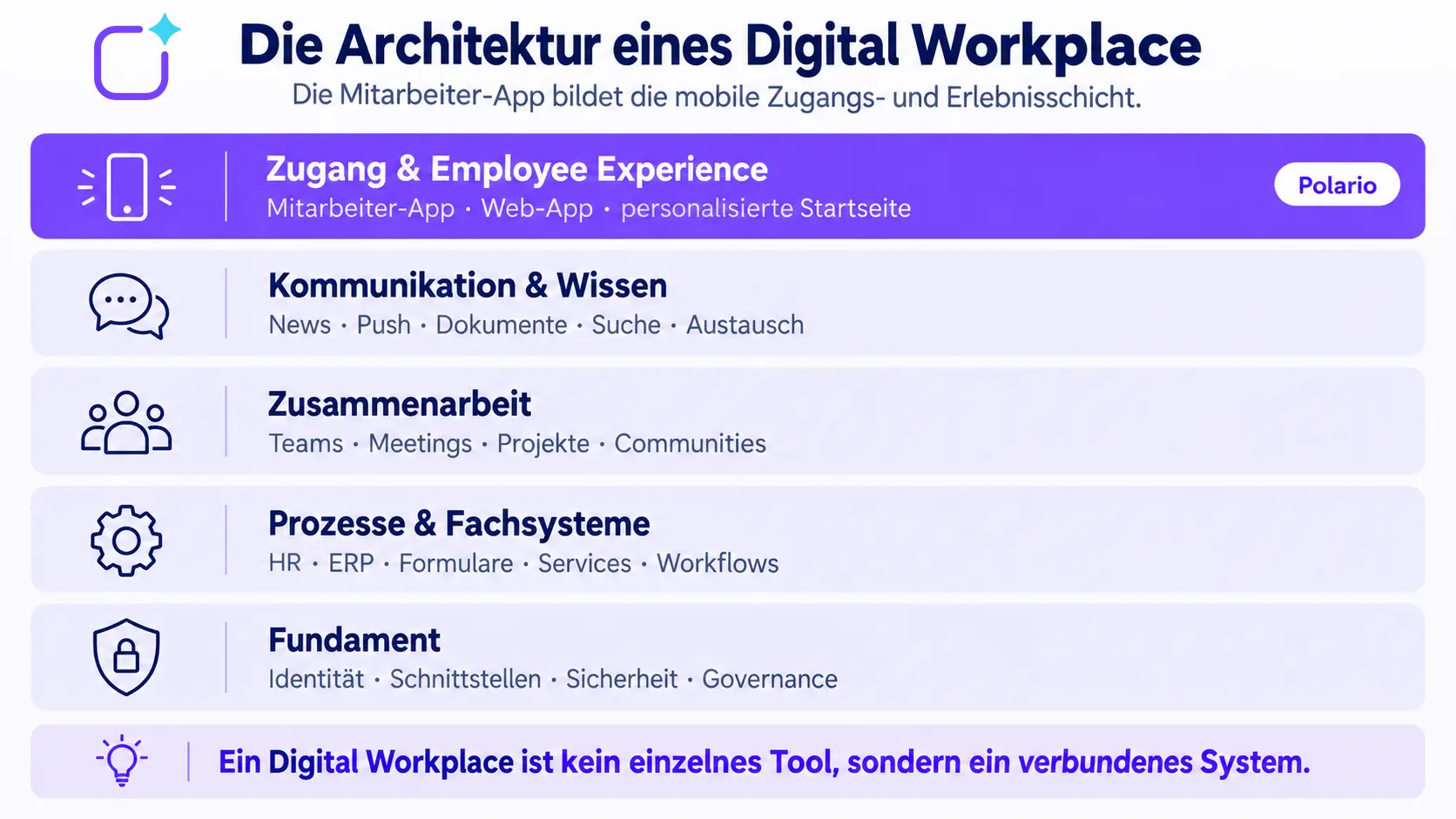
What components make up a digital workplace?
Zugang und Employee Experience
Employees need a clear point of entry that is tailored to their role, location, language and working context. This could be a home page in a browser, a staff app, Microsoft Teams or a combination of several access points. What matters is not that everyone sees the same screen, but that everyone can access the content relevant to their tasks.
Communication and Knowledge
Company news, push notifications, documents, policies, FAQs, search and discussion forums are among the key visible features. Content must be up to date, easy to find and tailored to the target audience. Without editorial oversight, even with modern software, information can quickly become disorganised.
Collaboration
Chats, meetings, shared files, projects and communities all support collaboration. Microsoft, for example, describes Viva as an employee experience platform within Microsoft 365 and Teams that brings together communication, resources and other work experiences. This also demonstrates that collaboration is an important building block, but does not automatically constitute the complete digital workplace. (Microsoft Viva Overview)
Processes and specialist systems
HR self-services, ERP, duty rosters, forms, tickets, training programmes and other specialist applications are often housed in dedicated systems. A digital workplace does not need to replace them entirely. However, it should make relevant tasks, links, status information and embedded applications accessible in such a way that employees do not need to be familiar with every system or search for them separately.
Identity, integration, security and governance
Single sign-on, roles, groups, interfaces, data protection, information security and clear lines of responsibility form the foundation. Anyone who merely designs the user interface without clarifying data flows and access rights is simply shifting existing problems into a new application.
How does Polario fit into a digital workplace?
Polario fits into the concept of a digital workplace if the platform is positioned correctly: not as a replacement for all collaboration, HR and specialist systems, but as a configurable gateway to communication, knowledge and selected services.
The Polario employee app delivers content as a web app and – depending on the version chosen – via native apps. News, notifications, pages, documents, calendars, directories, social feeds, chat, groups, roles and analytics can all be managed centrally. Data, logins and external applications can be connected or made accessible via APIs and integrations.
Polario can therefore fulfil four roles within the digital workplace:
- Enabling mobile access: Information reaches employees regardless of their fixed office workstation;
- Providing guidance: Relevant content and services are consolidated in a clear entry point;
- Targeting specific groups:Roles, groups and visibility settings filter out irrelevant content;
- Making systems accessible: Links, web views, SSO and interfaces connect existing applications with mobile use.
On the compliance front, Polario highlights, amongst other things, server hosting in Germany, development and support in Germany, as well as measures relating to ISO/IEC 27001 and TISAX. For a specific project, however, the contract, data flows, subcontractors, roles, data erasure policy and technical and organisational measures must still be reviewed.

Why frontline workers are crucial to the digital workplace strategy
Many digital workplace projects start with employees who have a personal laptop, a company account and regular access to Teams, SharePoint or the intranet. However, production, logistics, care, field staff, branch offices and technical services operate under different conditions. Devices are shared, screen time is limited and a personal company email account is not always available.
Microsoft provides dedicated planning for identities, licences, devices, Teams and applications in frontline scenarios. This underlines the fact that office set-ups cannot simply be transferred to operational user groups. (Microsoft 365 for Frontline Workers)
A mobile employee app is useful if it reduces genuine barriers to access. These include, for example:
- easy access via personal or company-provided devices,
- clearly defined registration and authentication processes,
- target-group-specific news rather than a complete flood of information,
- push notifications for time-sensitive alerts,
- multilingual and mobile-friendly content,
- quick access to forms, contacts, duty rosters or specialist applications,
- data-efficient analytics and transparent governance.
The organisation must clarify on a project-by-project basis whether personal devices may be used, what data is processed, and how working hours, employee participation or alternative information channels are regulated.
Does an employee app replace Microsoft 365 or Teams?
Not necessarily. Microsoft 365 and Teams excel at collaboration, meetings, files and the integration of Office applications. An employee app can complement these if reach, simplicity, mobile branding or access for staff working outside traditional office environments are the main priorities. The article ‘Microsoft 365 as a social intranet’ explores the differences in more detail from the perspective of internal communication.
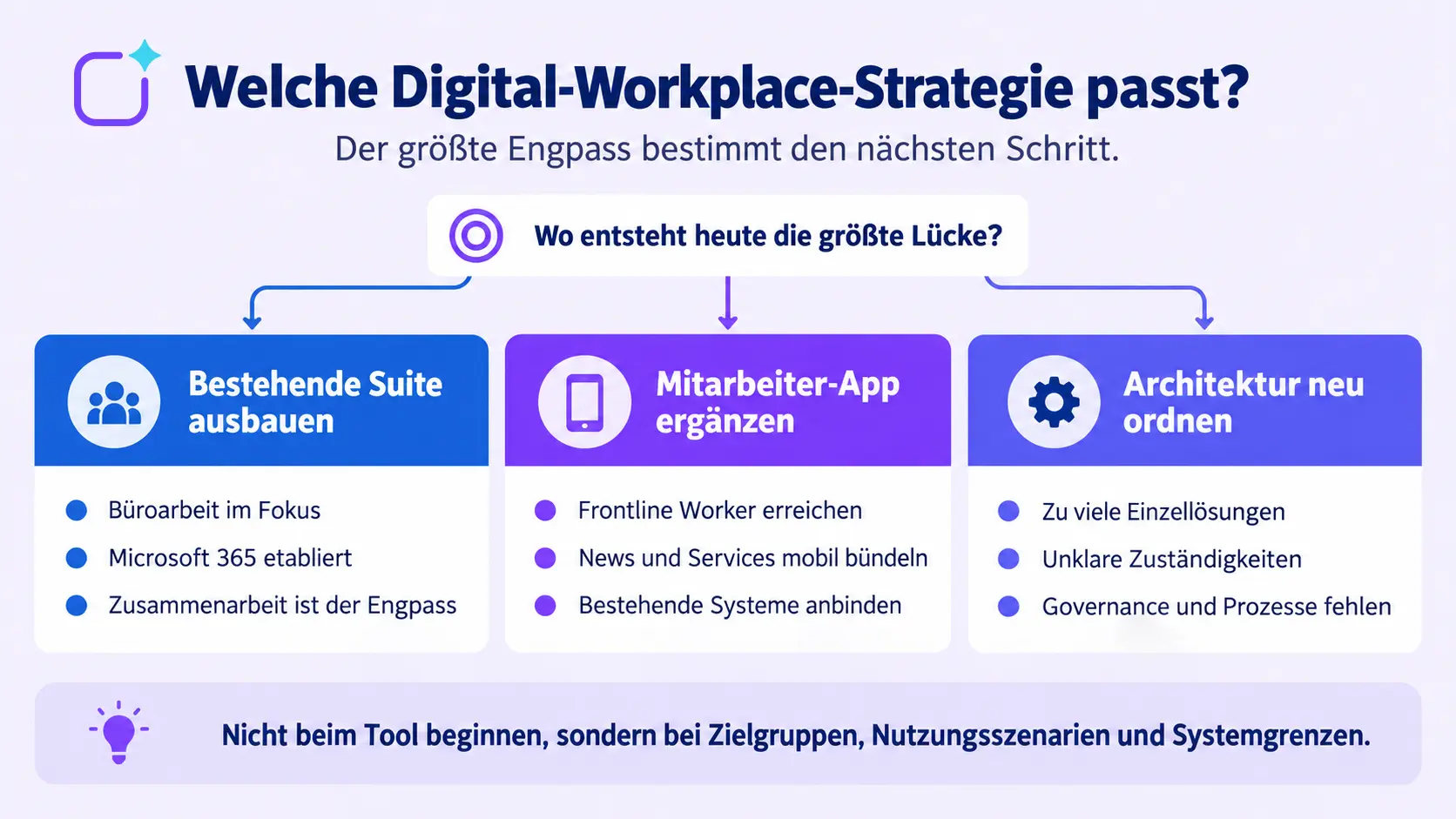
The three most common strategies are:
Extend the existing suite
This approach is suitable if almost all employees use Microsoft 365 on a daily basis, collaboration is the main bottleneck, and identities and devices are already being managed reliably. Additional Microsoft Viva components can enhance communication and the employee experience within the existing environment.
Add to the staff app
This approach is suitable if the aim is to better reach frontline workers, bundle company news and services on mobile devices, or deliver content more effectively to specific target groups. Polario can serve as a complementary interface, whilst Teams, SharePoint, HR or ERP systems continue to handle their specialised tasks. As soon as the planned comparison ‘Employee App vs. Microsoft Teams’ is published, a link to it can be added here.
Reorganising architecture
This approach makes sense when too many standalone solutions are operating in parallel, content is being maintained in multiple places, responsibilities are unclear or data flows are ambiguous. In such cases, simply adding a front-end is not enough. First, the target architecture, system leadership, governance and lifecycles must be defined.
What are the benefits of a well-planned digital workplace?
A digital workplace derives its value not from the number of features it offers, but from improved usage scenarios. Potential benefits include:
- Information reaches defined target groups more quickly;
- Knowledge and documents are easier to find;
- Employees switch less frequently between unrelated access points;
- Self-service tools and forms become accessible on mobile devices;
- Office-based and non-desk-based staff have comparable access to information;
- New staff find their way around more quickly;
- Redundant content and manual maintenance can be reduced;
- Responsibilities and security rules become more transparent.
These benefits must be translated into measurable objectives before the project begins. Statements such as ‘improve communication’ or ‘drive digitalisation forward’ are too vague for this purpose.
How to develop a digital workplace strategy
1. Understanding target groups and work situations
Don’t just consider departments, but specific working contexts: Who works on a desktop, on a mobile device, in shifts or with shared devices? What identities and access arrangements are in place? What languages and barriers need to be taken into account?
2. Prioritise usage scenarios
Formulate tasks from the employees’ perspective, for example: “A service technician finds the current safety instructions in less than two minutes” or “An employee without a work email address receives a location-based warning message”. Such scenarios can be tested later.
3. Document the current landscape and system boundaries
List the systems, content, data controllers, interfaces, identities and existing contracts. Specify which system remains the primary source for each dataset. An employee app should not generate any unnecessary copies.
4. Weighing up requirements
Distinguish between mandatory criteria and quantifiable benefits. The revised checklist of requirements for an employee app helps to structure functional, technical and organisational requirements in a clear and logical way.
5. Establish governance and editorial policies
Define roles for content, sharing, groups, permissions, moderation, data protection, support and further development. You can also specify when content is to be archived or deleted.
6. Carry out a pilot study with representative target groups
Don’t limit your testing to office staff who are tech-savvy. A pilot should reflect critical user groups, real-world content, poor network conditions and typical devices. The selection of a solution can be structured and evaluated using the ‘Employee App Providers’ guide.
7. Planning the roll-out and operation
Communication, training, key influencers, support and performance measurement should all be included in the same plan as technology and migration. The guide to rolling out an employee app outlines the relevant phases.
How can success be measured?
A simple count of logins does not show whether the digital workplace is helpful in day-to-day work. Appropriate metrics depend on the specific usage scenario:
| Objective | Possible metric | Insight | Points to note |
|---|---|---|---|
|
Increase reach |
Engagement rate and active usage by target group |
Are defined groups actually being reached? |
Evaluate office and frontline staff separately |
|
Convey information |
Reach of critical content and confirmations |
Is relevant content getting through? |
Not every message requires a read receipt |
|
Make knowledge discoverable |
Search success, search abandonment, time taken to find information |
Are employees finding the right information? |
Take search terms and data protection into account |
|
Simplify processes |
Completion rate, processing time, media breaks |
Does this make a task easier to complete? |
Record the baseline figure before implementation |
In addition, qualitative interviews, support enquiries and feedback from specialist departments are important. Key performance indicators should be used to drive improvement and should not be used without a clear basis for monitoring individual performance or behaviour.
Common mistakes in digital workplace projects
Introducing a new tool without a clear problem
If there are no objectives or usage scenarios, the platform simply becomes yet another channel. Employees then have to check even more places, rather than fewer.
Equating the digital workplace with the intranet or Teams
Both can be key components. However, the digital workplace also encompasses access, specialist systems, identities, governance and the reality of working outside the office.
Involving frontline workers too late
A concept optimised for desktop work often falls short due to a lack of accounts, shared devices, limited usage time or unsuitable content.
Underestimating the scope and responsibilities
Even an intuitive platform requires editorial management, approval processes, updating and archiving. Out-of-date content erodes trust more quickly than missing features.
Confusing integration with complete replacement
Not every system needs to be replaced. It is often more cost-effective and carries less risk to integrate specialised applications via secure, user-friendly access points.
Conclusion: The digital workplace needs to be accessible to all
A digital workplace combines communication, knowledge, collaboration and processes into a usable digital working environment. Its success depends less on having the longest possible list of features than on clear use cases, a robust architecture and binding governance.
This is a relevant issue for Polario because many organisations face a gap between their established office IT systems and employees who do not have regular desktop access. Polario can bridge this gap by providing a mobile communication and access layer. The platform is therefore not ‘the entire Digital Workplace’, but a specific component of it – and it is precisely this clear role that lends credibility to its positioning.
Sources and editorial basis
- Staff app: https://polario.app/de/mitarbeiter-app/
- Staff portal: https://polario.app/de/mitarbeiterportal/
- API and Integration: https://polario.app/de/api-integration/
- Compliance: https://polario.app/de/compliance/
- Requirements for an employee app: https://polario.app/de/anforderungen-mitarbeiter-app/
- Choosing an employee app: https://polario.app/de/beste-mitarbeiter-app-finden/
- Launch of an employee app: https://polario.app/de/einfuehrung-mitarbeiter-app/
- Microsoft 365 as a social intranet: https://polario.app/de/microsoft-365-alternative/
- Microsoft Viva Overview: https://learn.microsoft.com/en-us/viva/microsoft-viva-overview?view=o365-worldwide
- Microsoft 365 for Frontline Worker: https://learn.microsoft.com/en-us/microsoft-365/frontline/flw-setup-microsoft-365?view=o365-worldwide
- Microsoft Viva Engage: https://learn.microsoft.com/en-us/viva/engage/overview
Frequently asked questions (FAQ)
What is a digital workplace, explained simply?
A digital workplace is a company’s interconnected digital working environment. It brings together communication, knowledge, collaboration, processes and specialist systems via appropriate access points. This encompasses not only software, but also identities, rules, responsibilities and the design of the user experience.
What does a digital workplace consist of?
Typical components include an intranet or staff portal, collaboration tools, documents and search functions, staff communication, HR and specialist systems, mobile apps, identity management, integrations, security measures, governance and analytics. The exact structure depends on the target groups and usage scenarios.
Is Microsoft 365 a digital workplace?
Microsoft 365 can cover a large part of a digital workplace, particularly collaboration, files, meetings and Office productivity. Whether additional access points or systems are required depends on frontline scenarios, communication, branding, business processes, licences and the existing IT landscape.
What role does an employee app play in the digital workplace?
An employee app provides mobile access to news, knowledge, communication and selected services. It is particularly useful for staff who do not have a fixed PC workstation. It can provide access to existing systems via interfaces, SSO, links or embedded content, but does not automatically replace them.
What is the difference between a digital workplace and employee experience?
The Digital Workplace refers to the digital working environment and its architecture. Employee Experience refers to the overall experience of employees throughout their relationship with the organisation. The Digital Employee Experience is the part of this experience that is shaped by digital tools, content and processes.
How do you implement a digital workplace?
The implementation begins with target groups, problems and measurable usage scenarios. This is followed by an analysis of the current situation, the target architecture, requirements, governance, data protection and security assessments, a pilot, roll-out and continuous optimisation. A software roll-out alone is not enough.
How do you measure the success of a digital workplace?
Suitable metrics include, for example, engagement by target group, reach of key content, search success, completion rates for digital processes, processing times and qualitative feedback. The metrics must be linked to specific objectives in advance and used in a manner that complies with data protection regulations.
Is Polario suitable as digital workplace software?
Polario fits within a digital workplace as a mobile access, communication and experience layer. The platform is suitable when news, knowledge, interaction and services need to be bundled for mobile use and existing systems need to be integrated. Whether it fits the target vision must be assessed on the basis of the specific architecture and requirements.