Skip to content




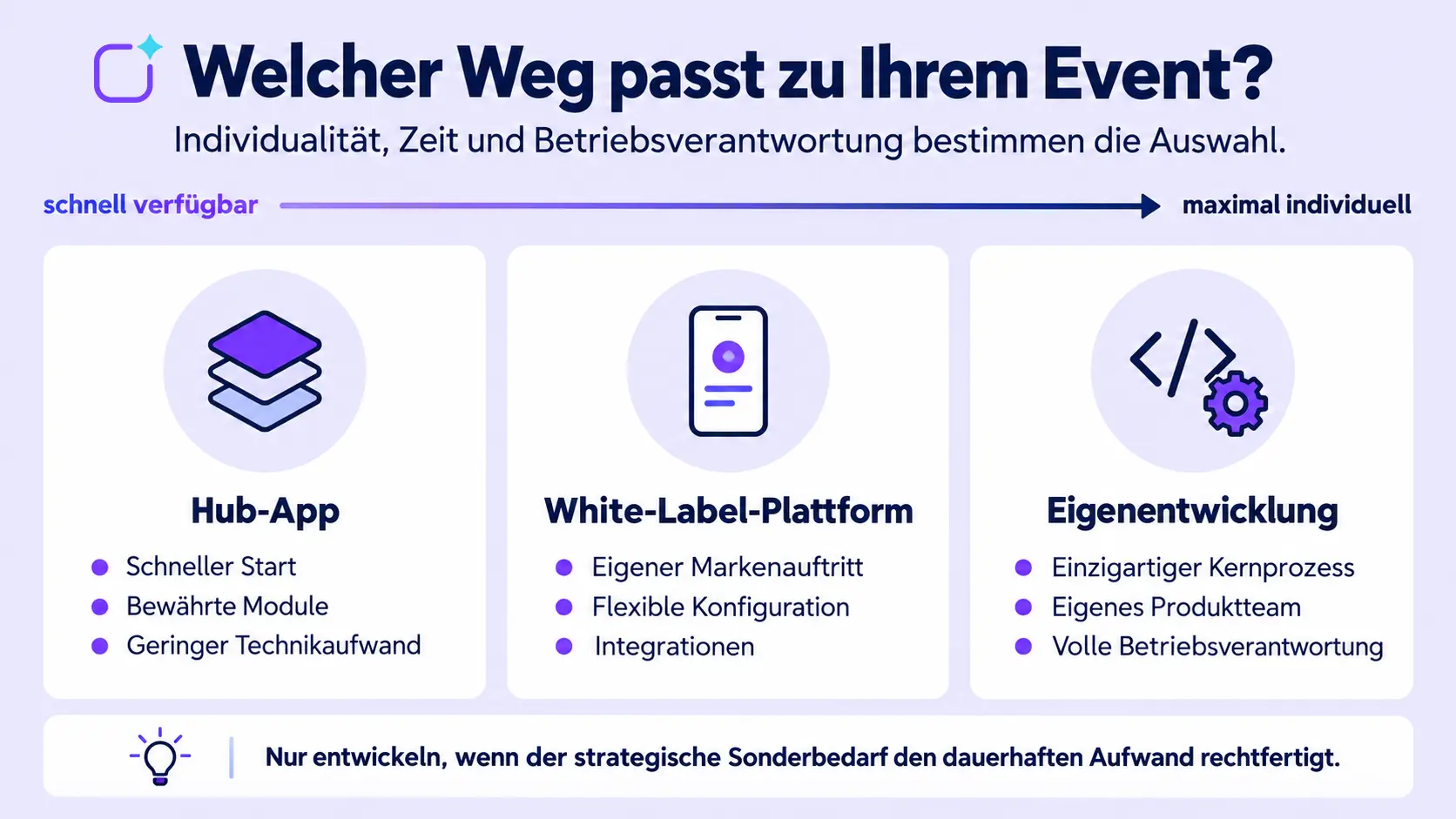
Anyone wishing to have an app developed does not necessarily have to start with a blank code project. For events in particular, there are at least three options: using a ready-to-use standard or hub app, configuring an existing platform as a web or white-label app, or having an event app developed entirely from scratch. The right choice depends on your objectives, timetable, need for differentiation, system landscape and available operational resources.
In short: Having an event app developed from scratch is particularly worthwhile if you have a strategically unique core process and a product that is sustainably funded. For many event organisers, a configurable platform is more cost-effective: a hub app enables a quick launch, whilst a white-label platform combines your own brand identity with existing, professionally managed technology.
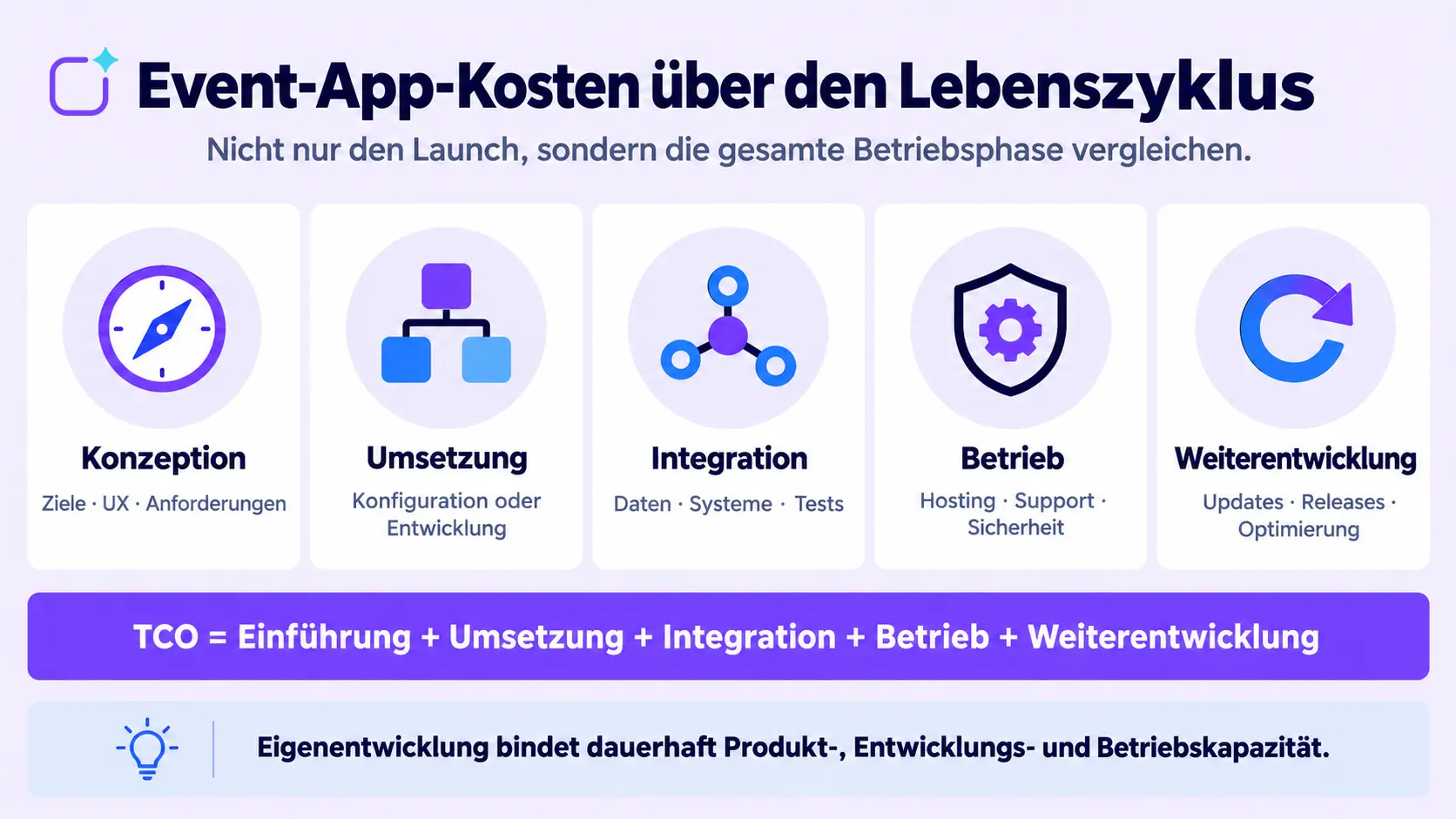
The decision should not be based solely on the visible launch price. Take the entire lifecycle into account: design, UX, development or configuration, integrations, app store processes, hosting, security, support, updates and further development.
What does ‘having an app developed’ mean in the context of events?
Traditionally, having an app developed means commissioning an agency or a software service provider to handle the concept, design and programming. The result can be tailored to specific requirements. However, clients remain responsible for product decisions, acceptance, data, operational specifications and long-term funding. An in-house product owner is therefore required even when development is carried out externally.
However, creating an event app can also mean configuring an existing no-code or SaaS platform. Event teams select existing modules, design the navigation and branding, and manage content via a content management system. The provider operates the technical infrastructure and provides general updates. The team creates its digital attendee experience without having the underlying app programmed from scratch.
In the case of a bespoke white-label app, the application is also based on an existing platform but appears with its own app name, icon, app store listing and corporate design. Processes, integrations and functions can be further customised depending on the platform and project.
An in-house development project, on the other hand, begins with the product concept, architecture and software development. The company bears ongoing responsibility for the source code, operation, security, app store compliance, bug fixing and further development.
So the real question is:
How much customisation actually delivers real value – and how much technical responsibility is the organisation willing to take on in the long term?
An overview of the three approaches to creating an event app
| Approach | Particularly suitable when | Typical in-house effort | Key limitation |
|---|---|---|---|
|
Standard or hub app |
A quick start and tried-and-tested event features are key |
Content, design and project organisation |
No fully independent store presence |
|
Configurable white-label platform |
A bespoke brand identity, flexible modules and integrations are required |
Requirements, configuration, content and acceptance testing |
Customisation remains within the scope of the platform |
|
Fully in-house development |
A unique strategic process cannot be meaningfully standardised |
Product team, development, operations and support |
significant ongoing effort and technical risk |
The table is intended as a guide, not a blanket recommendation. A project can also be launched in stages: initially as a web or hub app, and later as a white-label app. It is important that the architecture, data model and provider support this development path.
When is a standard or hub app sufficient?
A standard or hub app is a sensible choice when tried-and-tested event features largely meet your needs and time is tight. Events often require similar components: agenda, speaker and attendee profiles, documents, site maps, news, notifications, surveys, Q&A, networking and sponsor areas.
The key advantage lies not only in a quicker launch. The platform provider takes care of the technical infrastructure. The event team can focus on structure, content, engagement and execution. With a native hub app, the app is published within an existing app; a separate store listing is not required.
A hub app is particularly suitable if:
- the event needs to be organised at short notice,
- in-app branding is sufficient,
- tried-and-tested modules are required rather than specialised custom functions,
- the team wishes to manage the content themselves via a no-code CMS,
- several events are to be bundled within a single access point,
- the provider is to handle App Store publication and technical maintenance.
Limitations become apparent when a distinct brand identity is important even before the app launches, or when exceptional process logic is required. In such cases, a white-label option should be considered.
When does a configurable white-label app make sense?
A white-label app combines an existing technical platform with a standalone brand identity. The app’s name, icon, app store description, colours, navigation and content can all be customised to match your own brand identity. Features and integrations are put together using existing modules and project-specific components.
This approach often strikes a balance between a standard product and in-house development. It is suitable when:
- the app is to be published under the company’s own brand on the Apple App Store and Google Play Store,
- multiple events or a permanent event community are to be bundled together,
- target groups, roles and content need to be managed in a differentiated manner,
- registration, check-in, CRM or other systems are to be integrated,
- professional operation is required, but there are no plans to set up an in-house app product team,
- configuration and service are more important than full control over the source code.
Even a white-label app is not a sure-fire success. To set up your own store presence, you’ll need developer accounts, store materials, privacy policies and approvals. Apple reviews apps and updates before publication; according to its own figures, an average of 90 per cent of submissions are reviewed in less than 24 hours, though incomplete submissions may take longer. Membership of the Apple Developer Programme currently costs US$99 per year. Google currently charges a one-off registration fee of US$25 for a Play Console developer account. These fees are small in relation to the overall project, but the organisational responsibilities should nevertheless be clarified at an early stage.
Polario describes three deployment options for the event app: web app, hub app and bespoke custom app. The guide to the different event app variants explains the differences in more detail.
When might in-house development be justified?
Developing an application entirely in-house may be advisable if the application itself is intended to create a strategic competitive advantage and the key processes cannot be adequately mapped by a configurable platform.
Possible reasons include:
- a unique interaction or business logic,
- proprietary hardware or complex real-time processes,
- very specific offline requirements,
- a product strategy in which the app is managed on an ongoing basis as a standalone digital product,
- an existing interdisciplinary team comprising product management, UX, mobile development, backend, quality assurance, security and operations.
“We want to be completely flexible” is not sufficient justification. Custom software remains flexible only if the budget, expertise and capacity for continuous changes are in place. Without a dedicated product team, technical freedom quickly turns into a maintenance backlog.
An in-house development must be scrutinised particularly carefully if the app is only used for a few event days each year. In such cases, development and operating costs must be spread over a short period of use, whilst security and update obligations remain in place throughout the year.
What are the costs involved in purchasing and developing an app?
A fair comparison looks beyond just the licence fee or initial development budget. The relevant figure is the Total Cost of Ownership over a standard period, for example three years.
TCO = Implementation + usage or development + integrations + operation + support + further development + internal resources
Costs of a configurable platform
Typical cost categories are:
- Licence or project price,
- – Set-up, configuration and branding,
- Data migration and integrations,
- Custom app publication, if required,
- Training, service and on-site support,
- In-house editorial and project management,
Optional modules and further developments.
Polario currently offers a starting price of 2,500 euros per event for the Event App Web and, for the Hub version with web and native apps, from 3,000 euros per event. The price for the custom app is calculated on a case-by-case basis. The current price and service overview and the binding quotation are decisive.
Costs of in-house development
In addition to design and programming, the cost estimate includes:
- Product management and UX/UI design,
- iOS, Android, web and backend development,
- Hosting, monitoring, backups and availability,
- Quality assurance for devices and operating system versions,
- Data protection, information security and penetration testing,
- App store accounts, releases and approvals,
- support, troubleshooting and incident management,
- adaptations to new operating systems and store guidelines,
- documentation, cover arrangements and knowledge retention,
- further technical development following the first event.
Google Cloud recommends understanding resource requirements and usage patterns to make reliable TCO forecasts, and considering cost drivers across the entire lifecycle. This principle applies equally to an event app: a low initial investment says little about the costs following several releases.
What risks are often underestimated when developing a product in-house?
The first release isn’t the end
Following the launch, maintenance and product operations begin. Operating systems, devices, libraries and store guidelines are subject to change. Errors must be analysed, security vulnerabilities patched and new requirements prioritised.
The event date cannot be changed
In many software projects, a release can be postponed. A conference, trade fair or annual general meeting, on the other hand, takes place on a fixed date. Any delays have a direct impact on participants, organisers and sponsors. That is why stability, testing and a robust fallback plan are particularly important.
Knowledge is tied to individual people
In-house developments require documented architecture, handover procedures and contingency plans. Should a key developer leave the company or the service provider, this must not jeopardise operations or the ability to release software.
Safety is an ongoing process
User profiles, contact details, interactions and, where applicable, registration data require appropriate safeguards. Security requirements must be embedded in the architecture, development, testing and operations. A one-off check prior to launch is not sufficient.
Special features overshadow basic quality
Teams tend to invest in a high-profile special feature whilst underestimating the importance of search, accessibility, roles, data import, analytics, offline functionality or editorial usability. A good event app is not judged solely on stage, but across many small moments of use.
What requirements should be included in the decision?
Start by formulating usage scenarios rather than a long wish list. A scenario describes the target audience, situation, action and expected outcome; for example:
A participant receives a reliable notification ten minutes before a room change, immediately opens the updated session and locates the new room on the floor plan.
Testable requirements can be derived from such scenarios.
1. Purpose and scope
- a single event, a series of events or an ongoing community,
- expected number of participants and languages,
- in-person, hybrid or virtual format,
- public or restricted access.
2. Participant experience
- personal calendar and up-to-date information,
- push notifications or browser-based alerts,
- networking, chat and matchmaking,
- surveys, Q&A, feedback and gamification,
- accessibility and usability.
3. Branding and distribution
- Web app, hub app or dedicated store presence,
- corporate design and customised navigation,
- public download or restricted distribution,
- responsibilities for developer accounts and store materials.
4. Processes and integrations
- Invitations, participant registration, check-in and follow-up,
- CRM, event management, marketing automation or identity providers,
- imports, exports, APIs and webhooks,
- roles, authorisations and data ownership.
5. Operation and Service
- editorial responsibility,
- support before, during and after the event,
- response times and escalation procedures,
- hosting, monitoring, backups and recovery,
- release and change management process.
When planning and implementing an event app, these points should be taken into account before the technical configuration begins. Anyone wishing to compare different platforms will find a broader overview of the market in the 2026 Event App Provider Comparison.
Decision-making checklist: Buy, configure or develop?
Answer the following questions together with the event team, IT, data protection and procurement:
- 1. Which three usage scenarios are key to the project’s success?
- 2. Which requirements are genuine must-have criteria?
- 3. Is the special requirement a strategic differentiator or is it simply worded in an unusual way?
- 4. By when must a tested solution be ready for deployment?
- 5. Is a dedicated app store presence required?
- 6. Which systems and data flows need to be integrated?
- 7. Who is responsible for content, support and releases?
- 8. What will the total cost of ownership (TCO) be over three years?
- 9. What happens in the event of a system failure, staff turnover or a change of provider?
- 10. Can the preferred approach be validated through a realistic pilot?
Decision-making guidelines
A standard or hub app is more suitable when speed, tried-and-tested functions and low technical operational overhead are the key priorities.
A configurable white-label platform is a better fit if you require your own brand identity, integrations and flexible modules, without having to develop the technical infrastructure yourself.
An in-house development is a better fit if the focus is on a unique strategic process, standard platforms have demonstrably proved insufficient, and a product team with long-term funding is in place.
How does Polario support the creation of an event app?
Polario is a configurable platform, not a bespoke development built from scratch. Event teams manage content via a no-code CMS and choose between a web app, hub app and custom app, depending on the project. Features such as the agenda, pages, news, documents, directories, notifications, interaction and analytics can be customised on a project-by-project basis. According to the current price list, API access is included in the published event app packages.
With ‘registr’ and supplementary check-in processes, the workflow can be extended from registration right through to attendance. Details regarding data location, security and data protection should be checked for the specific project using Polario’s compliance information and contractual documents. Polario outlines a range of services and support for workshops, set-up and ongoing assistance.
The platform is therefore of particular interest to organisations that require greater flexibility than a rigid off-the-shelf product can offer, but do not wish to take full responsibility for development, maintenance and platform operation themselves.
Conclusion: The best event app isn’t necessarily developed in-house
Creating an event app doesn’t necessarily mean programming software from scratch. For many organisers, a configurable platform combines speed, tried-and-tested features and manageable operating costs. A white-label app extends this approach by offering a standalone brand presence. Developing the app entirely in-house remains a strategic option if a unique process genuinely justifies the additional effort.
Make your decision in the following order: define usage scenarios, establish essential criteria, compare three possible solutions, assess TCO and risks, and test the preferred approach using a realistic demo or pilot.
Sources and editorial basis
- Event App: https://polario.app/de/event-app/
- Types of event apps: https://polario.app/de/event-app-varianten/
- Prices and versions: https://polario.app/de/preise/
- Planning and implementation: https://polario.app/de/planung-umsetzung/
- registr: Participant management: https://polario.app/de/registr/
- Compliance: https://polario.app/de/compliance/
- Service and Support: https://polario.app/de/service-support/
- A comparison of event app providers: https://polario.app/de/event-app-anbieter-vergleich/
- Apple App Review: https://developer.apple.com/app-store/review/
- Apple Developer Program: https://developer.apple.com/programs/enroll/
- Google Play Console Registrierung: https://support.google.com/googleplay/android-developer/answer/6112435
- Google Cloud Well-Architected Framework – Kostenoptimierung: https://docs.cloud.google.com/architecture/framework/cost-optimization/optimize-resource-usage
Frequently asked questions (FAQ)
How long does it take to create an event app?
The duration depends on the approach taken. A web or hub app on an existing platform can be set up much more quickly than a bespoke app. White-label projects also require branding, app store materials, accounts and approvals. A fully bespoke development project encompasses concept, design, development, testing, launch and operation, and should not be planned solely on the basis of the time required for programming.
How much does an event app cost?
The costs depend on the number of users, the deployment model, features, integrations, service and contract term. If you develop the solution in-house, you will also need to factor in ongoing costs for product management, development, hosting, security, support and updates. Prices should therefore be compared in terms of total cost of ownership (TCO) over a standard period.
Is an event app builder the same as a standard app?
Not necessarily. Some modular platforms offer only content and design templates, whilst other platforms combine no-code configuration, roles, integrations, native apps and services. What matters is not the label, but which parts are configurable and who is responsible for operation and further development.
Does every event need a native app?
No. A web app can be a good option for short-term or open-ended events, as it can be accessed directly via a link. A native app offers advantages when long-term visibility, native push notifications, recurring events or a distinct brand identity are important. The article on the different types of event apps provides a detailed comparison of these models
Who owns the content in a SaaS event app?
Ownership, rights of use, export options and deletion are governed by contract. Organisations should review these points, as well as data formats, interfaces and exit support. Using a platform does not automatically mean that the provider is free to use content or participant data as it sees fit.
Can a purchased event app be integrated with other systems?
Many platforms offer APIs, webhooks or standard integrations. For each system required, check the data flow, timeliness, authentication, error handling and responsibility. A general statement such as ‘API available’ is no substitute for concrete evidence of integration.